Kalyani is an indie Malayalam track from Kochi label Money Verse Records that crossed 90 million Spotify streams and turned into a dance challenge, and the July 2026 remix video with Shreya Ghoshal and Saniya Iyappan pushed it up all over again. On CapCut it now has a whole family of templates behind it: KALYANI 🫠 with 191.8K uses and KALYANI SLOWMO with 168.2K, plus a dozen smaller remix cuts. This page covers both sides of it — the traditional look most reels use, and the slow-mo template edit.
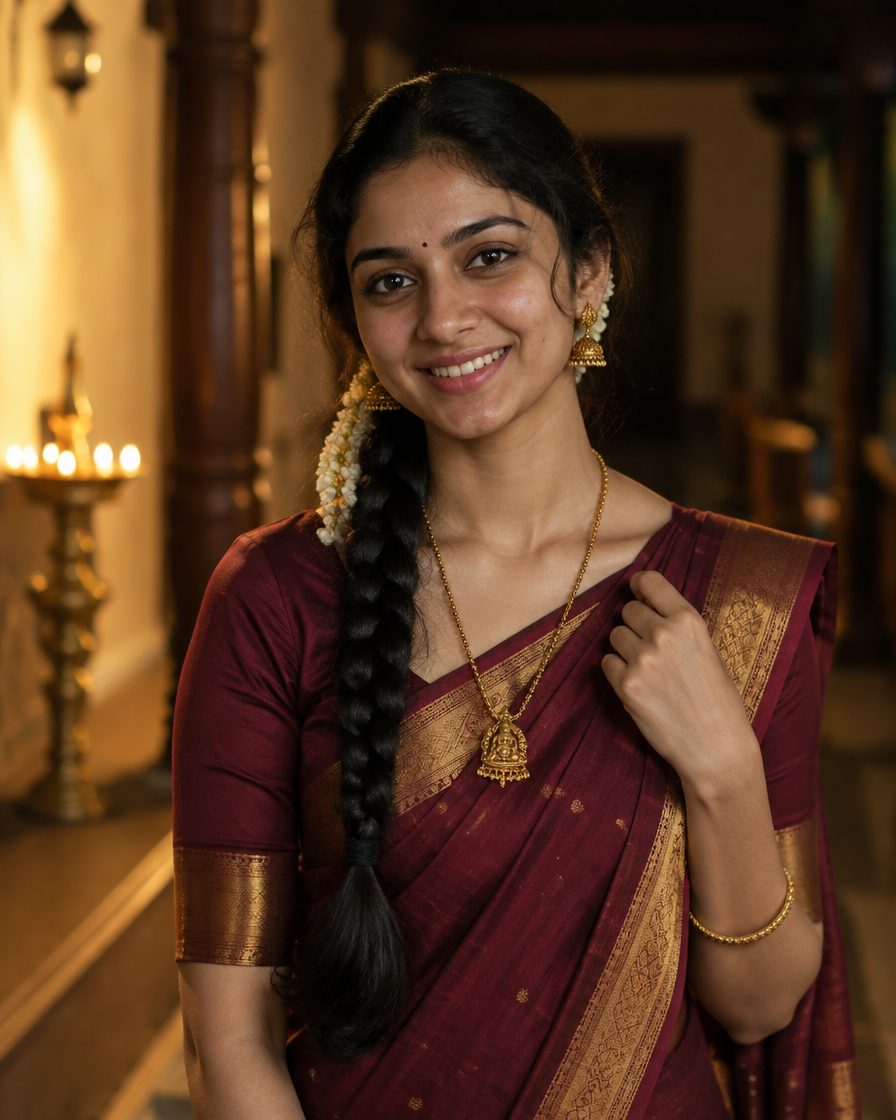
Example result — tumhari photo alag aayegi
Two versions of the same trend
The original is a dance challenge, and because the song is Malayalam, most of the reels lean traditional — a Kerala kasavu saree with a gold border, jasmine in the hair, shot outdoors in daylight. If you can dance even a little, this version travels furthest.
The second is the CapCut slow-mo edit, which needs no choreography at all. You walk, turn, or push your hair back, and the template drops it into slow motion on the beat. Most people posting this trend are doing this one, because it takes two minutes.
Where to get the template
Open CapCut, go to the Templates tab and search Kalyani. The versions that matter are titled “KALYANI”, “KALYANI SLOWMO” and “Kalyani remix”. You can also browse them on CapCut’s own Kalyani template page and open the one you want in the app.
Use the in-app search rather than a link someone forwarded you. Template links die when a creator takes one down, and a reposted link is the single most common reason people land on a page that will not open. Searching the name always works.
The clips the template needs
Most Kalyani templates ask for one clip, and the better ones use two. Check the clip count on the template before you start, since it varies between versions.
First clip — keep it plain. A normal walking or standing shot. This one is the setup, so nothing dramatic should happen in it.
Second clip — this is the one people see. One complete movement in three to five seconds: turning toward the camera, hair being pushed back, an expression changing. Shoot it outdoors in natural light, ideally golden hour, because slow motion multiplies noise and a dark clip falls apart once it stretches.
One person, still background. Someone walking past behind you becomes the thing everyone watches once it slows down.
Face lit, face visible. The beat drop lands on your face. In shadow at that moment, the edit has no payoff.
No clip? Generate the frame
If you have no footage, or the one you shot came out dark, generate the frame instead. CapCut accepts a photo wherever a template asks for a clip, and the template’s own zoom gives it movement. It will not match real footage of you turning, but for a single beat-drop frame it holds up, and it costs nothing.
Five prompts below. The first two are the traditional Kerala look the song belongs to; the rest suit the slow-mo edit. Copy one as it is, upload a bright front-facing selfie in ChatGPT or Google Gemini, and paste.
Prompt 1: Kerala kasavu saree
AI example — aapka result alag ho sakta hai
✦ AI PROMPTCopy → paste in ChatGPT / Gemini
Edit my uploaded photo. If I attached more than one photo of myself, use all of them together to get my face right. Do not redraw my face – keep it exactly as in the original: the same face shape and width, the same cheeks, the same jawline and chin, the same nose shape and width, the same eye shape and spacing, the same eyebrows, the same lip shape, the same skin tone and the same skin texture. Do not slim my face, do not sharpen the jaw, do not enlarge the eyes, do not smooth or airbrush the skin, do not change my age and do not make my features more symmetrical. Change ONLY the clothing, the background and the lighting described below, and keep my head at the same angle as in the photo. Create a waist-up three-quarter portrait of me in a traditional Kerala kasavu saree – off-white cotton with a wide gold zari border – with gold jhumkas, a thin gold chain, fresh jasmine flowers in the hair and a small bindi. Background: a traditional Kerala house with a tiled roof, wooden pillars and green banana leaves, kept fully out of focus. Lighting: soft warm morning daylight from the side with a gentle glow on the skin, no harsh shadows. Catch me mid-turn toward the camera with the saree pallu and hair moving, calm warm smile into the lens. Whole head visible with space above the hair, no side profile. Finish it like a professional model shoot: 85mm lens look, shallow depth of field, magazine-quality retouch, natural skin. Vertical 4:5 format, high resolution. No text, no watermark.
Chehra same rehne ki guarantee nahi hai. Result ko apni reference photo se compare karo aur zaroorat ho to correction do.
Prompt 2: Colourful silk saree, evening
AI example — aapka result alag ho sakta hai
✦ AI PROMPTCopy → paste in ChatGPT / Gemini
Edit my uploaded photo. If I attached more than one photo of myself, use all of them together to get my face right. Do not redraw my face – keep it exactly as in the original: the same face shape and width, the same cheeks, the same jawline and chin, the same nose shape and width, the same eye shape and spacing, the same eyebrows, the same lip shape, the same skin tone and the same skin texture. Do not slim my face, do not sharpen the jaw, do not enlarge the eyes, do not smooth or airbrush the skin, do not change my age and do not make my features more symmetrical. Change ONLY the clothing, the background and the lighting described below, and keep my head at the same angle as in the photo. Create a waist-up three-quarter portrait of me in a rich silk saree in deep teal or maroon with a contrast gold border, antique gold temple jewellery, bangles and a maang tikka, hair tied back with flowers. Background: a warmly lit courtyard at evening with hanging brass lamps and soft golden bokeh, fully out of focus. Lighting: warm lamp light as the key with a gold rim light on the hair and shoulder. Catch me mid-movement with one hand lifting the pallu, chin up, confident expression into the lens. Whole head visible with space above the hair, no side profile. Finish it like a professional model shoot: 85mm lens look, shallow depth of field, magazine-quality retouch, rich cinematic colour grade. Vertical 4:5 format, high resolution. No text, no watermark.
Chehra same rehne ki guarantee nahi hai. Result ko apni reference photo se compare karo aur zaroorat ho to correction do.
Prompt 3: Night street turn
AI example — aapka result alag ho sakta hai
✦ AI PROMPTCopy → paste in ChatGPT / Gemini
Edit my uploaded photo. If I attached more than one photo of myself, use all of them together to get my face right. Do not redraw my face – keep it exactly as in the original: the same face shape and width, the same cheeks, the same jawline and chin, the same nose shape and width, the same eye shape and spacing, the same eyebrows, the same lip shape, the same skin tone and the same skin texture. Do not slim my face, do not sharpen the jaw, do not enlarge the eyes, do not smooth or airbrush the skin, do not change my age and do not make my features more symmetrical. Change ONLY the clothing, the background and the lighting described below, and keep my head at the same angle as in the photo. Create a waist-up three-quarter portrait of me in an oversized jacket over a plain top, standing on a neon-lit city street at night, with shop signage and traffic lights melted into colourful bokeh far behind me and a light rain sheen on the road. Catch me mid-turn toward the camera with my hair swinging from the movement, chin up, calm confident expression looking into the lens. Lighting: neon rim light on the hair and shoulders with a soft warm key on the face. Whole head visible with space above the hair, no side profile, no extreme close-up. Finish it like a professional model shoot: 85mm lens look, shallow depth of field, magazine-quality retouch, polished skin, motion blur only in the hair and never on the face. Vertical 4:5 format, high resolution. No text, no watermark.
Chehra same rehne ki guarantee nahi hai. Result ko apni reference photo se compare karo aur zaroorat ho to correction do.
Prompt 4: Golden hour rooftop
AI example — aapka result alag ho sakta hai
✦ AI PROMPTCopy → paste in ChatGPT / Gemini
Edit my uploaded photo. If I attached more than one photo of myself, use all of them together to get my face right. Do not redraw my face – keep it exactly as in the original: the same face shape and width, the same cheeks, the same jawline and chin, the same nose shape and width, the same eye shape and spacing, the same eyebrows, the same lip shape, the same skin tone and the same skin texture. Do not slim my face, do not sharpen the jaw, do not enlarge the eyes, do not smooth or airbrush the skin, do not change my age and do not make my features more symmetrical. Change ONLY the clothing, the background and the lighting described below, and keep my head at the same angle as in the photo. Create a waist-up three-quarter portrait of me in a plain fitted top and open shirt, standing on an open rooftop at golden hour with a hazy city skyline completely out of focus behind me. Catch me mid-step toward the camera with one hand pushing my hair back, shoulders open, relaxed half smile into the lens. Lighting: warm low sun behind me creating a soft halo on the hair, with gentle fill on the face, no harsh shadows. Whole head visible with space above the hair, no side profile. Finish it like a professional model shoot: 85mm lens look, shallow depth of field, magazine-quality retouch, warm cinematic colour grade. Vertical 4:5 format, high resolution. No text, no watermark.
Chehra same rehne ki guarantee nahi hai. Result ko apni reference photo se compare karo aur zaroorat ho to correction do.
Prompt 5: Dark studio, single light
AI example — aapka result alag ho sakta hai
✦ AI PROMPTCopy → paste in ChatGPT / Gemini
Edit my uploaded photo. If I attached more than one photo of myself, use all of them together to get my face right. Do not redraw my face – keep it exactly as in the original: the same face shape and width, the same cheeks, the same jawline and chin, the same nose shape and width, the same eye shape and spacing, the same eyebrows, the same lip shape, the same skin tone and the same skin texture. Do not slim my face, do not sharpen the jaw, do not enlarge the eyes, do not smooth or airbrush the skin, do not change my age and do not make my features more symmetrical. Change ONLY the clothing, the background and the lighting described below, and keep my head at the same angle as in the photo. Create a waist-up three-quarter portrait of me in a plain black top against a deep black studio background with nothing else in the frame. Light me with a single hard key light from one side and a cool blue rim light along the jaw and shoulder, leaving deep shadows. Head turned toward the camera, direct eye contact, serious composed expression, chin slightly lifted. Whole head visible with space above the hair, no side profile, no extreme close-up. Finish it like a professional model shoot: 85mm lens look, shallow depth of field, magazine-quality retouch, natural skin texture kept, rich high-contrast colour grade. Vertical 4:5 format, high resolution. No text, no watermark.
Chehra same rehne ki guarantee nahi hai. Result ko apni reference photo se compare karo aur zaroorat ho to correction do.
Crop the result to 9:16 before you drop it into the template — the photo resizer does that in one tap, in your browser.
Steps, start to finish
Search Kalyani in CapCut Templates and pick the version whose preview you like. Note the clip count on it.
Tap Use template and pick your clips — the plain one first, the movement one second.
Trim so the movement peaks exactly where the beat drops. This one adjustment separates an edit that lands from one that feels slightly off.
Export without the watermark using the export screen’s own option, then post at 1080p.
On Instagram, add the audio from Instagram’s own library rather than relying on the exported track — Reels favours posts using library audio.
Mistakes that kill this edit
A clip shorter than the template slot. CapCut stretches it further and the motion turns into a stutter.
Zooming in inside the template. It softens an already-stretched frame. Crop before importing instead.
Two dramatic clips. If the first one is also busy, the beat drop has nothing to land against.
Posting a week late. Template trends run hot for ten to fifteen days, then the same edit starts reading as old.
Your own text on top. These templates are built around the music, and extra text competes with the drop.
FAQs
What is the Kalyani song?
An independent Malayalam release from November 2025 by Money Verse Records in Kochi, mixing R and B with Afrobeat rhythm and Malayalam lyrics. It crossed 90 million Spotify streams, and the July 2026 remix with Shreya Ghoshal and Saniya Iyappan restarted the trend.
How many clips do I need?
One is enough for most versions, but two works better — a plain clip followed by the slow-motion one. The template screen shows the exact count before you start.
Is the template free?
Yes. CapCut templates are free, and the watermark comes off from the export screen without paying.
Can I use a photo instead of a video?
Yes, and that is what the prompts above are for. A photo will not move on its own, so the template’s zoom does all the work — pick a frame with implied motion, like hair mid-swing, rather than a straight standing pose.
The template link will not open.
Forwarded links break often. Search the template name inside CapCut instead, and update the app — older versions cannot open newer templates.


 VN Codes
 VN Codes
 VN Codes
 VN Codes
 VN Codes
 VN Codes