Couple portrait ko natural banane ke liye grand location zaroori nahi. Ek café walk, shoulder lean ya shared laugh bhi achhi photo ban sakti hai—bas dono ki expressions, hands aur light saath mein believable hon. Is guide mein seven casual couple AI photoshoot ideas aur complete copy-paste prompts milenge.
Café denim look, olive-white outfits, garden portrait, heart hands, doodle-wall aur playful sky selfie—har look ke neeche matching original AI example aur orange Prompt Copy Karo box hai. Photos par koi text overlay nahi hai. Supplied screenshots ko inspiration ke liye use kiya gaya hai; unki photos aur celebrity likeness republish nahi hui hain.
Dono faces ke liye references kaise prepare karein
Dono adults ki permission ke saath clear original photos use karein. Ek Person A aur doosri Person B label karein.
Similar light aur natural-distance portraits choose karein. Filters, sunglasses aur partly hidden faces identity comparison ko difficult bana sakte hain.
Agar ek shared original photo ho, usmein Person A aur Person B ko clearly identify karein; prompt ki Image 1/Image 2 lines accordingly replace karein.
Style screenshot attach karein toh uska role sirf pose, outfit aur background rakhein. Screenshot ke logon ko identity source na banayein.
Example man/woman styling ko apne couple ke roles ke hisaab se edit kar sakte hain; har person ki actual features, age aur identity preserve karein.
Couple AI photo banane ke steps
Original photos attach karein aur roles likhein: Image 1 = Person A, Image 2 = Person B.
Result mein pehle Person A ka face compare karein, phir Person B ka. Ek sahi face ka matlab dono sahi nahi hain.
Hands, shoulders, walking feet aur matching light check karein. Error ho toh original references ke saath correction prompt use karein.
Next pose mein dono original photos dobara identity references rakhein. Approved generated image sirf scene/outfit guide ho sakti hai.
Final image save karein. 9:16 Story/Reel layout ya background extend karke 4:5 portrait post banayein.
Ye creative pose ideas hain; verified viral ranking ya exact reference recreation ka promise nahi. AI editing mein dono faces bilkul identical rehne ki guarantee nahi hoti.
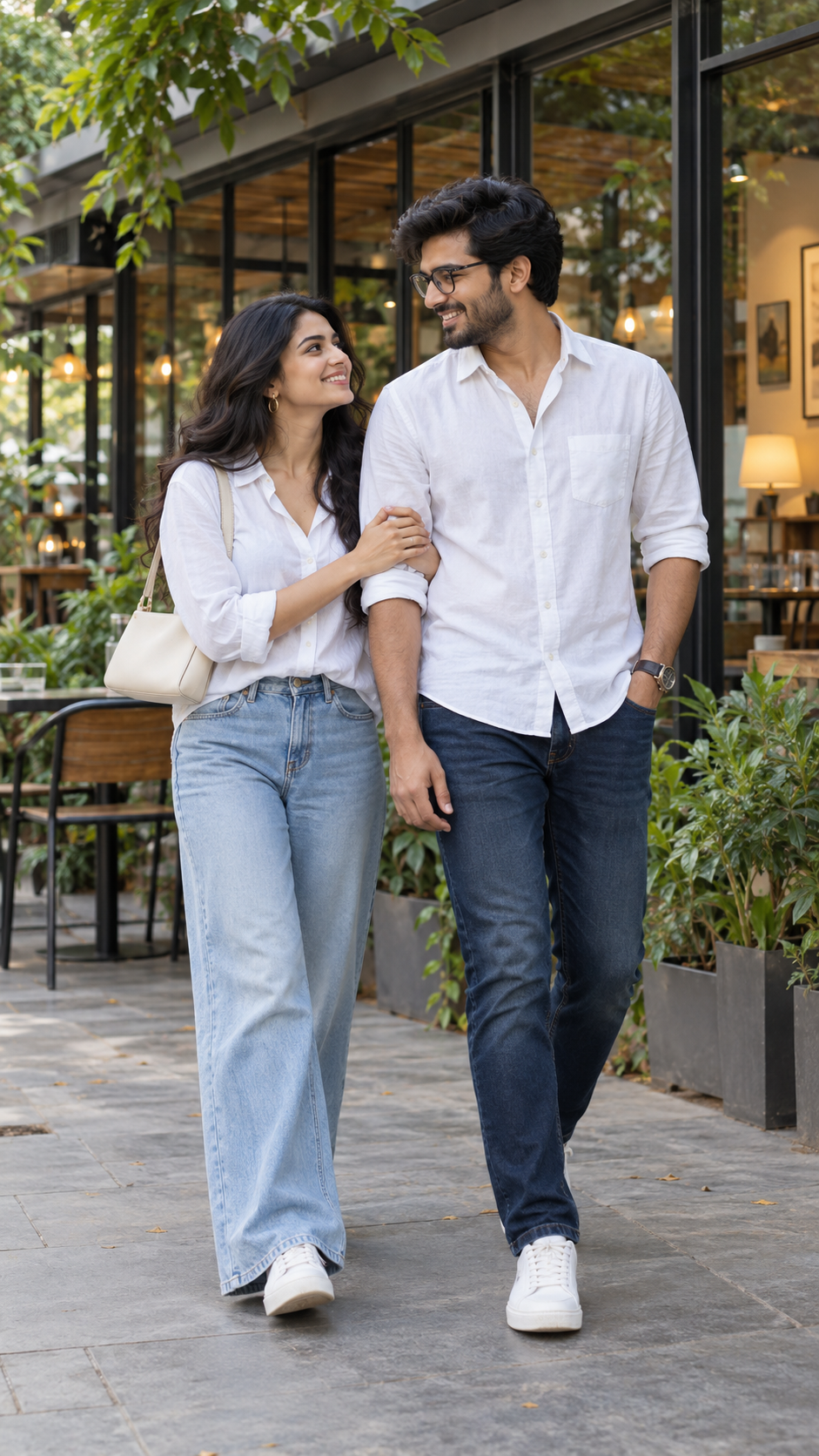
Prompt 1: White-shirt café walk
Original AI-generated illustration — fictional adult couple, no text overlay.
White shirts aur denim café background ke saath clean, relaxed look dete hain. Arm-in-arm walk mein body ko stiff na rakhein; dono ka eye contact portrait ko candid feel deta hai.
✦ AI PROMPTCopy → paste in ChatGPT / Gemini
Edit my uploaded photo. If I attached more than one photo of myself, use all of them together to get my face right. Do not redraw my face – keep it exactly as in the original: the same face shape and width, the same cheeks, the same jawline and chin, the same nose shape and width, the same eye shape and spacing, the same eyebrows, the same lip shape, the same skin tone and the same skin texture. Do not slim my face, do not sharpen the jaw, do not enlarge the eyes, do not smooth or airbrush the skin, do not change my age and do not make my features more symmetrical. Change ONLY the clothing, the background and the lighting described below, and keep my head at the same angle as in the photo. Create a realistic portrait of the two consenting adults in my uploaded photos. Image 1 identifies Person A (the man in this styling example); Image 2 identifies Person B (the woman). Preserve EACH person's recognizable face shape, eye spacing, nose, lips, skin tone, hairstyle and actual age as closely as possible. Do not swap, blend or duplicate their identities, and do not use faces from a style reference. No beautification or skin smoothing. Scene and styling: Full-body the referenced couple walking arm-in-arm outside a modern glass-front café, both white cotton shirts, woman light blue wide-leg jeans ivory shoulder bag hoop earrings, man dark blue jeans light beard glasses watch, white sneakers, exchanging natural smiles. Soft overcast daylight and leafy café patio. Natural skin texture, authentic clothing folds, matching lighting on both people, believable relative height and natural body proportions. Exactly two adults, two arms per person and realistic individual fingers. Vertical 9:16 with breathing room; keep head and footwear in frame for full-body poses. No captions, writing, text, logos, watermarks, phone UI or borders.
Chehra same rehne ki guarantee nahi hai. Result ko apni reference photo se compare karo aur zaroorat ho to correction do.
Prompt 2: Candid courtyard hand-hold
Original AI-generated illustration — fictional adult couple, no text overlay.
Courtyard hand-hold ke liye movement simple rakhein. Ek gentle step aur natural laugh enough hai—running pose mein fused hands aur floating feet ka risk badh sakta hai.
✦ AI PROMPTCopy → paste in ChatGPT / Gemini
Edit my uploaded photo. If I attached more than one photo of myself, use all of them together to get my face right. Do not redraw my face – keep it exactly as in the original: the same face shape and width, the same cheeks, the same jawline and chin, the same nose shape and width, the same eye shape and spacing, the same eyebrows, the same lip shape, the same skin tone and the same skin texture. Do not slim my face, do not sharpen the jaw, do not enlarge the eyes, do not smooth or airbrush the skin, do not change my age and do not make my features more symmetrical. Change ONLY the clothing, the background and the lighting described below, and keep my head at the same angle as in the photo. Create a realistic portrait of the two consenting adults in my uploaded photos. Image 1 identifies Person A (the man in this styling example); Image 2 identifies Person B (the woman). Preserve EACH person's recognizable face shape, eye spacing, nose, lips, skin tone, hairstyle and actual age as closely as possible. Do not swap, blend or duplicate their identities, and do not use faces from a style reference. No beautification or skin smoothing. Scene and styling: Full-body the referenced couple in sunlit cream courtyard with green trees, man olive linen shirt beige trousers white sneakers, woman pale sage overshirt white tank and white wide-leg trousers white sneakers. Holding hands during a playful gentle walking step, woman laughing glancing back, relaxed believable candid movement. ONE photo not collage. Natural skin texture, authentic clothing folds, matching lighting on both people, believable relative height and natural body proportions. Exactly two adults, two arms per person and realistic individual fingers. Vertical 9:16 with breathing room; keep head and footwear in frame for full-body poses. No captions, writing, text, logos, watermarks, phone UI or borders.
Chehra same rehne ki guarantee nahi hai. Result ko apni reference photo se compare karo aur zaroorat ho to correction do.
Prompt 3: Garden shoulder lean
Original AI-generated illustration — fictional adult couple, no text overlay.
Shoulder lean ek quiet romantic pose hai. Dono ke heads, shoulders aur relative height ko believable rakhein; arm grip aur neck angle zoom karke inspect karein.
✦ AI PROMPTCopy → paste in ChatGPT / Gemini
Edit my uploaded photo. If I attached more than one photo of myself, use all of them together to get my face right. Do not redraw my face – keep it exactly as in the original: the same face shape and width, the same cheeks, the same jawline and chin, the same nose shape and width, the same eye shape and spacing, the same eyebrows, the same lip shape, the same skin tone and the same skin texture. Do not slim my face, do not sharpen the jaw, do not enlarge the eyes, do not smooth or airbrush the skin, do not change my age and do not make my features more symmetrical. Change ONLY the clothing, the background and the lighting described below, and keep my head at the same angle as in the photo. Create a realistic portrait of the two consenting adults in my uploaded photos. Image 1 identifies Person A (the man in this styling example); Image 2 identifies Person B (the woman). Preserve EACH person's recognizable face shape, eye spacing, nose, lips, skin tone, hairstyle and actual age as closely as possible. Do not swap, blend or duplicate their identities, and do not use faces from a style reference. No beautification or skin smoothing. Scene and styling: Full-body the referenced couple on leafy flower-lined garden path, man olive overshirt over white T-shirt beige chinos brown shoes, woman ivory ribbed midi dress olive cardigan tan shoulder bag white sneakers. She gently leans head on his shoulder while holding his upper arm, he smiles toward her, soft daylight. Natural skin texture, authentic clothing folds, matching lighting on both people, believable relative height and natural body proportions. Exactly two adults, two arms per person and realistic individual fingers. Vertical 9:16 with breathing room; keep head and footwear in frame for full-body poses. No captions, writing, text, logos, watermarks, phone UI or borders.
Chehra same rehne ki guarantee nahi hai. Result ko apni reference photo se compare karo aur zaroorat ho to correction do.
Prompt 4: Low-angle heart hands
Original AI-generated illustration — fictional adult couple, no text overlay.
Camera neeche se upar dekh raha hai aur centre mein dono ki hands ek heart banati hain. Ye technically tricky look hai: thumbs, finger joints aur wrists ko carefully check karein. Faces par extreme fisheye distortion avoid karein.
✦ AI PROMPTCopy → paste in ChatGPT / Gemini
Edit my uploaded photos – the first person and the second person. Do not redraw either face – keep both faces exactly as in the original: the same face shape and width, the same cheeks, the same jawline and chin, the same nose shape and width, the same eye shape and spacing, the same eyebrows, the same lip shape, the same skin tone and the same skin texture. Do not slim our faces, do not sharpen the jaw, do not enlarge the eyes, do not smooth or airbrush the skin, do not change our age and do not make our features more symmetrical. Change ONLY the clothing, the background and the lighting described below, and keep both heads at the same angle as in the photo. Create a realistic portrait of the two consenting adults in my uploaded photos. Image 1 identifies Person A (the man in this styling example); Image 2 identifies Person B (the woman). Preserve EACH person's recognizable face shape, eye spacing, nose, lips, skin tone, hairstyle and actual age as closely as possible. Do not swap, blend or duplicate their identities, and do not use faces from a style reference. No beautification or skin smoothing. Scene and styling: Single low-angle worm's-eye photo the referenced couple leaning toward camera from two sides against blue sky with thin clouds, cream linen shirts, happy expressions. Together forming ONE heart with their hands at centre, each contributing one hand, other hands out of frame. Clear recognisable hand-heart shape and natural fingers, both faces visible without excessive fisheye distortion. Natural skin texture, authentic clothing folds, matching lighting on both people, believable relative height and natural body proportions. Exactly two adults, two arms per person and realistic individual fingers. Vertical 9:16 with breathing room; keep head and footwear in frame for full-body poses. No captions, writing, text, logos, watermarks, phone UI or borders.
Chehra same rehne ki guarantee nahi hai. Result ko apni reference photo se compare karo aur zaroorat ho to correction do.
Prompt 5: Doodle-wall couple portrait
Original AI-generated illustration — fictional adult couple, no text overlay.
Real couple ke behind charcoal-style illustrations creative background banate hain. Doodles artwork ka hissa hain; foreground mein sirf do real people hon. Drawing mein bhi koi caption ya naam na add karein.
✦ AI PROMPTCopy → paste in ChatGPT / Gemini
Edit my uploaded photo. If I attached more than one photo of myself, use all of them together to get my face right. Do not redraw my face – keep it exactly as in the original: the same face shape and width, the same cheeks, the same jawline and chin, the same nose shape and width, the same eye shape and spacing, the same eyebrows, the same lip shape, the same skin tone and the same skin texture. Do not slim my face, do not sharpen the jaw, do not enlarge the eyes, do not smooth or airbrush the skin, do not change my age and do not make my features more symmetrical. Change ONLY the clothing, the background and the lighting described below, and keep my head at the same angle as in the photo. Create a realistic portrait of the two consenting adults in my uploaded photos. Image 1 identifies Person A (the man in this styling example); Image 2 identifies Person B (the woman). Preserve EACH person's recognizable face shape, eye spacing, nose, lips, skin tone, hairstyle and actual age as closely as possible. Do not swap, blend or duplicate their identities, and do not use faces from a style reference. No beautification or skin smoothing. Scene and styling: Full-body the referenced couple leaning side-by-side on cream concrete wall, man black T-shirt black cargo trousers white sneakers, woman ivory sleeveless buttoned top black trousers white sneakers. Arms crossed naturally each person, one knee casually bent, looking toward each other. Behind them two large charcoal-style playful drawings of the same fictional couple, small drawn hearts, NO written text, warm daylight. Natural skin texture, authentic clothing folds, matching lighting on both people, believable relative height and natural body proportions. Exactly two adults, two arms per person and realistic individual fingers. Vertical 9:16 with breathing room; keep head and footwear in frame for full-body poses. No captions, writing, text, logos, watermarks, phone UI or borders.
Chehra same rehne ki guarantee nahi hai. Result ko apni reference photo se compare karo aur zaroorat ho to correction do.
Prompt 6: Matching olive café outfit
Original AI-generated illustration — fictional adult couple, no text overlay.
Olive shirts aur white trousers coordinated outfit palette banate hain. Leaf shadows background par soft rahein; face par heavy stripes na padein. Coffee cup plain aur unbranded rakhein.
✦ AI PROMPTCopy → paste in ChatGPT / Gemini
Edit my uploaded photo. If I attached more than one photo of myself, use all of them together to get my face right. Do not redraw my face – keep it exactly as in the original: the same face shape and width, the same cheeks, the same jawline and chin, the same nose shape and width, the same eye shape and spacing, the same eyebrows, the same lip shape, the same skin tone and the same skin texture. Do not slim my face, do not sharpen the jaw, do not enlarge the eyes, do not smooth or airbrush the skin, do not change my age and do not make my features more symmetrical. Change ONLY the clothing, the background and the lighting described below, and keep my head at the same angle as in the photo. Create a realistic portrait of the two consenting adults in my uploaded photos. Image 1 identifies Person A (the man in this styling example); Image 2 identifies Person B (the woman). Preserve EACH person's recognizable face shape, eye spacing, nose, lips, skin tone, hairstyle and actual age as closely as possible. Do not swap, blend or duplicate their identities, and do not use faces from a style reference. No beautification or skin smoothing. Scene and styling: Full-body the referenced couple wearing matching olive green linen shirts white relaxed trousers white sneakers. Leaning comfortably side-by-side against warm beige café wall, man sunglasses hands in pockets, woman holding plain unbranded iced coffee cup in one hand, other hand in pocket, both looking slightly off camera, leaf-shadow afternoon light. Natural skin texture, authentic clothing folds, matching lighting on both people, believable relative height and natural body proportions. Exactly two adults, two arms per person and realistic individual fingers. Vertical 9:16 with breathing room; keep head and footwear in frame for full-body poses. No captions, writing, text, logos, watermarks, phone UI or borders.
Chehra same rehne ki guarantee nahi hai. Result ko apni reference photo se compare karo aur zaroorat ho to correction do.
Prompt 7: Playful sky selfie
Original AI-generated illustration — fictional adult couple, no text overlay.
Low-angle sky shot mein laughter aur near-camera palm playful perspective dete hain. Example fictional models ki hai; apne photos use karte waqt actual features aur identity preserve karein, ethnicity ya age change karne ki request na dein.
✦ AI PROMPTCopy → paste in ChatGPT / Gemini
Edit my uploaded photo. If I attached more than one photo of myself, use all of them together to get my face right. Do not redraw my face – keep it exactly as in the original: the same face shape and width, the same cheeks, the same jawline and chin, the same nose shape and width, the same eye shape and spacing, the same eyebrows, the same lip shape, the same skin tone and the same skin texture. Do not slim my face, do not sharpen the jaw, do not enlarge the eyes, do not smooth or airbrush the skin, do not change my age and do not make my features more symmetrical. Change ONLY the clothing, the background and the lighting described below, and keep my head at the same angle as in the photo. Create a realistic portrait of the two consenting adults in my uploaded photos. Image 1 identifies Person A (the man in this styling example); Image 2 identifies Person B (the woman). Preserve EACH person's recognizable face shape, eye spacing, nose, lips, skin tone, hairstyle and actual age as closely as possible. Do not swap, blend or duplicate their identities, and do not use faces from a style reference. No beautification or skin smoothing. Scene and styling: Low-angle wide-lens photo the referenced couple in simple black tops leaning down toward camera under clear blue sky, candid joyful laughter. Woman extends one open palm toward camera, man points one index finger toward lens. Normal two arms per person, realistic individual fingers and foreshortening, faces sharp, tiny sunlight flare between their heads, no text. Natural skin texture, authentic clothing folds, matching lighting on both people, believable relative height and natural body proportions. Exactly two adults, two arms per person and realistic individual fingers. Vertical 9:16 with breathing room; keep head and footwear in frame for full-body poses. No captions, writing, text, logos, watermarks, phone UI or borders.
Chehra same rehne ki guarantee nahi hai. Result ko apni reference photo se compare karo aur zaroorat ho to correction do.
Faces mix ho rahe hain ya hands wrong hain?
Dono original photos dobara attach karein. Person A aur Person B ke roles repeat karein, phir neeche ka correction prompt use karein. Repeated edits se likeness drift ho toh simpler pose ko original photos se fresh banayein.
✦ AI PROMPTCopy → paste in ChatGPT / Gemini
Edit my uploaded photo. If I attached more than one photo of myself, use all of them together to get my face right. Do not redraw my face – keep it exactly as in the original: the same face shape and width, the same cheeks, the same jawline and chin, the same nose shape and width, the same eye shape and spacing, the same eyebrows, the same lip shape, the same skin tone and the same skin texture. Do not slim my face, do not sharpen the jaw, do not enlarge the eyes, do not smooth or airbrush the skin, do not change my age and do not make my features more symmetrical. Change ONLY the clothing, the background and the lighting described below, and keep my head at the same angle as in the photo. Revise the generated couple image using Image 1 as Person A's identity and Image 2 as Person B's identity. Restore each person's own face shape, eyes, nose, cheeks, lips, skin tone, hairstyle and age. Do not swap or blend the two faces. Keep the approved clothing, background, composition and pose. Correct hands touching each other, wrist angles and finger separation. For the hand-heart pose, each person contributes one hand to one clear heart; remove extra hands. Match lighting and head-to-body scale on both people. No beautification, text, logo or watermark.
Kya alag photos se couple portrait ban sakta hai? Image-editing tools that accept multiple references mein try kar sakte hain. Dono roles explicitly map karein; exact likeness guaranteed nahi.
Kya same face seven photos mein rahega? Same originals help guide identity, lekin har result separately review karein. Website examples real-user face consistency tests nahi hain.
Heart hands mein fingers wrong aaye toh? One hand per person aur one shared heart specify karein. Fused fingers aaye toh correction prompt use karein ya simpler pose choose karein.
Doodle-wall mein four people kyun dikh sakte hain? Background drawings ko flat artwork describe karein, aur foreground mein exactly two real adults specify karein.
Kya photos par “My Happiness” ya naam add karna hai? Nahi. Prompts aur published examples text-free hain; caption image ke bahar likhein.
Verification note: Seven original fictional-couple examples generate aur visually inspect kiye gaye. Real reader identity photos par prompts tested nahi hain. Source screenshots ka original prompt, model aur creation method verify nahi hua.
Navratri ka AI portrait sirf colourful lehenga add karne se complete nahi hota. Dupatta ki movement, jewellery, dandiya grip aur background light saath mein believable honi chahiye. Is guide mein seven Garba/Dandiya looks hain—yellow dupatta close-up, garden twirl, pastel palace, green choli, navy dance pose, red-white night portrait aur ivory mirror-work editorial.
Har photo ke neeche orange Prompt Copy Karo box hai. Complete prompt copy karke apni original adult photo ke saath use karein. Examples naye AI-generated fictional models ki hain; supplied screenshots ya unke faces republish nahi kiye gaye hain. Kisi photo par text overlay nahi hai.
Shuru karne se pehle
Clear original adult portrait choose karein—face visible, even light, beauty filter ke bina.
Full-length look ke liye natural-distance body reference helpful ho sakta hai. Extreme wide-angle selfie body proportions ko guide karne ke liye ideal nahi.
Style image attach kar rahe hain toh roles clear likhein: original photo = identity; style reference = outfit, pose and setting.
Ye seven different outfits hain. Same-outfit series chahiye toh approved outfit image ko har next prompt ke saath styling reference rakhein.
Photo banane ka easy workflow
Image-editing AI tool mein original photo attach karein.
Ek complete prompt copy karein aur image create/edit karne ko kahe.
Pehle face aur body proportions approve karein, phir embroidery, jewellery aur props.
Agla look banate waqt original photo ko dobara identity source rakhein. Generated image par baar-baar edit karne se likeness drift ho sakti hai.
Final portrait save karein. 9:16 version Story/Reel layout ke liye use karein; 4:5 post banate waqt background extend karein, feet aur raised dandiya crop na karein.
Ye reference-inspired creative styling tutorial hai. Supplied images ka original model, prompt aur creation method verify nahi hua; is set ko verified viral ranking ke roop mein present nahi kiya gaya hai.
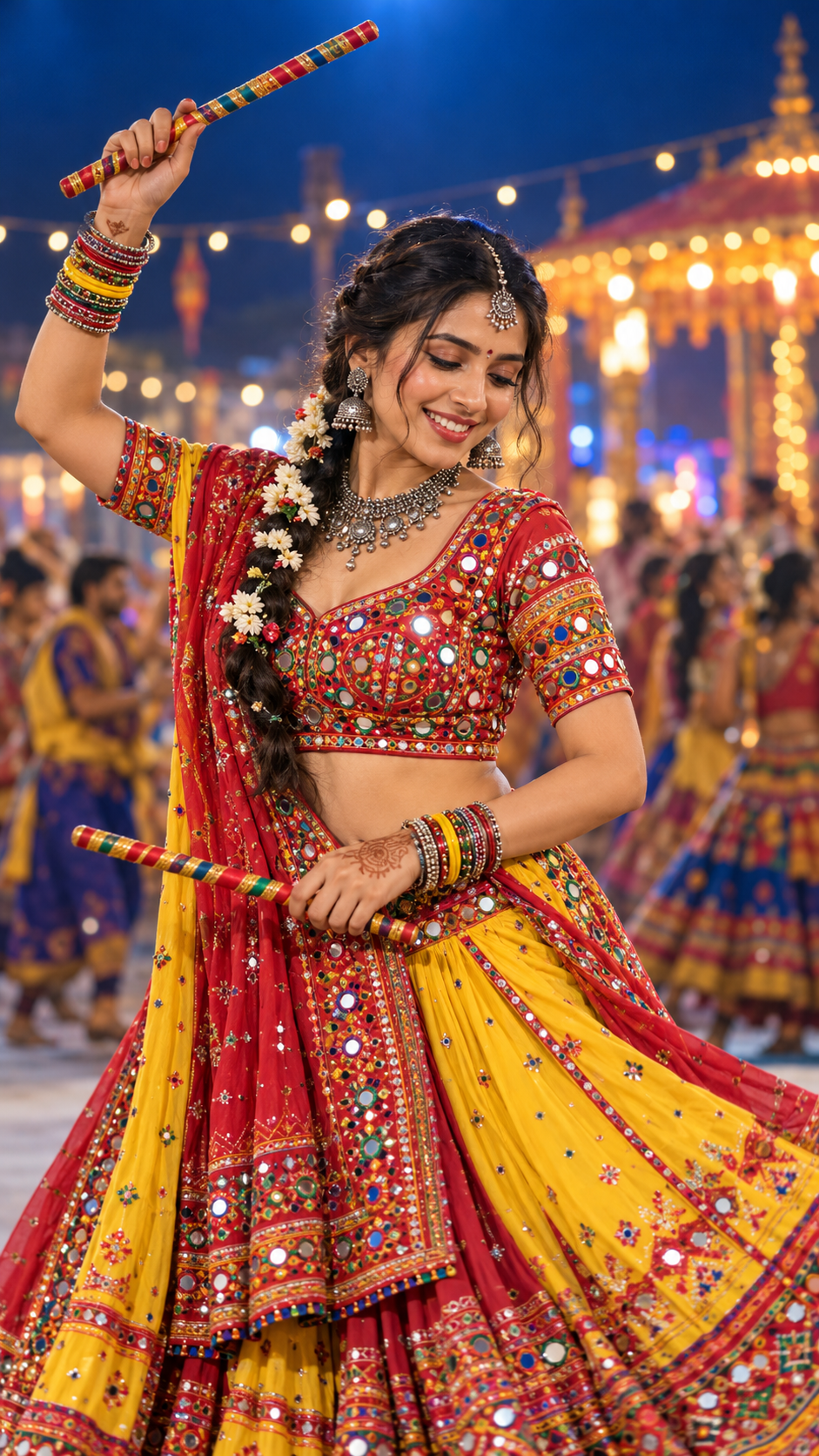
Prompt 1: Yellow dupatta dandiya close-up
Original AI-generated illustration — fictional adult model, no text overlay.
Yellow dupatta aur red mirror-work blouse night bokeh mein bright focal point banate hain. Overhead dandiya ke saath shoulder aur wrist relaxed rakhein. Ye closer portrait hai; full outfit ke bajaye face, braid aur jewellery par focus hai.
✦ AI PROMPTCopy → paste in ChatGPT / Gemini
Edit my uploaded photo. If I attached more than one photo of myself, use all of them together to get my face right. Do not redraw my face – keep it exactly as in the original: the same face shape and width, the same cheeks, the same jawline and chin, the same nose shape and width, the same eye shape and spacing, the same eyebrows, the same lip shape, the same skin tone and the same skin texture. Do not slim my face, do not sharpen the jaw, do not enlarge the eyes, do not smooth or airbrush the skin, do not change my age and do not make my features more symmetrical. Change ONLY the clothing, the background and the lighting described below, and keep my head at the same angle as in the photo. Edit my uploaded adult portrait. Use the original photo as the identity reference and preserve my recognizable face shape, eye shape and spacing, nose, lips, cheeks, skin tone, age and natural skin texture as closely as possible. Do not slim the face, enlarge eyes or beautify my features. Keep my original head angle where possible; adapt the body pose naturally without distorting my neck. Style and pose: Three-quarter waist-up me in red multicolour mirror-work choli with bright yellow red dupatta, oxidised silver necklace jhumkas head chain, colourful bangles, flower decorated long braid, subtle mehndi. One hand naturally holds a striped dandiya overhead, other holds second at waist. Warm night festival bokeh with blue background, smiling gaze down. Photorealistic premium festival portrait, believable embroidery, coherent jewellery, matching light on face and body, natural anatomy with two arms and two legs and realistic fingers. Vertical 9:16, comfortable breathing room above the head, full body and footwear visible for full-length poses. No text, captions, logo, watermark, phone controls, extra limbs or plastic skin.
Chehra same rehne ki guarantee nahi hai. Result ko apni reference photo se compare karo aur zaroorat ho to correction do.
Prompt 2: Peacock lehenga garden twirl
Original AI-generated illustration — fictional adult model, no text overlay.
Peacock embroidery aur multicolour skirt ko garden light mein clearly dikhayein. Twirl ek frozen-action photo hai: skirt naturally sweep kare, lekin body balance aur feet believable rahein.
✦ AI PROMPTCopy → paste in ChatGPT / Gemini
Edit my uploaded photo. If I attached more than one photo of myself, use all of them together to get my face right. Do not redraw my face – keep it exactly as in the original: the same face shape and width, the same cheeks, the same jawline and chin, the same nose shape and width, the same eye shape and spacing, the same eyebrows, the same lip shape, the same skin tone and the same skin texture. Do not slim my face, do not sharpen the jaw, do not enlarge the eyes, do not smooth or airbrush the skin, do not change my age and do not make my features more symmetrical. Change ONLY the clothing, the background and the lighting described below, and keep my head at the same angle as in the photo. Edit my uploaded adult portrait. Use the original photo as the identity reference and preserve my recognizable face shape, eye shape and spacing, nose, lips, cheeks, skin tone, age and natural skin texture as closely as possible. Do not slim the face, enlarge eyes or beautify my features. Keep my original head angle where possible; adapt the body pose naturally without distorting my neck. Style and pose: Full-length me turning gently on palace garden lawn, multicolour orange teal pink yellow lehenga panels with rich embroidered peacock motifs, coordinating modest festive blouse and flowing multicolour dupatta, loose wavy hair and silver jhumkas. Look back over shoulder with relaxed smile, natural frozen twirl, believable skirt sweep, daylight cream palace garden. Photorealistic premium festival portrait, believable embroidery, coherent jewellery, matching light on face and body, natural anatomy with two arms and two legs and realistic fingers. Vertical 9:16, comfortable breathing room above the head, full body and footwear visible for full-length poses. No text, captions, logo, watermark, phone controls, extra limbs or plastic skin.
Chehra same rehne ki guarantee nahi hai. Result ko apni reference photo se compare karo aur zaroorat ho to correction do.
Prompt 3: Pastel palace lehenga portrait
Original AI-generated illustration — fictional adult model, no text overlay.
Light blue dupatta aur pastel panels warm sandstone se achha colour separation dete hain. Simple standing pose details ko readable rakhta hai; har look mein dance pose zaroori nahi.
✦ AI PROMPTCopy → paste in ChatGPT / Gemini
Edit my uploaded photo. If I attached more than one photo of myself, use all of them together to get my face right. Do not redraw my face – keep it exactly as in the original: the same face shape and width, the same cheeks, the same jawline and chin, the same nose shape and width, the same eye shape and spacing, the same eyebrows, the same lip shape, the same skin tone and the same skin texture. Do not slim my face, do not sharpen the jaw, do not enlarge the eyes, do not smooth or airbrush the skin, do not change my age and do not make my features more symmetrical. Change ONLY the clothing, the background and the lighting described below, and keep my head at the same angle as in the photo. Edit my uploaded adult portrait. Use the original photo as the identity reference and preserve my recognizable face shape, eye shape and spacing, nose, lips, cheeks, skin tone, age and natural skin texture as closely as possible. Do not slim the face, enlarge eyes or beautify my features. Keep my original head angle where possible; adapt the body pose naturally without distorting my neck. Style and pose: Full-length me in luxurious multicolour patchwork Gujarati lehenga with pastel pink yellow purple ivory panels, red embroidered blouse and light blue mirror-work dupatta with pompom edge. Calm direct gaze, relaxed standing pose holding dupatta edge, carved warm sandstone courtyard and bougainvillea, late afternoon light. Photorealistic premium festival portrait, believable embroidery, coherent jewellery, matching light on face and body, natural anatomy with two arms and two legs and realistic fingers. Vertical 9:16, comfortable breathing room above the head, full body and footwear visible for full-length poses. No text, captions, logo, watermark, phone controls, extra limbs or plastic skin.
Chehra same rehne ki guarantee nahi hai. Result ko apni reference photo se compare karo aur zaroorat ho to correction do.
Prompt 4: Green choli courtyard dandiya
Original AI-generated illustration — fictional adult model, no text overlay.
Green blouse, cream lehenga aur pink dupatta fresh festive palette dete hain. Dandiya sticks ke grip aur fingers check karein—intricate costume ke saath hand errors easily miss ho jate hain.
✦ AI PROMPTCopy → paste in ChatGPT / Gemini
Edit my uploaded photo. If I attached more than one photo of myself, use all of them together to get my face right. Do not redraw my face – keep it exactly as in the original: the same face shape and width, the same cheeks, the same jawline and chin, the same nose shape and width, the same eye shape and spacing, the same eyebrows, the same lip shape, the same skin tone and the same skin texture. Do not slim my face, do not sharpen the jaw, do not enlarge the eyes, do not smooth or airbrush the skin, do not change my age and do not make my features more symmetrical. Change ONLY the clothing, the background and the lighting described below, and keep my head at the same angle as in the photo. Edit my uploaded adult portrait. Use the original photo as the identity reference and preserve my recognizable face shape, eye shape and spacing, nose, lips, cheeks, skin tone, age and natural skin texture as closely as possible. Do not slim the face, enlarge eyes or beautify my features. Keep my original head angle where possible; adapt the body pose naturally without distorting my neck. Style and pose: Full-length me green floral embroidered choli, cream gold lehenga with green pink embroidered borders and colourful pompom trims, hot pink dupatta, matching jewellery. One striped dandiya raised above head and another near shoulder, comfortable balanced pose, golden courtyard with marigolds and flowers, embroidered jutti visible. Photorealistic premium festival portrait, believable embroidery, coherent jewellery, matching light on face and body, natural anatomy with two arms and two legs and realistic fingers. Vertical 9:16, comfortable breathing room above the head, full body and footwear visible for full-length poses. No text, captions, logo, watermark, phone controls, extra limbs or plastic skin.
Chehra same rehne ki guarantee nahi hai. Result ko apni reference photo se compare karo aur zaroorat ho to correction do.
Prompt 5: Navy Garba dance portrait
Original AI-generated illustration — fictional adult model, no text overlay.
Navy outfit par colourful folk embroidery aur silver jewellery stand out karti hai. Raised-hand pose mein elbow, wrist aur torso ek natural line mein hone chahiye.
✦ AI PROMPTCopy → paste in ChatGPT / Gemini
Edit my uploaded photo. If I attached more than one photo of myself, use all of them together to get my face right. Do not redraw my face – keep it exactly as in the original: the same face shape and width, the same cheeks, the same jawline and chin, the same nose shape and width, the same eye shape and spacing, the same eyebrows, the same lip shape, the same skin tone and the same skin texture. Do not slim my face, do not sharpen the jaw, do not enlarge the eyes, do not smooth or airbrush the skin, do not change my age and do not make my features more symmetrical. Change ONLY the clothing, the background and the lighting described below, and keep my head at the same angle as in the photo. Edit my uploaded adult portrait. Use the original photo as the identity reference and preserve my recognizable face shape, eye shape and spacing, nose, lips, cheeks, skin tone, age and natural skin texture as closely as possible. Do not slim the face, enlarge eyes or beautify my features. Keep my original head angle where possible; adapt the body pose naturally without distorting my neck. Style and pose: Full-length me navy blue embroidered chaniya choli with densely detailed folk-art border, silver jewellery and long braid with tassels, colourful bangles. Gentle frozen dance turn with one hand raised and other near waist, balanced feet visible, warm festive hall background with subtle pink stage light and softly blurred people. Photorealistic premium festival portrait, believable embroidery, coherent jewellery, matching light on face and body, natural anatomy with two arms and two legs and realistic fingers. Vertical 9:16, comfortable breathing room above the head, full body and footwear visible for full-length poses. No text, captions, logo, watermark, phone controls, extra limbs or plastic skin.
Chehra same rehne ki guarantee nahi hai. Result ko apni reference photo se compare karo aur zaroorat ho to correction do.
Prompt 6: Red-white bandhani night portrait
Original AI-generated illustration — fictional adult model, no text overlay.
Bandhani-inspired red-white outfit aur lantern background se Garba-night atmosphere banta hai. Face par soft light rakhein; background ki lights ko skin overexpose na karne dein.
✦ AI PROMPTCopy → paste in ChatGPT / Gemini
Edit my uploaded photo. If I attached more than one photo of myself, use all of them together to get my face right. Do not redraw my face – keep it exactly as in the original: the same face shape and width, the same cheeks, the same jawline and chin, the same nose shape and width, the same eye shape and spacing, the same eyebrows, the same lip shape, the same skin tone and the same skin texture. Do not slim my face, do not sharpen the jaw, do not enlarge the eyes, do not smooth or airbrush the skin, do not change my age and do not make my features more symmetrical. Change ONLY the clothing, the background and the lighting described below, and keep my head at the same angle as in the photo. Edit my uploaded adult portrait. Use the original photo as the identity reference and preserve my recognizable face shape, eye shape and spacing, nose, lips, cheeks, skin tone, age and natural skin texture as closely as possible. Do not slim the face, enlarge eyes or beautify my features. Keep my original head angle where possible; adapt the body pose naturally without distorting my neck. Style and pose: Full-length me red white bandhani lehenga and red mirror-work choli, white red dupatta, oxidised silver waist belt bangles and earrings. Natural easy standing smile, two hands relaxed visible, Navratri night ground with hanging lanterns bunting marigold pillars and softly blurred dancing people. Photorealistic premium festival portrait, believable embroidery, coherent jewellery, matching light on face and body, natural anatomy with two arms and two legs and realistic fingers. Vertical 9:16, comfortable breathing room above the head, full body and footwear visible for full-length poses. No text, captions, logo, watermark, phone controls, extra limbs or plastic skin.
Chehra same rehne ki guarantee nahi hai. Result ko apni reference photo se compare karo aur zaroorat ho to correction do.
Prompt 7: Ivory mirror-work editorial portrait
Original AI-generated illustration — fictional adult model, no text overlay.
Ivory base, colourful embroidered panels aur silver border ke liye quiet backdrop useful hai. Textured wall aur clay pots outfit ko clearly dikhate hain. Ye calm editorial portrait hai.
✦ AI PROMPTCopy → paste in ChatGPT / Gemini
Edit my uploaded photo. If I attached more than one photo of myself, use all of them together to get my face right. Do not redraw my face – keep it exactly as in the original: the same face shape and width, the same cheeks, the same jawline and chin, the same nose shape and width, the same eye shape and spacing, the same eyebrows, the same lip shape, the same skin tone and the same skin texture. Do not slim my face, do not sharpen the jaw, do not enlarge the eyes, do not smooth or airbrush the skin, do not change my age and do not make my features more symmetrical. Change ONLY the clothing, the background and the lighting described below, and keep my head at the same angle as in the photo. Edit my uploaded adult portrait. Use the original photo as the identity reference and preserve my recognizable face shape, eye shape and spacing, nose, lips, cheeks, skin tone, age and natural skin texture as closely as possible. Do not slim the face, enlarge eyes or beautify my features. Keep my original head angle where possible; adapt the body pose naturally without distorting my neck. Style and pose: Full-length me ivory Gujarati lehenga and short-sleeve choli with vertical red teal mustard embroidered panels and mirror-work details, silver coin border, oxidised silver turquoise necklace earrings bangles. Calm direct gaze, one hand near waist other relaxed, cream textured plaster wall and clay pots, soft daylight premium editorial. Photorealistic premium festival portrait, believable embroidery, coherent jewellery, matching light on face and body, natural anatomy with two arms and two legs and realistic fingers. Vertical 9:16, comfortable breathing room above the head, full body and footwear visible for full-length poses. No text, captions, logo, watermark, phone controls, extra limbs or plastic skin.
Chehra same rehne ki guarantee nahi hai. Result ko apni reference photo se compare karo aur zaroorat ho to correction do.
Face ya dandiya grip galat aaye toh
Original portrait dobara attach karein aur neeche ka correction prompt use karein. Face ko reference se compare karein; sirf outfit impressive hone ki wajah se wrong likeness accept na karein.
✦ AI PROMPTCopy → paste in ChatGPT / Gemini
Edit my uploaded photo. If I attached more than one photo of myself, use all of them together to get my face right. Do not redraw my face – keep it exactly as in the original: the same face shape and width, the same cheeks, the same jawline and chin, the same nose shape and width, the same eye shape and spacing, the same eyebrows, the same lip shape, the same skin tone and the same skin texture. Do not slim my face, do not sharpen the jaw, do not enlarge the eyes, do not smooth or airbrush the skin, do not change my age and do not make my features more symmetrical. Change ONLY the clothing, the background and the lighting described below, and keep my head at the same angle as in the photo. Revise the generated photo using my original uploaded adult portrait as the identity reference. Restore face shape, eye spacing, cheeks, nose, lips, skin tone and age closer to the original. Keep the chosen outfit, backdrop, framing and pose where possible. Correct head-to-body scale, neck, wrists and fingers holding the dandiya. Maintain exactly two arms and two legs. Restore coherent embroidered borders and separate jewellery from skin. Match the scene lighting across face and body. No skin smoothing, text, logo or watermark.
Caption mein AI-assisted portraits mention karein; image par extra text dalna required nahi.
Final quality check
Face shape, skin tone aur age original photo ke close hain?
Dandiya hands, elbows, bangles aur necklace visibly separate hain?
Twirl mein waist, feet aur skirt ki direction believable hai?
Embroidery consistent motif lagti hai ya random symbols?
Face aur body par same scene light hai?
Photo par unwanted text, logo, watermark ya screenshot controls toh nahi?
Frequently asked questions
Kya exact face same rahega? Guarantee nahi. Clear original reference, simpler pose aur careful comparison zaroori hain.
Kya same face seven looks mein use ho sakta hai? Har generation mein same original portrait use karein. In website examples ko real-user identity consistency test na maanein.
Kya twirl prompt video banata hai? Nahi, yahan prompt single still portrait ke liye hai. Skirt movement ek frozen moment hai.
Kya outfit exactly reference jaisa hoga? Prompts colour, silhouette aur motifs guide karte hain. Exact garment reproduction ki guarantee nahi; specific outfit important ho toh uski clear reference attach karein.
Navratri ki photo mein baby ki innocent expression aur temple ka warm festive atmosphere ek saath aaye, toh portrait bahut special lagta hai. Is Baby Durga / Little Devi guide mein five cinematic looks milenge: red temple portrait, lotus aur veil, crown close-up, ivory marble temple aur sunset blessing pose.
Har look ke neeche complete copy-paste prompt hai. Apni baby ya toddler photo attach karein, matching prompt copy karein aur ek image se shuru karein. Example photos original AI-generated fictional children ki hain; uploaded reference images republish nahi ki gayi hain. Photos par koi title, naam ya text overlay nahi hai.
Baby Durga portrait banane se pehle
Clear original child photo choose karein: face visible, natural light, beauty filter aur motion blur ke bina.
Seated baby look ke liye seated reference aur standing look ke liye standing toddler reference use karein. Infant ko older child banane ki request na dein.
Agar style image bhi attach karein, likhein: original child photo = identity; style image = clothing, backdrop and lighting only.
Identity ko har result mein original photo se compare karein. AI face preservation exact hone ki guarantee nahi hai.
AI photo banane ke simple steps
Apne image-editing AI tool mein original child photo upload karein.
Neeche se ek complete prompt copy karke paste karein. Image create/edit karne ko kahe.
Pehle face, actual age aur body proportions check karein; phir crown, hands aur costume.
Next look ke liye original photo dobara identity reference rakhein. Approved generated photo sirf styling reference ho sakti hai.
Final image save karein. Story/Reel ke liye 9:16; portrait post chahiye toh background extend karke 4:5 karein, crown ya feet crop na karein.
Ye devotional, reference-inspired creative portraits hain. In five styling ideas ko kisi specific scriptural form ki verified depiction ya viral-ranking list ke roop mein label nahi kiya gaya hai.
Prompt 1: Red temple aur trishul portrait
Original AI-generated illustration — fictional child, no text overlay.
Deep red fabric, gold embroidery aur marigold garlands is portrait ko traditional temple feel dete hain. Background idol softly blurred rakhein, taaki focus baby ke face par rahe.
✦ AI PROMPTCopy → paste in ChatGPT / Gemini
Edit my uploaded photo. If I attached more than one photo of myself, use all of them together to get my face right. Do not redraw my face – keep it exactly as in the original: the same face shape and width, the same cheeks, the same jawline and chin, the same nose shape and width, the same eye shape and spacing, the same eyebrows, the same lip shape, the same skin tone and the same skin texture. Do not slim my face, do not sharpen the jaw, do not enlarge the eyes, do not smooth or airbrush the skin, do not change my age and do not make my features more symmetrical. Change ONLY the clothing, the background and the lighting described below, and keep my head at the same angle as in the photo. Edit the uploaded child's photo into a respectful Durga-inspired festive portrait. Use the original photo as the child's identity reference. Preserve the recognizable face shape, cheeks, eye shape and spacing, nose, lips, skin tone, hair, age, original expression and head angle as closely as possible. Do not beautify, enlarge eyes, slim the face, smooth away natural skin texture or make the child older. Use age-appropriate clothing and realistic child anatomy, with only two arms and two legs. Full body seated baby in deep red gold embroidered traditional drape, delicate crown with floral accents and peacock feather, rounded decorative gold trident held naturally, temple shrine with softly blurred Durga idol behind, marigold garlands, brass LED lamps at safe distance, warm believable temple light. Photorealistic premium family portrait, natural skin texture and embroidered fabric, balanced head-to-body scale, matching lighting across face and body, vertical 9:16 with space above the crown. Keep flames and sharp props away from the child; use decorative LED lamps and rounded props. No writing, text, captions, names, logo, watermark, extra limbs or fused fingers.
Chehra same rehne ki guarantee nahi hai. Result ko apni reference photo se compare karo aur zaroorat ho to correction do.
Prompt 2: Lotus aur red veil portrait
Original AI-generated illustration — fictional child, no text overlay.
Lotus aur red veil wale look mein soft smile sabse important hai. Veil face ko cover na kare aur crown head ke proportion mein ho.
✦ AI PROMPTCopy → paste in ChatGPT / Gemini
Edit my uploaded photo. If I attached more than one photo of myself, use all of them together to get my face right. Do not redraw my face – keep it exactly as in the original: the same face shape and width, the same cheeks, the same jawline and chin, the same nose shape and width, the same eye shape and spacing, the same eyebrows, the same lip shape, the same skin tone and the same skin texture. Do not slim my face, do not sharpen the jaw, do not enlarge the eyes, do not smooth or airbrush the skin, do not change my age and do not make my features more symmetrical. Change ONLY the clothing, the background and the lighting described below, and keep my head at the same angle as in the photo. Edit the uploaded child's photo into a respectful Durga-inspired festive portrait. Use the original photo as the child's identity reference. Preserve the recognizable face shape, cheeks, eye shape and spacing, nose, lips, skin tone, hair, age, original expression and head angle as closely as possible. Do not beautify, enlarge eyes, slim the face, smooth away natural skin texture or make the child older. Use age-appropriate clothing and realistic child anatomy, with only two arms and two legs. Seated baby in rich red gold festive outfit with delicate sheer red veil and jewel crown, holding one pink lotus with both hands, carved golden pillar and small brass lion sculpture beside platform, warm festive temple bokeh, joyful subtle smile. Photorealistic premium family portrait, natural skin texture and embroidered fabric, balanced head-to-body scale, matching lighting across face and body, vertical 9:16 with space above the crown. Keep flames and sharp props away from the child; use decorative LED lamps and rounded props. No writing, text, captions, names, logo, watermark, extra limbs or fused fingers.
Chehra same rehne ki guarantee nahi hai. Result ko apni reference photo se compare karo aur zaroorat ho to correction do.
Prompt 3: Golden crown close-up
Original AI-generated illustration — fictional child, no text overlay.
Close-up mein cheeks, eyes aur skin texture clearly dikhte hain. Oversized eyes aur excessively smooth skin se portrait doll jaisa lag sakta hai; natural features preserve karein.
✦ AI PROMPTCopy → paste in ChatGPT / Gemini
Edit my uploaded photo. If I attached more than one photo of myself, use all of them together to get my face right. Do not redraw my face – keep it exactly as in the original: the same face shape and width, the same cheeks, the same jawline and chin, the same nose shape and width, the same eye shape and spacing, the same eyebrows, the same lip shape, the same skin tone and the same skin texture. Do not slim my face, do not sharpen the jaw, do not enlarge the eyes, do not smooth or airbrush the skin, do not change my age and do not make my features more symmetrical. Change ONLY the clothing, the background and the lighting described below, and keep my head at the same angle as in the photo. Edit the uploaded child's photo into a respectful Durga-inspired festive portrait. Use the original photo as the child's identity reference. Preserve the recognizable face shape, cheeks, eye shape and spacing, nose, lips, skin tone, hair, age, original expression and head angle as closely as possible. Do not beautify, enlarge eyes, slim the face, smooth away natural skin texture or make the child older. Use age-appropriate clothing and realistic child anatomy, with only two arms and two legs. Close waist-up portrait baby with red brocade festive outfit, ornate but proportional golden red gemstone crown, pink lotus held at chest, natural round cheeks and softly expressive eyes, amber temple background bokeh, portrait photography no artificial doll appearance. Photorealistic premium family portrait, natural skin texture and embroidered fabric, balanced head-to-body scale, matching lighting across face and body, vertical 9:16 with space above the crown. Keep flames and sharp props away from the child; use decorative LED lamps and rounded props. No writing, text, captions, names, logo, watermark, extra limbs or fused fingers.
Chehra same rehne ki guarantee nahi hai. Result ko apni reference photo se compare karo aur zaroorat ho to correction do.
Prompt 4: Ivory marble temple portrait
Original AI-generated illustration — fictional child, no text overlay.
Ye standing toddler look hai. Ivory-gold outfit aur marble pillars se bright, peaceful image banti hai. Standing reference use karein aur child ki actual age preserve karein.
✦ AI PROMPTCopy → paste in ChatGPT / Gemini
Edit my uploaded photo. If I attached more than one photo of myself, use all of them together to get my face right. Do not redraw my face – keep it exactly as in the original: the same face shape and width, the same cheeks, the same jawline and chin, the same nose shape and width, the same eye shape and spacing, the same eyebrows, the same lip shape, the same skin tone and the same skin texture. Do not slim my face, do not sharpen the jaw, do not enlarge the eyes, do not smooth or airbrush the skin, do not change my age and do not make my features more symmetrical. Change ONLY the clothing, the background and the lighting described below, and keep my head at the same angle as in the photo. Edit the uploaded child's photo into a respectful Durga-inspired festive portrait. Use the original photo as the child's identity reference. Preserve the recognizable face shape, cheeks, eye shape and spacing, nose, lips, skin tone, hair, age, original expression and head angle as closely as possible. Do not beautify, enlarge eyes, slim the face, smooth away natural skin texture or make the child older. Use age-appropriate clothing and realistic child anatomy, with only two arms and two legs. Use a standing toddler reference; preserve the child's actual age rather than turning an infant into an older child. Full-length standing toddler around 2 years old in ivory gold traditional sari-inspired drape, small pearl crown and pearl jewellery, holding pink lotus, pale marble temple pillars and lotus pond behind, morning golden natural light, realistic toddler body proportions. Photorealistic premium family portrait, natural skin texture and embroidered fabric, balanced head-to-body scale, matching lighting across face and body, vertical 9:16 with space above the crown. Keep flames and sharp props away from the child; use decorative LED lamps and rounded props. No writing, text, captions, names, logo, watermark, extra limbs or fused fingers.
Chehra same rehne ki guarantee nahi hai. Result ko apni reference photo se compare karo aur zaroorat ho to correction do.
Prompt 5: Sunset blessing aur bell portrait
Original AI-generated illustration — fictional child, no text overlay.
Sunset palette, floral garland aur small bell se calm devotional composition banti hai. Raised hand simple rakhein aur fingers inspect karein.
✦ AI PROMPTCopy → paste in ChatGPT / Gemini
Edit my uploaded photo. If I attached more than one photo of myself, use all of them together to get my face right. Do not redraw my face – keep it exactly as in the original: the same face shape and width, the same cheeks, the same jawline and chin, the same nose shape and width, the same eye shape and spacing, the same eyebrows, the same lip shape, the same skin tone and the same skin texture. Do not slim my face, do not sharpen the jaw, do not enlarge the eyes, do not smooth or airbrush the skin, do not change my age and do not make my features more symmetrical. Change ONLY the clothing, the background and the lighting described below, and keep my head at the same angle as in the photo. Edit the uploaded child's photo into a respectful Durga-inspired festive portrait. Use the original photo as the child's identity reference. Preserve the recognizable face shape, cheeks, eye shape and spacing, nose, lips, skin tone, hair, age, original expression and head angle as closely as possible. Do not beautify, enlarge eyes, slim the face, smooth away natural skin texture or make the child older. Use age-appropriate clothing and realistic child anatomy, with only two arms and two legs. Seated baby in deep red gold festive drape with ornate small sun-shaped golden crown, red floral garland, one hand raised in gentle blessing gesture, other holding small brass bell, stone shrine platform at sunset, temple silhouettes and rose petals, calm dignified devotional atmosphere no battle violence. Photorealistic premium family portrait, natural skin texture and embroidered fabric, balanced head-to-body scale, matching lighting across face and body, vertical 9:16 with space above the crown. Keep flames and sharp props away from the child; use decorative LED lamps and rounded props. No writing, text, captions, names, logo, watermark, extra limbs or fused fingers.
Chehra same rehne ki guarantee nahi hai. Result ko apni reference photo se compare karo aur zaroorat ho to correction do.
Face, crown ya hands galat aaye toh
Original child photo dobara attach karein aur correction prompt use karein. Sirf decoration improve karne ke liye wrong face accept na karein. Multiple edits ke baad likeness drift ho toh original se fresh simpler portrait banayein.
✦ AI PROMPTCopy → paste in ChatGPT / Gemini
Edit my uploaded photo. If I attached more than one photo of myself, use all of them together to get my face right. Do not redraw my face – keep it exactly as in the original: the same face shape and width, the same cheeks, the same jawline and chin, the same nose shape and width, the same eye shape and spacing, the same eyebrows, the same lip shape, the same skin tone and the same skin texture. Do not slim my face, do not sharpen the jaw, do not enlarge the eyes, do not smooth or airbrush the skin, do not change my age and do not make my features more symmetrical. Change ONLY the clothing, the background and the lighting described below, and keep my head at the same angle as in the photo. Revise the previous generated portrait using the original child's photo as the identity reference. Restore the face shape, cheeks, eye spacing, nose, lips, skin tone, hair and age closer to the original. Preserve the approved outfit, scene and framing. Correct fingers, wrists, feet, crown scale and jewellery placement; keep two arms and two legs. Match the scene light on face and body and preserve natural skin texture. Remove all text, lettering, logos and watermarks. Do not change the child into an older person.
Chehra same rehne ki guarantee nahi hai. Result ko apni reference photo se compare karo aur zaroorat ho to correction do.
Premium look ke liye small changes
Light face aur body par same direction se aani chahiye. Golden background ke saath skin ko orange na banayein.
Embroidery detailed ho, lekin jewellery aur crown face par overlap na karein.
Background idol ya temple architecture secondary rakhein; baby ki expression main focus ho.
Text-free image save karein. Caption aur AI disclosure image ke bahar post text mein rakhein.
Frequently asked questions
Kya original baby face exactly same rahega? Guarantee nahi. Clear original reference aur restrained edits se shuru karein. Face shape, eyes, cheeks, skin tone aur age compare karke hi final choose karein.
Kya ye five images ek hi real child ki hain? Nahi. Ye fictional AI-generated examples hain. Ye aapke child ki identity preserve hone ka test nahi hain.
Kya AI automatically photo par text dalega? Prompt mein no text, captions, names, logo aur watermark included hai. Phir bhi result inspect karein aur unwanted writing aaye toh targeted correction dein.
Real photoshoot mein same setup use kar sakte hain? Digital example ko physical setup ki instructions na maanein. Baby ke paas lit lamps, sharp tridents, heavy crowns ya loose small decorations na rakhein.
Creator note: Five example portraits generate aur visually inspect kiye gaye hain. Reader identity-editing prompts individual real child photos par tested nahi hain. Source references se original creative styling banayi gayi; reference creator ka model ya original prompt verify nahi hua.
Navratri par baby ki ek special photo chahiye, lekin elaborate decoration aur costume setup karna mushkil lag raha hai? Ek clear baby photo se aap festive AI portrait bana sakte hain—yellow Garba outfit, marigold flowers, colourful dandiya ya Maa Durga se inspired decorative backdrop ke saath.
Is tutorial mein chaar alag photoshoot ideas aur ready-to-copy prompts milenge. White bedsheet wale simple flat-lay se lekar golden temple-style portrait tak, aap apne favourite look se shuru kar sakte hain.
Ek baat pehle samajh lein: AI editing mein baby ka face bilkul identical rehne ki guarantee nahi hoti. Achha reference aur clear instructions likeness ko guide karte hain, lekin final image ko original photo se compare karna zaroori hai.
Ye Navratri Photoshoot Style Kaisa Hai?
In reference designs mein baby composition ke centre mein hai. Mirror-work outfit, flowers, dandiya aur festive props uske around arrange kiye gaye hain. Durga-inspired versions mein baby ke peeche decorative arms ka pattern banaya gaya hai.
Ye arms backdrop ka hissa hain. Prompt mein ye distinction clear rakhna zaroori hai, warna AI baby ke body par extra hands bana sakta hai.
Look
Outfit aur background
Overall feel
Yellow Garba
Yellow mirror-work outfit, white cloth, colourful dandiya
Image editing support wala AI tool. Is tutorial mein ChatGPT ka upload-and-edit workflow use kiya gaya hai.
Text add karne ke liye aapka usual photo ya design editor.
Beauty filter, motion blur aur face par strong shadows wali photo avoid karein. Top-down flat-lay chahiye to similar angle ki reference photo use karna practical rahega. Sitting photo se lying-down pose banwane par body aur face mein zyada changes aa sakte hain.
Baby Navratri AI Photo Kaise Banayein
Step 1: Original Photo Upload Karein
ChatGPT mein baby ki photo attach karein aur image create/edit karne ki request dein. OpenAI ki official guidance ke mutabik, existing image upload karke desired changes describe kiye ja sakte hain. Interface aur available features account ke hisaab se vary kar sakte hain.
Step 2: Style Reference ko Alag Identify Karein
Agar baby photo ke saath inspiration image bhi upload kar rahe hain, likhein:
Image 1 is the identity reference for the baby. Image 2 is only a reference for the festive styling, decoration and composition. Do not use the face of the child in Image 2.
Isse aap clearly bata rahe hain ki kis image se face lena hai aur kis se design inspiration.
Step 3: Identity Instruction Add Karein
Neeche ka paragraph har style prompt ke pehle paste karein:
✦ AI PROMPTCopy → paste in ChatGPT / Gemini
Edit my uploaded photo. If I attached more than one photo of myself, use all of them together to get my face right. Do not redraw my face – keep it exactly as in the original: the same face shape and width, the same cheeks, the same jawline and chin, the same nose shape and width, the same eye shape and spacing, the same eyebrows, the same lip shape, the same skin tone and the same skin texture. Do not slim my face, do not sharpen the jaw, do not enlarge the eyes, do not smooth or airbrush the skin, do not change my age and do not make my features more symmetrical. Change ONLY the clothing, the background and the lighting described below, and keep my head at the same angle as in the photo. Edit the uploaded baby photo into a realistic Navratri festival portrait. Preserve the baby's recognizable identity as closely as possible: the same face shape, cheeks, eye shape and spacing, nose, lips, skin tone, hair and age. Keep the original expression and head angle. Do not slim the face, enlarge the eyes, smooth away natural skin texture or make the baby look older. Change the outfit, backdrop and lighting as described below. Keep realistic infant anatomy and natural body proportions.
Chehra same rehne ki guarantee nahi hai. Result ko apni reference photo se compare karo aur zaroorat ho to correction do.
Step 4: Apna Favourite Look Choose Karein
Ek baar mein ek image banwayein. Pehle face aur body check karein, phir decoration refine karein. Ye prompts design suggestions hain; exact reference image recreate hone ki guarantee nahi hai.
Prompt 1: Yellow Garba Baby Photoshoot
AI-generated example — fictional baby; aapka result alag ho sakta hai.
Yellow outfit aur colourful dandiya is look ko cheerful banate hain. White cloth background decoration ko clearly separate karta hai.
Identity instruction ke baad ye prompt paste karein:
✦ AI PROMPTCopy → paste in ChatGPT / Gemini
Edit my uploaded photo. If I attached more than one photo of myself, use all of them together to get my face right. Do not redraw my face – keep it exactly as in the original: the same face shape and width, the same cheeks, the same jawline and chin, the same nose shape and width, the same eye shape and spacing, the same eyebrows, the same lip shape, the same skin tone and the same skin texture. Do not slim my face, do not sharpen the jaw, do not enlarge the eyes, do not smooth or airbrush the skin, do not change my age and do not make my features more symmetrical. Change ONLY the clothing, the background and the lighting described below, and keep my head at the same angle as in the photo. Create a top-down full-body festive portrait of the baby lying comfortably on a softly textured white cotton sheet. Dress the baby in a bright yellow traditional Gujarati festive outfit with colourful embroidered borders and small mirror-work details, appropriate for the baby's age. Arrange colourful dandiya sticks, orange and yellow marigold flowers, scattered petals and small decorative clay pots around the baby in a balanced layout. Use unlit decorative diyas. Keep the baby's two natural arms and two legs clearly visible, with realistic hands and feet. Use soft daylight, authentic fabric texture, gentle shadows and a warm professional family-photography finish. Keep the entire body in frame with generous space above and below. Vertical 4:5 composition. No text, no logo, no watermark.
Chehra same rehne ki guarantee nahi hai. Result ko apni reference photo se compare karo aur zaroorat ho to correction do.
Optional heading: Happy Navratri
Prompt 2: Marigold Durga-Inspired Flat-Lay
AI-generated example — fictional baby; aapka result alag ho sakta hai.
Is version mein baby ke around ek decorative devotional arrangement banta hai. Arms ko fabric aur flower artwork ki tarah describe kiya gaya hai, physical limbs ki tarah nahi.
✦ AI PROMPTCopy → paste in ChatGPT / Gemini
Edit my uploaded photo. If I attached more than one photo of myself, use all of them together to get my face right. Do not redraw my face – keep it exactly as in the original: the same face shape and width, the same cheeks, the same jawline and chin, the same nose shape and width, the same eye shape and spacing, the same eyebrows, the same lip shape, the same skin tone and the same skin texture. Do not slim my face, do not sharpen the jaw, do not enlarge the eyes, do not smooth or airbrush the skin, do not change my age and do not make my features more symmetrical. Change ONLY the clothing, the background and the lighting described below, and keep my head at the same angle as in the photo. Create a realistic top-down Navratri flat-lay portrait of the baby on a clean white cotton sheet, wearing a red and gold traditional festive outfit with delicate embroidery. Behind the baby's shoulders, arrange a symmetrical Durga-inspired motif made from flat fabric applique, grains and flower petals. Show exactly eight decorative arm shapes, four on each side, lying flat on the sheet as separate backdrop artwork. These must not connect anatomically to the baby's body. The baby has only two real arms and two real legs. Create a circular orange and yellow marigold floral ornament above the head. Place a decorative kalash and unlit clay diyas near the outer edges. Use soft natural light, visible cloth texture, realistic skin and a balanced handmade festive arrangement. Full body visible, vertical 4:5 composition, blank space beneath the feet for a heading added later. No lettering, no logo, no watermark.
Chehra same rehne ki guarantee nahi hai. Result ko apni reference photo se compare karo aur zaroorat ho to correction do.
Optional heading: Jai Mata Di
Prompt 3: Red-Green Navratri Baby Portrait
AI-generated example — fictional baby; aapka result alag ho sakta hai.
Red skirt, green blouse aur floral decoration se ye look aur vibrant ho jata hai. Outfit mein detail rakhein, lekin face ko jewellery ya flowers se cover na hone dein.
✦ AI PROMPTCopy → paste in ChatGPT / Gemini
Edit my uploaded photo. If I attached more than one photo of myself, use all of them together to get my face right. Do not redraw my face – keep it exactly as in the original: the same face shape and width, the same cheeks, the same jawline and chin, the same nose shape and width, the same eye shape and spacing, the same eyebrows, the same lip shape, the same skin tone and the same skin texture. Do not slim my face, do not sharpen the jaw, do not enlarge the eyes, do not smooth or airbrush the skin, do not change my age and do not make my features more symmetrical. Change ONLY the clothing, the background and the lighting described below, and keep my head at the same angle as in the photo. Create a photorealistic top-down baby Navratri portrait on white fabric. Dress the baby in a festive red skirt and green blouse with multicoloured Gujarati embroidery and subtle mirror-work, using age-appropriate styling. Keep the baby's face fully unobstructed. Arrange a circular floral ornament above the head using red roses, small white flowers and marigolds. Behind the baby, place eight flat decorative Durga-inspired arm motifs made of textured fabric and petals, four on each side, clearly separate from the baby's real body. The baby has exactly two natural arms and two legs. Arrange two pairs of colourful dandiya sticks near the lower sides, with a small painted kalash in an outer corner and unlit decorative diyas. Bright, soft daylight, realistic fabric folds and natural skin texture. Full-body vertical 4:5 framing with clean space below the feet. No text, no logo, no watermark.
Chehra same rehne ki guarantee nahi hai. Result ko apni reference photo se compare karo aur zaroorat ho to correction do.
Optional heading: Jai Maa Durga
Prompt 4: Golden Temple-Style Navratri Portrait
AI-generated example — fictional baby; aapka result alag ho sakta hai.
Golden arch aur warm light is design ko festive greeting-card feel dete hain. Reference photo mein jo pose hai, use preserve karne ki instruction dein.
✦ AI PROMPTCopy → paste in ChatGPT / Gemini
Edit my uploaded photo. If I attached more than one photo of myself, use all of them together to get my face right. Do not redraw my face – keep it exactly as in the original: the same face shape and width, the same cheeks, the same jawline and chin, the same nose shape and width, the same eye shape and spacing, the same eyebrows, the same lip shape, the same skin tone and the same skin texture. Do not slim my face, do not sharpen the jaw, do not enlarge the eyes, do not smooth or airbrush the skin, do not change my age and do not make my features more symmetrical. Change ONLY the clothing, the background and the lighting described below, and keep my head at the same angle as in the photo. Create a premium Navratri baby portrait while preserving the baby's original pose, head angle and expression. Dress the baby in an age-appropriate orange, red and magenta traditional outfit with intricate multicoloured embroidery. Build a warm ivory and gold temple-inspired decorative backdrop with a carved arch, hanging brass bells, marigold garlands and subtle fairy-light bokeh. Behind the baby, include a symmetrical flat illustrated Durga-inspired arm motif as backdrop artwork only, clearly separate from the baby's two real arms. Keep props away from the baby's face and body. Add rose petals and soft warm decorative lighting around the outer border. Natural infant skin texture, believable fabric detail and gentle golden light without an orange cast on the face. Full body visible, vertical 4:5 composition, generous blank space at the top and bottom for text added later. No text, no brand marks, no watermark.
Chehra same rehne ki guarantee nahi hai. Result ko apni reference photo se compare karo aur zaroorat ho to correction do.
Optional heading: My First Navratri — sirf tab use karein jab ye baby ki pehli Navratri ho.
Face Change ho Raha Hai? Ye Correction Try Karein
Naye result ko reference banane ke bajaye original baby photo dobara attach karein. Phir likhein:
✦ AI PROMPTCopy → paste in ChatGPT / Gemini
Edit my uploaded photo. If I attached more than one photo of myself, use all of them together to get my face right. Do not redraw my face – keep it exactly as in the original: the same face shape and width, the same cheeks, the same jawline and chin, the same nose shape and width, the same eye shape and spacing, the same eyebrows, the same lip shape, the same skin tone and the same skin texture. Do not slim my face, do not sharpen the jaw, do not enlarge the eyes, do not smooth or airbrush the skin, do not change my age and do not make my features more symmetrical. Change ONLY the clothing, the background and the lighting described below, and keep my head at the same angle as in the photo. The baby's face in this result has drifted from the original reference. Revise it using the original uploaded baby photo as the identity source. Match the original cheeks, eyes, nose, lips, skin tone, hair, age, expression and head angle more closely. Keep the approved outfit, decoration, framing and lighting unchanged. Avoid beautification and skin smoothing.
Chehra same rehne ki guarantee nahi hai. Result ko apni reference photo se compare karo aur zaroorat ho to correction do.
Ye correction instruction hai, exact face recovery ka promise nahi. Agar likeness important hai aur AI baar-baar face badal raha hai, original face ko preserve karte hue manual compositing better control de sakta hai.
Extra Hands ya Distorted Feet ko Kaise Fix Karein?
✦ AI PROMPTCopy → paste in ChatGPT / Gemini
Edit my uploaded photo. If I attached more than one photo of myself, use all of them together to get my face right. Do not redraw my face – keep it exactly as in the original: the same face shape and width, the same cheeks, the same jawline and chin, the same nose shape and width, the same eye shape and spacing, the same eyebrows, the same lip shape, the same skin tone and the same skin texture. Do not slim my face, do not sharpen the jaw, do not enlarge the eyes, do not smooth or airbrush the skin, do not change my age and do not make my features more symmetrical. Change ONLY the clothing, the background and the lighting described below, and keep my head at the same angle as in the photo. Correct the baby's anatomy only. The baby must have exactly two real arms and two real legs with natural infant hands and feet. All additional arm motifs belong to the flat decorative backdrop and must remain visibly separate from the body. Remove fused fingers, duplicated limbs and any props overlapping the face. Preserve the approved face, outfit and composition.
Chehra same rehne ki guarantee nahi hai. Result ko apni reference photo se compare karo aur zaroorat ho to correction do.
Final result zoom karke dekhein: fingers, feet, eyes, jewellery aur body ke around decoration ki boundaries check karein. Thumbnail size par achhi lagne wali image mein bhi small errors ho sakte hain.
Text aur Final Export
Photo approve hone ke baad heading alag se add karein. Is workflow mein prompts text-free rakhe gaye hain, taaki spelling, placement aur font aap control kar sakein.
Portrait post ke liye 4:5 layout use karein; example export size 1080 × 1350 pixels.
Story ya Reel cover ke liye 9:16 version banayein; example size 1080 × 1920 pixels.
Ratio change karte waqt baby ke feet ya head cut karne ke bajaye background extend karne ki request dein.
Heading ko face se door rakhein aur festive decoration ko unnecessarily cover na karein.
Frequently Asked Questions
Kya ye prompts baby boy ke liye bhi use kar sakte hain?
Haan. Outfit line ko “yellow embroidered kediyu and dhoti-style bottoms” ya “red and gold kurta with traditional bottoms” se replace karein. Original photo ko identity source banaye rakhein.
Kya reference images AI-generated hain?
Sirf images dekhkar unki creation method confirm nahi ki ja sakti. Is article mein unhe visual inspiration maana gaya hai.
Kya ye viral trend hai?
Is article ke liye verified reach ya trend data establish nahi kiya gaya hai. Ye reference-inspired seasonal photoshoot tutorial hai.
Kya AI photo real photoshoot jaisi lag sakti hai?
Natural skin texture, believable light aur balanced decoration help karte hain. Result tool, source photo aur revisions par depend karega; har generation professional photo jaisi nahi hogi.
Real setup mein bhi ye decoration use kar sakte hain?
Real photoshoot mein lit diyas, sharp props aur loose small objects baby ke paas na rakhein. Image mein dikhne wala elaborate arrangement digital styling ka idea hai.
Ek simple look se shuru karein, baby ki likeness approve karein aur phir festive details add karein. Sabse memorable photo wahi hogi jisme decoration ke beech bhi aapke baby ki asli expression pehchaani ja sake.
Neeche diye gaye visuals naye AI-generated examples hain; kisi real baby ki uploaded photo publish nahi ki gayi hai. Aapka result alag ho sakta hai. Workflow source: OpenAI — Creating images with ChatGPT.
Royal Navratri look ka charm sirf heavy jewellery mein nahi hai. Black mirror-work lehenga, maroon dupatta aur warm stone courtyard ek saath photo ko rich banate hain. Is guide mein apni photo se six different portraits try karenge, phir Instagram ke Edits app mein unka simple slideshow Reel banayenge—VN ki zaroorat nahi.
Pehle difference samjhein: reference Reel mein festive portraits cuts ke saath dikhte hain. Yeh guide still photos aur slideshow ke liye hai, continuous AI Garba dance ke liye nahi. Neeche ke prompts reference-inspired TricksFunn recreations hain; creator ka original prompt, model aur exact music verify nahi hua.
Original TricksFunn AI illustration — reference-inspired look, creator ka frame nahi. Aapka result alag ho sakta hai.
Pehle ek consistent look taiyar karein
Apni clear, evenly lit adult portrait use karein. Kisi aur ki photo ho toh unki permission lein. Full-body proportions important hain toh ek normal-distance body reference bhi helpful ho sakta hai.
Apne available image-editing AI tool mein original photo attach karein. Prompt 1 se shuru karein; access aur generation cost pehle check karein.
Pehla result pasand aaye toh next pose ke liye original face reference aur approved outfit image dono attach karein. Likhein: original photo = identity; generated photo = outfit/scene only.
Har prompt ek still image banata hai. Same prompt se exact face ya identical embroidery ki guarantee nahi hoti.
6 copy prompts: Black lehenga aur maroon dupatta
Prompt 1: Over-shoulder palace portrait
✦ AI PROMPTCopy → paste in ChatGPT / Gemini
Do not redraw or replace my facial features. Preserve my identity while allowing the natural pose and expression described below. Use my uploaded adult portrait as the identity reference. Keep my facial structure, skin tone, age and natural features close to the reference; do not beautify, slim my face or enlarge my eyes. Create a photorealistic Indian festive fashion photograph. Dress me in the same black Gujarati lehenga and black blouse with small silver and antique-gold mirror embroidery, deep maroon embroidered dupatta, oxidised silver jhumkas and glass bangles. Keep this outfit and jewellery consistent across the series. Natural wavy dark hair, realistic skin and fabric, balanced head-to-body proportions. Stand beside a carved sandstone pillar in a heritage courtyard. Turn the torso slightly away while looking back toward the camera with a relaxed soft smile, without an extreme neck twist. Full-length framing with shoes and skirt hem inside the frame. A few brass lamps and rose petals in the softly blurred background. Warm natural late-afternoon light with matching shadows on face, body and setting; no excessive orange grading. Vertical 9:16, space around head and outfit. No text, watermark, extra limbs, merged fingers or plastic skin.
Chehra same rehne ki guarantee nahi hai. Result ko apni reference photo se compare karo aur zaroorat ho to correction do.
Prompt 2: Blue-door close portrait
✦ AI PROMPTCopy → paste in ChatGPT / Gemini
Do not redraw or replace my facial features. Preserve my identity while allowing the natural pose and expression described below. Use my uploaded adult portrait as the identity reference. Keep my facial structure, skin tone, age and natural features close to the reference; do not beautify, slim my face or enlarge my eyes. Create a photorealistic Indian festive fashion photograph. Dress me in the same black Gujarati lehenga and black blouse with small silver and antique-gold mirror embroidery, deep maroon embroidered dupatta, oxidised silver jhumkas and glass bangles. Keep this outfit and jewellery consistent across the series. Natural wavy dark hair, realistic skin and fabric, balanced head-to-body proportions. Stand beside a weathered blue wooden door in the same heritage courtyard. Waist-up framing, shoulders relaxed, face turned only slightly toward the camera, gentle direct gaze. One hand rests naturally at the waist; the other loosely holds the dupatta edge. Keep the doorway softly detailed but secondary. Warm natural late-afternoon light with matching shadows on face, body and setting; no excessive orange grading. Vertical 9:16, space around head and outfit. No text, watermark, extra limbs, merged fingers or plastic skin.
Chehra same rehne ki guarantee nahi hai. Result ko apni reference photo se compare karo aur zaroorat ho to correction do.
Prompt 3: Diya-holding seated portrait
✦ AI PROMPTCopy → paste in ChatGPT / Gemini
Do not redraw or replace my facial features. Preserve my identity while allowing the natural pose and expression described below. Use my uploaded adult portrait as the identity reference. Keep my facial structure, skin tone, age and natural features close to the reference; do not beautify, slim my face or enlarge my eyes. Create a photorealistic Indian festive fashion photograph. Dress me in the same black Gujarati lehenga and black blouse with small silver and antique-gold mirror embroidery, deep maroon embroidered dupatta, oxidised silver jhumkas and glass bangles. Keep this outfit and jewellery consistent across the series. Natural wavy dark hair, realistic skin and fabric, balanced head-to-body proportions. Sit naturally on a low sandstone step in the same courtyard. Look down with a gentle relaxed expression at one brass diya resting on a shallow tray held with both hands at the lap. Fingers grip the cool tray rim, away from the flame. Three-quarter portrait with comfortable seated proportions and natural lehenga folds. Warm natural late-afternoon light with matching shadows on face, body and setting; no excessive orange grading. Vertical 9:16, space around head and outfit. No text, watermark, extra limbs, merged fingers or plastic skin.
Chehra same rehne ki guarantee nahi hai. Result ko apni reference photo se compare karo aur zaroorat ho to correction do.
Original AI-generated diya portrait — same outfit ka illustrative variant, identity test nahi.
Prompt 4: Frozen twirl full-length
✦ AI PROMPTCopy → paste in ChatGPT / Gemini
Do not redraw or replace my facial features. Preserve my identity while allowing the natural pose and expression described below. Use my uploaded adult portrait as the identity reference. Keep my facial structure, skin tone, age and natural features close to the reference; do not beautify, slim my face or enlarge my eyes. Create a photorealistic Indian festive fashion photograph. Dress me in the same black Gujarati lehenga and black blouse with small silver and antique-gold mirror embroidery, deep maroon embroidered dupatta, oxidised silver jhumkas and glass bangles. Keep this outfit and jewellery consistent across the series. Natural wavy dark hair, realistic skin and fabric, balanced head-to-body proportions. Capture a single still photograph at the midpoint of a gentle lehenga turn in the same courtyard. The skirt flares naturally, maroon dupatta follows the turn, arms remain comfortably bent and feet balanced on the stone floor. Face stays recognisable at a mild three-quarter angle. This is a frozen-action photo, not an animated dance. Full-length frame with no cropped head or hem. Warm natural late-afternoon light with matching shadows on face, body and setting; no excessive orange grading. Vertical 9:16, space around head and outfit. No text, watermark, extra limbs, merged fingers or plastic skin.
Chehra same rehne ki guarantee nahi hai. Result ko apni reference photo se compare karo aur zaroorat ho to correction do.
Prompt 5: Courtyard seated fashion portrait
✦ AI PROMPTCopy → paste in ChatGPT / Gemini
Do not redraw or replace my facial features. Preserve my identity while allowing the natural pose and expression described below. Use my uploaded adult portrait as the identity reference. Keep my facial structure, skin tone, age and natural features close to the reference; do not beautify, slim my face or enlarge my eyes. Create a photorealistic Indian festive fashion photograph. Dress me in the same black Gujarati lehenga and black blouse with small silver and antique-gold mirror embroidery, deep maroon embroidered dupatta, oxidised silver jhumkas and glass bangles. Keep this outfit and jewellery consistent across the series. Natural wavy dark hair, realistic skin and fabric, balanced head-to-body proportions. Sit sideways on a broad stone step in the same courtyard with the lehenga spread naturally, not in a perfect circular pattern. Rest one forearm loosely over a bent knee and the other hand on the step. Look toward the camera with a calm candid smile. Keep the spine, neck and shoulders relaxed and the head proportional to the seated body. Warm natural late-afternoon light with matching shadows on face, body and setting; no excessive orange grading. Vertical 9:16, space around head and outfit. No text, watermark, extra limbs, merged fingers or plastic skin.
Chehra same rehne ki guarantee nahi hai. Result ko apni reference photo se compare karo aur zaroorat ho to correction do.
Prompt 6: Terrace full-look portrait
✦ AI PROMPTCopy → paste in ChatGPT / Gemini
Do not redraw or replace my facial features. Preserve my identity while allowing the natural pose and expression described below. Use my uploaded adult portrait as the identity reference. Keep my facial structure, skin tone, age and natural features close to the reference; do not beautify, slim my face or enlarge my eyes. Create a photorealistic Indian festive fashion photograph. Dress me in the same black Gujarati lehenga and black blouse with small silver and antique-gold mirror embroidery, deep maroon embroidered dupatta, oxidised silver jhumkas and glass bangles. Keep this outfit and jewellery consistent across the series. Natural wavy dark hair, realistic skin and fabric, balanced head-to-body proportions. Stand on a quiet heritage terrace overlooking distant old rooftops. Gently hold one edge of the maroon dupatta near the waist, with the other arm resting naturally. Look just beside the camera with an easy smile. Full-length composition, carved stone parapet, uncluttered background, consistent black lehenga and jewellery. Warm natural late-afternoon light with matching shadows on face, body and setting; no excessive orange grading. Vertical 9:16, space around head and outfit. No text, watermark, extra limbs, merged fingers or plastic skin.
Chehra same rehne ki guarantee nahi hai. Result ko apni reference photo se compare karo aur zaroorat ho to correction do.
Face bada lag raha hai ya light alag hai?
Face ko alag crop karke chipkane jaisa result aaye toh aur grain ya filter lagane se problem solve nahi hogi. Original portrait dobara attach karein aur poori anatomy + lighting ko ek saath correct karayein. Neeche ka correction prompt try karein; agar likeness phir bhi wrong ho toh result reject karke simpler pose banayein.
✦ AI PROMPTCopy → paste in ChatGPT / Gemini
Do not redraw or replace my facial features. Preserve my identity while allowing the natural pose and expression described below. Revise the previous generated image using my original uploaded portrait as the identity reference. Keep the outfit, pose and courtyard composition unchanged where possible. Restore facial structure, skin tone and age closer to the reference without enlarging the face. Correct head-to-body scale, neck length, shoulder width and seated or standing anatomy together; do not paste a separately lit face onto the body. Match the direction, softness and colour of the scene light across face and body. Keep natural skin texture. No beauty filter, extra fingers, distorted jewellery, text or watermark.
Chehra same rehne ki guarantee nahi hai. Result ko apni reference photo se compare karo aur zaroorat ho to correction do.
Instagram Edits mein photo Reel kaise banayein
Edits, Instagram ka separate video-editing app hai. Meta frame-accurate timeline, clip-level editing aur watermark-free export describe karta hai. Official introduction aur 2026 update dekhein. Neeche practical edit plan hai; humne is guide ko phone par hands-on test nahi kiya. Buttons aur available controls aapke app version/device mein alag ho sakte hain.
Setup: official App Store/Google Play se Edits install ya update karein aur apne Instagram account se sign in karein. Sirf required photos ka access dein.
Project: Projects area mein naya project shuru karein aur saved portraits import karein. Order rakhein: over-shoulder → blue door → diya → seated → twirl → terrace.
Framing: preview vertical 9:16 rakhein. Har photo ka fit/crop check karein; full-look shots mein sir, haath aur lehenga hem bachayein. Blurry upscaled photos ko 4K export karke asli detail wapas nahi milti.
Timing: timeline mein photo select karke uske duration/end edges adjust karein. Shuruaat ke liye har photo lagbhag 1.5–2 seconds rakhein. Six photos se roughly 9–12-second slideshow banega; yeh suggested timing hai, viral formula nahi.
Cuts: pehle simple direct cuts rakhein. Reference ke black intro ko copy karna zaroori nahi—strongest portrait se turant start karein. Optional short dissolve tabhi lagayein jab scene ko samajhne ka time mile.
Optional motion: agar selected photo par position/scale keyframe control available ho, start par normal framing aur end par bahut halka zoom set karein. Frame mein face/outfit safe rakhein. Control na mile toh static photos + clean cuts use karein; AI animation compulsory nahi.
Music: usable/licensed audio choose karein. Edits mein available audio se edit karein, ya silent export ke baad Instagram ke Reel composer mein permitted track add karein. Account/region aur commercial use ki permissions alag ho sakti hain. Beat sun kar cuts manually adjust karein—auto-sync ko perfect na maanein.
Export: preview dekhkar Export use karein. Is photo slideshow ke liye available HD/1080p aur 30fps ek practical starting choice hai. 4K ya 60fps compulsory nahi. Saved file ko gallery mein chala kar sharpness, framing aur audio check karein; phir Instagram par share karein.
Final check: Post karne se pehle
Har photo mein face, neck aur body proportion saath mein believable hain?
Black outfit, maroon dupatta aur jewellery shot-to-shot reasonably consistent hain?
Export mein black gaps, cropped face ya abrupt audio ending toh nahi?
Caption mein AI-assisted images disclose karein. Creator ka downloaded Reel ya unlicensed soundtrack repost na karein.
Aam sawaal
Kya Edits photo generate karega? Is workflow mein portraits image-editing tool mein bante hain; Edits unhe arrange aur export karta hai. Optional AI effects ko is tutorial ka required step nahi maana gaya.
Kya exact face same rahega? Guarantee nahi. Same original references, simple pose aur scene-matched light se shuru karein, phir har result compare karein. Face correction guide bhi dekhein.
Continuous twirl video chahiye? Woh alag image-to-video step hai, is slideshow se alag. Photo-to-video guide dekhein; movement, cost aur face drift check karein.
Verification note: reference clip ke sampled frames, dono original example images, WordPress prompt-box rendering aur official Edits feature information check ki gayi. Six reader identity prompts ko individual user faces par test nahi kiya gaya; examples illustrative hain.
Sunset mein saree twirl aur flowing pallu wala Reel look chahiye? Pehle clear original clips shoot karein. Yeh shot plan aapko footage taiyar karne mein help karega; kisi particular CapCut template ka tested result nahi hai.
Saree twirl ka visual reference — video ya tested CapCut template result nahi.
Video reference: Saree walking shot
Higgsfield / Wan 3.0 ka 6-second saree walking-shot example. Yeh courtyard walk hai, sunset rooftop twirl ya Jhalak Dikhla Ja song/template ka tested result nahi.
Saree twirl ke liye shots
Walk: camera ki taraf dheere walk karein; chehra aur outfit frame mein rakhein.
Twirl close-up: upper-body aur pallu ki movement capture karein. Camera steady rakhein.
Wide twirl: poora outfit aur ghoomne ki jagah frame mein rakhein. Terrace ke edge se door shoot karein.
Smile: movement ke baad ek short, natural smile shot lein.
Yeh chaar suggested shots hain, template ke required slots ka count nahi. Original clips ko normal speed par save rakhein. Template mein pehle se slow motion ho sakta hai, isliye har clip ko pehle se 0.5x karke upload karna zaroori nahi.
Template choose karte waqt
Ek hi song naam se alag creators ke templates ho sakte hain. Preview, creator, required clip count aur duration dekhein. Sirf top search result ko matching template na maanein. Free ya paid access, export options aur available effects selected template aur account ke hisaab se check karein.
Preview mein face cut ho, twirl adhura ho ya beat mismatch ho toh clip selection aur crop adjust karein. Result dekhe bina auto-sync ko perfect na maanein.
Aap kisi aur ki Reel ko sirf crop, filter aur naya gaana laga kar repost kar rahe hain? Pehle sochiye: viewer ko aapki video se kaunsi nayi baat samajh aayegi? Yeh guide apna useful contribution jodne ka suggested plan hai, tested ranking result nahi.
Original filming aur commentary setup ka AI illustration — YouTube interface ya approval result nahi.
Original contribution kyun zaroori hai?
YouTube ki official monetization policy meaningful original commentary aur substantive changes ko importance deti hai. Sirf crop, filter ya naya gaana lagana earning eligibility ka proof nahi.
Recommendation yani video logon tak pahunchna; monetization yani earning eligibility. Monetization policy channel ke original contribution ko alag se check karti hai. Copyright aur footage ke rights bhi alag hain. Permission ya credit apne aap monetization approval nahi hai. Views ki guarantee nahi.
Example: apni saree twirl clip se editing lesson
Apni shoot ki hui clip use karein. Kisi aur ka footage use karna ho toh rights pehle verify karein. Suggested order: problem dikhayein → apni tip samjhayein → apna demonstration → short recap. Yeh example plan hai; finished demo video nahi.
Apna contribution jodne ke 7 tareeqe
1. Apni explanation: Sirf scene describe na karein. Batayein pallu ka movement clear kyun dikh raha hai aur viewer waise kaise shoot kare.
2. Nayi kahani: Common shooting problem se shuru karein, phir apna solution aur demonstration dikhayein.
3. Useful reframe: Frame yani screen mein dikhne wala hissa. Haath ya pallu par zoom karke specific tip samjhayein. Crop akela originality ka proof nahi.
4. Apne graphics: Khud banaya arrow aur chhota label use karein, jaise Camera steady rakhein. Har graphic ek baat samjhaye.
5. Apne supporting shots: B-roll yani extra footage. Apna phone setup aur light ki direction record karke dikhayein.
6. Saaf audio: Apni explanation clear rakhein aur background music halka. Music ke rights check karein. Sirf gaana badalna original contribution nahi.
7. Apna analysis: Kya kaam kar raha hai aur kya improve ho sakta hai, wajah ke saath batayein. Sirf silent reaction se useful explanation nahi milti.
Upload se pehle checklist
1. Footage aur music use karne ke rights clear hain?
2. Meri apni explanation, demonstration ya point of view kya hai?
3. Viewer ko original clip se alag kya seekhne ko milega?
4. Kya video sirf crop, speed, filter aur template par depend kar rahi hai? Agar haan, apna useful contribution jodein.
5. Title aur description sach batate hain?
6. Original recordings aur editing project save hain?
7. Recommendation, monetization aur copyright ko alag checks samjha hai?
Yeh self-review checklist hai, YouTube approval certificate nahi. Har video mein saaton editing tareeqe bharna zaroori nahi; ek clear aur useful lesson banana zaroori hai.
Policy source checked: 11 October 2026. Hands-on app test ya ranking test ka claim nahi.
Photo ko short video mein badalne ke liye image aur motion instruction dono kaam aate hain. Pehli try mein ek chhota movement choose karein. Neeche Runway aur Kling ke liye suggested prompts aur documentation-based starting steps hain; yeh tested video demo nahi.
Image-to-video planning ka illustrative visual — Kling ya Runway ka actual output nahi.
2 motion prompts
Camera Movement Prompt for Runway
Jab aap Runway mein image upload karte hain aur camera ka movement set karna ho, toh yeh text use karein.
✦ AI PROMPTCopy → paste in ChatGPT / Gemini
Edit my uploaded photo. If I attached more than one photo of myself, use all of them together to get my face right. Do not redraw my face – keep it exactly as in the original: the same face shape and width, the same cheeks, the same jawline and chin, the same nose shape and width, the same eye shape and spacing, the same eyebrows, the same lip shape, the same skin tone and the same skin texture. Do not slim my face, do not sharpen the jaw, do not enlarge the eyes, do not smooth or airbrush the skin, do not change my age and do not make my features more symmetrical. Change ONLY the clothing, the background and the lighting described below, and keep my head at the same angle as in the photo. The camera pans slowly from left to right. The subject remains mostly still, with subtle natural breathing. Hair moves gently in the breeze. Continuous single shot with consistent lighting and facial proportions.
Chehra same rehne ki guarantee nahi hai. Result ko apni reference photo se compare karo aur zaroorat ho to correction do.
Character Motion Prompt for Kling
Jab Kling AI mein kisi person ki photo ko animate karna ho, toh yeh prompt paste karein.
✦ AI PROMPTCopy → paste in ChatGPT / Gemini
Edit my uploaded photo. If I attached more than one photo of myself, use all of them together to get my face right. Do not redraw my face – keep it exactly as in the original: the same face shape and width, the same cheeks, the same jawline and chin, the same nose shape and width, the same eye shape and spacing, the same eyebrows, the same lip shape, the same skin tone and the same skin texture. Do not slim my face, do not sharpen the jaw, do not enlarge the eyes, do not smooth or airbrush the skin, do not change my age and do not make my features more symmetrical. Change ONLY the clothing, the background and the lighting described below, and keep my head at the same angle as in the photo. A person gently turns their head a little toward the camera and gives a small natural smile. The camera stays locked. Keep the background stable and preserve the person's facial proportions, clothing and scene lighting.
Chehra same rehne ki guarantee nahi hai. Result ko apni reference photo se compare karo aur zaroorat ho to correction do.
Runway se shuru karein
Runway mein video generation workspace open karein aur apne account par available image-to-video model chunein. Gen-4 guide input image aur motion prompt wala workflow describe karti hai; yeh older model documentation hai, latest model ka universal menu guide nahi.
Photo upload karein, ek motion prompt dein aur selected model ki duration, aspect ratio, resolution aur credit cost dekhein. Generate karne se pehle settings verify karein; sab models ke controls same nahi hote.
Kling mein kya choose karein
Kling ke video creation area mein image-to-video option aur available model select karein. Photo ko start frame ke roop mein add karein. Official VIDEO 3.0 guide image-to-video aur optional subject references describe karti hai. Single short shot se start karna is guide ka suggested approach hai.
Motion prompt paste karein. Available duration aur output options set karein; interface account aur model ke hisaab se badal sakta hai. Extra reference controls optional hain, pehli clip ke liye complex storyboard zaroori nahi.
Generate ke baad verify karein
Poora clip play karein aur first, middle, last frames compare karein. Face shape, head size, fingers, clothing seams aur background stretching dekhein. Movement zyada ho toh prompt mein one small action maangein.
Selected export/download option se save karein. Saved file play karke dimensions aur audio inspect karein. 4K prompt likhna actual 4K export choose nahi karta.
FAQs
Kya free hai?
Prompts free hain. Current credits, model access, subscription aur watermark/export terms tool mein check karein. Free generation ka blanket promise nahi.
Kitna time lagega?
Queue, model aur settings ke hisaab se time badalta hai. Fixed 1–3 minute delivery guarantee nahi.
Kya exact face match hoga?
Identity reference help kar sakta hai, lekin face aur anatomy change ho sakte hain. Result manually compare karein.
Official documentation checked: 11 October 2026. In exact prompts ka hands-on output test yahan claim nahi kiya gaya.
Is look mein raat ke petrol-pump background par teen log dance karte hain. Gemini Omni mein ise try karne ke liye teen clear adult photos ke saath ek reference video bhi rakhein. Reference video yani woh clip jo movement aur camera framing samjhati hai. Sirf photos aur prompt se exact wahi dance milna guaranteed nahi.
Petrol-station setting ka AI illustration: ek person dikh raha hai; teen-person dance ya tested video result nahi.
Pehle yeh taiyar rakhein
Apni ya permission wali teen photos aur dance clip use karein. Har photo mein ek alag person ka chehra clear ho. Vertical clip chunein: 9:16 ka matlab phone ki lambi screen wala frame. Is setup ko AI recreation samjhein; real petrol pump par dance shoot karna zaroori nahi.
Google ki official video guide ke mutabik personal account par Google AI plan aur age 18+ chahiye. Account mein video access aur remaining limit pehle check karein; ise sabke liye free mat samjhein.
Dance video ka prompt
Prompt yani AI ko di gayi instruction. Teen photos ko isi order mein upload karein: left dancer, right dancer, phir car ke paas wala person. Neeche ka text suggested starting point hai; chehre aur movement har result mein check karein.
✦ AI VIDEO PROMPTCopy → paste in Kling / Sora / Runway
Use the uploaded reference video as a guide for the dance movement and camera framing. Use the three uploaded adult reference photos for three distinct people: photo 1 is the left dancer, photo 2 is the right dancer, and photo 3 is the person beside the parked car. Create a fictional night-time petrol-station dance scene in vertical 9:16 composition. The first two people perform simple coordinated dance steps; the third joins them. Keep each person's facial features, clothing and hairstyle consistent without mixing their identities. Keep everyone fully visible with space between them. Use realistic lighting, natural hands and feet, and a steady camera. Simplify the movement if the full sequence cannot fit. No added captions or logos.
5. Submit karein aur result ka wait karein. Generation mein kuch minutes lag sakte hain.
6. Video play karein: teen alag chehre, haath-pair, kapde aur dance continuity check karein.
7. Result sahi ho toh video ke neeche Share → Download video chunein. File play karke dimensions aur audio check karein; prompt mein HD likhna actual resolution set nahi karta.
Result mein gadbad ho toh
Chehre mix hon toh reply karein: Keep the three identities separate. Reduce the choreography to simple steps with clear spacing. Haath ya pair bigde hon toh complex spins ke bajaye chhota movement maangein. Corrections par bhi account ki generation limits lag sakti hain.
Car se nikalne wala poora sequence fit na ho toh pehle car ke paas khade person ke dance mein join karne ka simple version try karein. Original reel ki exact choreography aur perfect identity match ki guarantee nahi.
Steps Google documentation par based hain, 6 October 2026 ko check kiye gaye. Is prompt ka TricksFunn demo abhi available nahi hai.
Apni photo ko 70s-inspired Indian film look dena chahte hain? Neeche cinema foyer, purani iron-gate lift, railway platform aur doosre scenes ke 10 copyable prompts hain. Prompt matlab AI app ko di jaane wali instruction. Yeh creative recreations hain, asli historical photos nahi.
AI style illustration — historical photograph ya verified prompt test nahi; aapka result alag ho sakta hai
Aapko apni ek clear photo aur image editing access wala Gemini account chahiye. Google ke mutabik uploaded photos edit ki ja sakti hain; photo editing ke liye 18+ hona zaroori hai. Access aur limits account aur region par depend karte hain. Official Gemini help.
Gemini mein apni photo upload karke neeche se ek prompt paste karein. Har look alag option hai. Pehli baar kar rahe hain? Prompt kaise use karein. Result save karne se pehle chehra, haath aur background check karein; exact face match ki guarantee nahi hai.
Edit my uploaded photo. If I attached more than one photo of myself, use all of them together to get my face right. Do not redraw my face – keep it exactly as in the original: the same face shape and width, the same cheeks, the same jawline and chin, the same nose shape and width, the same eye shape and spacing, the same eyebrows, the same lip shape, the same skin tone and the same skin texture. Do not slim my face, do not sharpen the jaw, do not enlarge the eyes, do not smooth or airbrush the skin, do not change my age and do not make my features more symmetrical. Change ONLY the clothing, the background and the lighting described below, and keep my head at the same angle as in the photo. Use my uploaded reference photo to preserve my facial features, skin tone and age. Create a fictional 1970s-inspired scene. Make this a scanned 1970s Indian colour photograph, shot on expired film. Put me in the lit foyer of a single-screen cinema in 1976, standing beside a hand-painted film poster, wearing a printed polyester saree with a wide-collar blouse, large round earrings, kajal and a centre parting (for men: a wide-collared printed shirt tucked into high-waisted flared trousers and a thin moustache). Behind me, a glass ticket window with a brass grille and a crowd softly out of focus. The light is only the warm tungsten bulbs of the foyer, from above and one side, with real shadow under the chin – no studio light, no beauty dish. Heavy film grain, faded colours shifted warm orange and cyan, soft focus at the edges, a mild light leak in one corner, visible dust specks. Calm, slightly formal expression. Vertical 4:5. No readable text anywhere, no watermark, no logo.
Chehra same rehne ki guarantee nahi hai. Result ko apni reference photo se compare karo aur zaroorat ho to correction do.
2. Purani iron-gate lift aur seedhiyan
AI style example — aapka result alag ho sakta hai. Yeh example 2:3 hai; prompt mein 4:5 manga gaya hai.
✦ AI PROMPTCopy → paste in ChatGPT / Gemini
Edit my uploaded photo. If I attached more than one photo of myself, use all of them together to get my face right. Do not redraw my face – keep it exactly as in the original: the same face shape and width, the same cheeks, the same jawline and chin, the same nose shape and width, the same eye shape and spacing, the same eyebrows, the same lip shape, the same skin tone and the same skin texture. Do not slim my face, do not sharpen the jaw, do not enlarge the eyes, do not smooth or airbrush the skin, do not change my age and do not make my features more symmetrical. Change ONLY the clothing, the background and the lighting described below, and keep my head at the same angle as in the photo. Use the uploaded reference photo as the primary identity reference. Preserve the woman's facial features, face shape, skin tone, proportions, hairstyle and natural expression. Do not redesign, beautify, replace or alter her face.
Create a photorealistic cinematic portrait of the same adult Indian woman standing casually in the quiet entrance lobby of a modest old Indian building from the 1970s.
She wears a mustard-yellow cotton saree with a subtle traditional print, a simple period-appropriate blouse, small vintage earrings, a delicate bindi and minimal jewellery. She carries a simple period-appropriate black leather shoulder bag and a plain brown paper shopping bag in one hand.
Behind her is an old Indian passenger lift with a dark metal accordion/scissor-gate door, aged metal frame and small vintage floor indicator. Immediately beside it is a simple staircase with dark terrazzo steps, an old metal handrail and slightly worn walls. A tall old window admits soft afternoon sunlight, casting gentle long shadows across the stairs and floor. Add an old notice board, small potted plant, aged plaster, terrazzo flooring and muted cream-and-brown walls. Keep the space quiet, minimal and lived-in.
Pose: standing naturally beside the lift, body slightly turned toward the staircase, one hand holding the paper bag, the other relaxed near her saree, looking slightly away from the camera with a soft effortless expression, as if casually photographed while waiting.
Camera: eye-level to slightly low angle, medium-full body composition, natural perspective, 50mm vintage film photography, subtle background separation. Lighting: warm natural afternoon sunlight mixed with soft indoor ambient light, gentle highlights and realistic skin texture.
Visual style: a fictional 1970s Indian cinema still, Kodak-style analog film, subtle film grain, slight softness, mild colour fading, imperfect exposure, natural contrast and understated vintage tones.
No mall, no escalator, no modern elevator, no glass architecture, no contemporary shopping centre, no modern handbag design, no modern signage, no logos, no excessive retro filter, no artificial sepia, no overly polished AI aesthetic.
Aspect ratio: 4:5 vertical portrait.
Chehra same rehne ki guarantee nahi hai. Result ko apni reference photo se compare karo aur zaroorat ho to correction do.
Prompt kaise use karein? Apni clear photo upload karein. Result mein chehra badal sakta hai; save karne se pehle check karein.
3. Chashme ki dukaan
Lakdi ki almari, gol aaina aur shop ki natural roshni.
1970s-inspired AI setting reference — is exact prompt ka verified output nahi.
AI example — aapka result alag ho sakta hai
✦ AI PROMPTCopy → paste in ChatGPT / Gemini
Edit my uploaded photo. If I attached more than one photo of myself, use all of them together to get my face right. Do not redraw my face – keep it exactly as in the original: the same face shape and width, the same cheeks, the same jawline and chin, the same nose shape and width, the same eye shape and spacing, the same eyebrows, the same lip shape, the same skin tone and the same skin texture. Do not slim my face, do not sharpen the jaw, do not enlarge the eyes, do not smooth or airbrush the skin, do not change my age and do not make my features more symmetrical. Change ONLY the clothing, the background and the lighting described below, and keep my head at the same angle as in the photo. Use my uploaded reference photo to preserve my facial features, skin tone and age. Create a fictional 1970s-inspired scene. Make this a scanned 1974 Indian colour photograph. Put me inside a small optical shop, trying on thick plastic-framed spectacles in front of a round mirror, wearing a wide-collared printed shirt tucked into high-waisted trousers (for women: a printed cotton saree with a wide-collar blouse). Behind me, wooden cabinets with rows of spectacle frames, a glass counter, a wall calendar and a bare bulb. The light is that single bare bulb plus daylight from the shop door, hard and uneven, with deep shadow in the corners – no studio light, no beauty dish. Heavy film grain, faded warm colour with a green cast in the shadows, soft edges, visible dust and one scratch. Calm, slightly formal expression. Vertical 4:5. No readable text, no watermark, no logo.
Chehra same rehne ki guarantee nahi hai. Result ko apni reference photo se compare karo aur zaroorat ho to correction do.
4. Painted deewar ke paas
Paint ki purani paratein aur dopahar ki tez dhoop.
AI example — aapka result alag ho sakta hai
✦ AI PROMPTCopy → paste in ChatGPT / Gemini
Edit my uploaded photo. If I attached more than one photo of myself, use all of them together to get my face right. Do not redraw my face – keep it exactly as in the original: the same face shape and width, the same cheeks, the same jawline and chin, the same nose shape and width, the same eye shape and spacing, the same eyebrows, the same lip shape, the same skin tone and the same skin texture. Do not slim my face, do not sharpen the jaw, do not enlarge the eyes, do not smooth or airbrush the skin, do not change my age and do not make my features more symmetrical. Change ONLY the clothing, the background and the lighting described below, and keep my head at the same angle as in the photo. Use my uploaded reference photo to preserve my facial features, skin tone and age. Create a fictional 1970s-inspired scene. Make this a scanned 1972 Indian colour photograph. Put me standing in front of a long painted civic wall with faded paint and distemper patches, wearing a cotton saree with a small floral print, a cloth sling bag and glass bangles, hair in a loose plait (for men: a bush shirt and flared trousers). A cycle leans against the wall behind me, afternoon haze. The light is hard overhead afternoon sun, with a short dark shadow on the wall behind me and squinting light on the face – no studio light, no soft fill. Heavy film grain, washed-out warm colours, blown highlights on the wall, soft corners, visible dust specks. Vertical 4:5. No readable text, no watermark, no logo.
Chehra same rehne ki guarantee nahi hai. Result ko apni reference photo se compare karo aur zaroorat ho to correction do.
5. Chhat par film camera
Film camera, paani ki tanki aur late-afternoon light.
AI example — aapka result alag ho sakta hai
✦ AI PROMPTCopy → paste in ChatGPT / Gemini
Edit my uploaded photo. If I attached more than one photo of myself, use all of them together to get my face right. Do not redraw my face – keep it exactly as in the original: the same face shape and width, the same cheeks, the same jawline and chin, the same nose shape and width, the same eye shape and spacing, the same eyebrows, the same lip shape, the same skin tone and the same skin texture. Do not slim my face, do not sharpen the jaw, do not enlarge the eyes, do not smooth or airbrush the skin, do not change my age and do not make my features more symmetrical. Change ONLY the clothing, the background and the lighting described below, and keep my head at the same angle as in the photo. Use my uploaded reference photo to preserve my facial features, skin tone and age. Create a fictional 1970s-inspired scene. Make this a scanned 1977 Indian colour photograph. Put me on a terrace rooftop photography class, holding an old film SLR camera near my chest with the strap around my neck, wearing a half-sleeve checked shirt, high-waisted trousers and a wristwatch, thick hair and sideburns (for women: a printed kurta with bell-bottom trousers and a centre parting). Behind me, other students with cameras softly out of focus, water tanks, a clothesline and a hazy skyline in late afternoon. The light is low warm afternoon sun from one side, with a long shadow across the terrace floor – no studio light, no beauty dish. Heavy film grain, warm faded colours, soft edges, a mild light leak along one edge, visible dust specks. Vertical 4:5. No readable text, no watermark, no logo.
Chehra same rehne ki guarantee nahi hai. Result ko apni reference photo se compare karo aur zaroorat ho to correction do.
6. Railway platform par intezaar
Steel trunk, platform pillar aur subah ki mixed light.
1970s-inspired AI setting reference — is exact prompt ka verified output nahi.
AI example — aapka result alag ho sakta hai
✦ AI PROMPTCopy → paste in ChatGPT / Gemini
Edit my uploaded photo. If I attached more than one photo of myself, use all of them together to get my face right. Do not redraw my face – keep it exactly as in the original: the same face shape and width, the same cheeks, the same jawline and chin, the same nose shape and width, the same eye shape and spacing, the same eyebrows, the same lip shape, the same skin tone and the same skin texture. Do not slim my face, do not sharpen the jaw, do not enlarge the eyes, do not smooth or airbrush the skin, do not change my age and do not make my features more symmetrical. Change ONLY the clothing, the background and the lighting described below, and keep my head at the same angle as in the photo. Use my uploaded reference photo to preserve my facial features, skin tone and age. Create a fictional 1970s-inspired scene. Make this a scanned 1975 Indian colour photograph. Put me standing on a railway platform beside a steel trunk and a cloth bundle, waiting, wearing a chiffon saree with a printed border, a cardigan over the blouse and a small bindi, hair in a bun with a flower (for men: a bush shirt, flared trousers and a shoulder bag). Behind me, a cast-iron platform pillar, a hanging lamp, a tea stall and a train softly out of focus in the haze. The light is early morning daylight under the platform roof, soft and cool, mixed with the warm bulb of the tea stall – no studio light, no beauty dish. Heavy film grain, faded mixed cool-warm colours, soft corners, visible dust specks and one scratch. Vertical 4:5. No readable text, no watermark, no logo.
Chehra same rehne ki guarantee nahi hai. Result ko apni reference photo se compare karo aur zaroorat ho to correction do.
7. Purane mohalle ka darwaza
Lakdi ka darwaza, cycle aur chhoti neighbourhood details.
1970s-inspired AI setting reference — is exact prompt ka verified output nahi.
AI example — aapka result alag ho sakta hai
✦ AI PROMPTCopy → paste in ChatGPT / Gemini
Edit my uploaded photo. If I attached more than one photo of myself, use all of them together to get my face right. Do not redraw my face – keep it exactly as in the original: the same face shape and width, the same cheeks, the same jawline and chin, the same nose shape and width, the same eye shape and spacing, the same eyebrows, the same lip shape, the same skin tone and the same skin texture. Do not slim my face, do not sharpen the jaw, do not enlarge the eyes, do not smooth or airbrush the skin, do not change my age and do not make my features more symmetrical. Change ONLY the clothing, the background and the lighting described below, and keep my head at the same angle as in the photo. Use my uploaded reference photo to preserve my facial features, skin tone and age. Create a fictional 1970s-inspired scene. Make this a scanned 1970s Indian colour photograph. Put me in a narrow old neighbourhood lane, leaning against the wooden door frame of an old house with a carved lintel, wearing a bush shirt tucked into flared trousers, a thin chain and chappals, thick wavy hair (for women: a cotton saree with a loose plait). Behind me, a hand-pump, a cycle, clothes drying on a line and a cat on the steps, softly out of focus. The light is late afternoon sun falling into the lane from one end, warm and directional, with the rest of the lane in deep shade – no studio light, no beauty dish. Heavy film grain, faded warm colour cast, soft corners, visible dust specks. Vertical 4:5. No readable text, no watermark, no logo.
Chehra same rehne ki guarantee nahi hai. Result ko apni reference photo se compare karo aur zaroorat ho to correction do.
8. Ambassador taxi stand
Vintage taxi aur midday reflections.
AI example — aapka result alag ho sakta hai
✦ AI PROMPTCopy → paste in ChatGPT / Gemini
Edit my uploaded photo. If I attached more than one photo of myself, use all of them together to get my face right. Do not redraw my face – keep it exactly as in the original: the same face shape and width, the same cheeks, the same jawline and chin, the same nose shape and width, the same eye shape and spacing, the same eyebrows, the same lip shape, the same skin tone and the same skin texture. Do not slim my face, do not sharpen the jaw, do not enlarge the eyes, do not smooth or airbrush the skin, do not change my age and do not make my features more symmetrical. Change ONLY the clothing, the background and the lighting described below, and keep my head at the same angle as in the photo. Use my uploaded reference photo to preserve my facial features, skin tone and age. Create a fictional 1970s-inspired scene. Make this a scanned 1971 Indian colour photograph. Put me standing beside a black and yellow Ambassador taxi at a taxi stand, one hand resting on the open door, wearing a half-sleeve shirt, dark trousers, a watch and sunglasses pushed up on my head, a trimmed moustache (for women: a printed saree with a wide-collar blouse and big round earrings). Behind me, more Ambassador cars and a row of shops, softly out of focus in the haze. The light is hard midday sun, with a short hard shadow under the car and strong reflections on the paintwork – no studio light, no soft fill. Heavy film grain, washed-out warm colours with blown highlights, soft corners, visible dust specks. Vertical 4:5. No readable text, no watermark, no logo.
Edit my uploaded photo. If I attached more than one photo of myself, use all of them together to get my face right. Do not redraw my face – keep it exactly as in the original: the same face shape and width, the same cheeks, the same jawline and chin, the same nose shape and width, the same eye shape and spacing, the same eyebrows, the same lip shape, the same skin tone and the same skin texture. Do not slim my face, do not sharpen the jaw, do not enlarge the eyes, do not smooth or airbrush the skin, do not change my age and do not make my features more symmetrical. Change ONLY the clothing, the background and the lighting described below, and keep my head at the same angle as in the photo. Use my uploaded reference photo to preserve my facial features, skin tone and age. Create a fictional 1970s-inspired scene. Make this a scanned 1978 Indian colour photograph. Put me inside a record and radio shop, holding a vinyl record sleeve and looking at it, wearing a fitted kurta over bell-bottom jeans, big hoop earrings and a scarf tied at the neck, hair feathered (for men: a wide-collared shirt with flared trousers and sideburns). Behind me, wooden racks of vinyl records, transistor radios stacked on shelves and a hanging speaker, softly out of focus. The light is warm shop tube-light plus daylight from the open shopfront, uneven, with shadow between the racks – no studio light, no beauty dish. Heavy film grain, faded warm colour with a slight magenta shift, soft corners, a mild light leak, visible dust specks. Vertical 4:5. No readable text, no watermark, no logo.
Chehra same rehne ki guarantee nahi hai. Result ko apni reference photo se compare karo aur zaroorat ho to correction do.
10. Couple ka studio portrait
Dono ki reference photos upload karein aur prompt mein har vyakti ke kapde clearly likhein.
AI example — aapka result alag ho sakta hai
✦ AI PROMPTCopy → paste in ChatGPT / Gemini
Edit my uploaded photos – the first person and the second person. Do not redraw either face – keep both faces exactly as in the original: the same face shape and width, the same cheeks, the same jawline and chin, the same nose shape and width, the same eye shape and spacing, the same eyebrows, the same lip shape, the same skin tone and the same skin texture. Do not slim our faces, do not sharpen the jaw, do not enlarge the eyes, do not smooth or airbrush the skin, do not change our age and do not make our features more symmetrical. Change ONLY the clothing, the background and the lighting described below, and keep both heads at the same angle as in the photo. Use my uploaded reference photo to preserve my facial features, skin tone and age. Create a fictional 1970s-inspired scene. Make this a scanned 1970s Indian studio portrait of us two, taken in a local photo studio. Keep both faces exactly as in my uploaded photos. We stand close together in front of a hand-painted canvas backdrop showing a garden with pillars: she wears a silk saree with a wide printed border and a gajra in her bun, he wears a safari suit with a wide collar, a thin moustache and side-parted hair. Both with the slightly stiff, formal expression of an old studio photograph. The light is the studio's single hot tungsten lamp from one side plus a weak reflector, giving a hard shadow on the backdrop behind us, and it falls the same way on both faces – no modern soft box, no beauty dish. Heavy film grain, warm faded colours, slight vignetting, soft edges, visible dust and a hairline scratch. Vertical 4:5. No readable text, no watermark, no logo.
Chehra same rehne ki guarantee nahi hai. Result ko apni reference photo se compare karo aur zaroorat ho to correction do.
Look mein kya badal sakte hain?
Kapde badalne ke liye prompt mein outfit ki line replace karein. Jaise “cotton saree” ki jagah “wide-collared shirt and flared trousers” likh sakte hain. Apne baal aur expression wahi rakhna ho toh unhe badalne wali line hata dein. Film grain matlab photo mein halka daanedaar texture; subtle grain se shuru karein.
5 optional motion prompts
Neeche ke prompts suggested motion ideas hain; inke tested video demos yahan available nahi hain. Pehle photo banayein, phir image-to-video support wale tool mein use upload karein. Runway ki Gen-4 documentation input image aur text prompt se video banana describe karti hai. Model aur plan ke hisaab se duration, ratio aur cost check karein. 4:5 photo se 9:16 video banate waqt crop ya extra background aa sakta hai; 9:16 matlab Reel jaisa lamba frame.
Reel 1: Cinema foyer
✦ AI VIDEO PROMPTCopy → paste in Kling / Sora / Runway
Animate this photo into a 5-second vertical 9:16 clip. Keep my face, clothes and the whole 1970s look exactly the same. Gentle, realistic motion only: the crowd behind me shifts slightly, one person walks past in the background, the warm foyer bulbs flicker very faintly, and I turn my head a few degrees toward the camera and blink once. Very slow push-in, no camera shake. Keep the film grain and the faded colours moving with the image. No new objects, no text, no watermark.
Result check karke use karein. App ki availability, limit aur cost aapke account par depend karti hai.
Reel 2: Platform
✦ AI VIDEO PROMPTCopy → paste in Kling / Sora / Runway
Animate this photo into a 5-second vertical 9:16 clip. Keep my face, clothes and the whole 1970s look exactly the same. Gentle, realistic motion only: a train moves slowly behind me with motion blur, steam and haze drift across the platform, my saree edge and hair lift slightly in the draught, and I blink once while looking into the distance. Locked-off camera, no push-in, no shake. Keep the film grain and the faded colours. No new objects, no text, no watermark.
Result check karke use karein. App ki availability, limit aur cost aapke account par depend karti hai.
Reel 3: Taxi stand
✦ AI VIDEO PROMPTCopy → paste in Kling / Sora / Runway
Animate this photo into a 5-second vertical 9:16 clip. Keep my face, clothes and the whole 1970s look exactly the same. Gentle, realistic motion only: I push the taxi door gently so it swings a little, traffic moves slowly in the far background with heat haze rising off the road, and I squint slightly in the sun. Very slow handheld drift, almost still. Keep the hard midday shadows exactly where they are, and keep the film grain. No new objects, no text, no watermark.
Result check karke use karein. App ki availability, limit aur cost aapke account par depend karti hai.
Reel 4: Record shop
✦ AI VIDEO PROMPTCopy → paste in Kling / Sora / Runway
Animate this photo into a 5-second vertical 9:16 clip. Keep my face, clothes and the whole 1970s look exactly the same. Gentle, realistic motion only: I turn the record sleeve over in my hands and look up at the camera once, a ceiling fan turns slowly above, and dust floats in the shaft of daylight from the shopfront. Very slow push-in. Keep the film grain and the warm faded colours. No new objects, no text, no watermark.
Result check karke use karein. App ki availability, limit aur cost aapke account par depend karti hai.
Reel 5: Studio portrait
✦ AI VIDEO PROMPTCopy → paste in Kling / Sora / Runway
Animate this photo into a 5-second vertical 9:16 clip. Keep both faces, the clothes and the whole 1970s studio look exactly the same. Almost no motion: both of us breathe gently and blink once, the painted backdrop stays completely still, and the image carries a faint old-film flicker and a slow drift of grain, as if a still photograph were being filmed on a projector. Locked-off camera. No new objects, no text, no watermark.
Result check karke use karein. App ki availability, limit aur cost aapke account par depend karti hai.
Video generate kiye bina photo Reel
Apne editor mein vertical 9:16 project banayein aur pasand ki photos add karein. Har photo itni der rakhein ki clearly dikhe; 1–2 seconds ek starting point hai. Halka zoom optional hai. Faces crop na hon, preview check karein aur available export setting mein save karein. Music platform ki licensed library ya apna authorized audio use karein.
Result theek na aaye toh
Zyada peela? Reply karein: Reduce the yellow cast; keep natural skin tones and subtle faded colours.
Modern cheezein aa gayi? Reply karein: Remove the smartwatch, earbuds and modern signage. Keep a modest old Indian setting.
Chehra badal gaya? Original photo se compare karein aur likhein: Use my original reference photo. Preserve my facial proportions, skin tone and age; change only the setting and outfit. Yeh correction request hai, guarantee nahi. Face reference tips.
Lift mall jaisi lag rahi? Reply karein: Replace it with an old metal scissor-gate passenger lift beside a worn terrazzo staircase. No escalator, glass lobby or modern elevator.
Sources aur example note
App capabilities ke liye Google Gemini Help aur Runway Gen-4 Help check kiye gaye: 8 October 2026. Gen-4 page older model documentation hai. Photo examples AI style references hain; har example ko in exact prompts ka tested output nahi bataya ja raha.
70s Indian film look formula
Identity reference + ek specific old Indian location + period outfit + us scene ki natural light + subtle analogue texture + modern objects exclude. Face aur body par consistent shadows rakhein; heavy orange tint aur excessive grain se bachein.