Kamariya Patre Patre is the Bhojpuri track by Pawan Singh and Shilpi Raj that has turned into a beat-sync template on CapCut. The edit is the opposite of the soft love templates going around this month — fast cuts, colour everywhere, and a transition landing on every beat. It is reaching a different audience too, which is the reason to make one even if Bhojpuri is not your usual thing.
Example result — tumhari photo alag aayegi
Where to find the template
Open CapCut, go to Templates and search Kamariya Patre Patre. Several versions come up with different clip counts — open two or three previews and pick the one whose cutting speed you like, because they vary a lot. The use count sits on each card, and the higher one is usually the safer pick.
Search inside the app rather than chasing a link. Template links break when a creator deletes theirs, which is why half the “100% working link” pages you land on do not work.
Which clips to use
Most versions want five or six clips. Unlike the slow templates, this one gives each clip barely a second, so what matters is not how beautiful the clip is but whether the eye can read it in that one second.
Movement in every clip. A twirl, a step forward, a hand gesture. A still pose in a fast cut just looks like a photo slipped into a video.
Change the distance between clips. Wide, mid, close, wide again. If every clip is the same distance the whole edit feels flat no matter how good the sync is.
Save the twirl for the beat drop. Put your strongest shot where the beat lands. That is the frame people stop on.
Bright clothes, bright light. This template is built around colour. A dull outfit in dull light gives you a technically correct edit that nobody watches twice.
No dance clips? Generate the look
A photo will not carry a fast-cut template the way a real clip does — there is no movement for the cut to land on. But it works for one or two slots in the edit, especially the beat-drop frame, and it is the easy way to get the mela look without a mela.
Copy a prompt, upload a bright front-facing selfie in ChatGPT or Google Gemini, and paste.
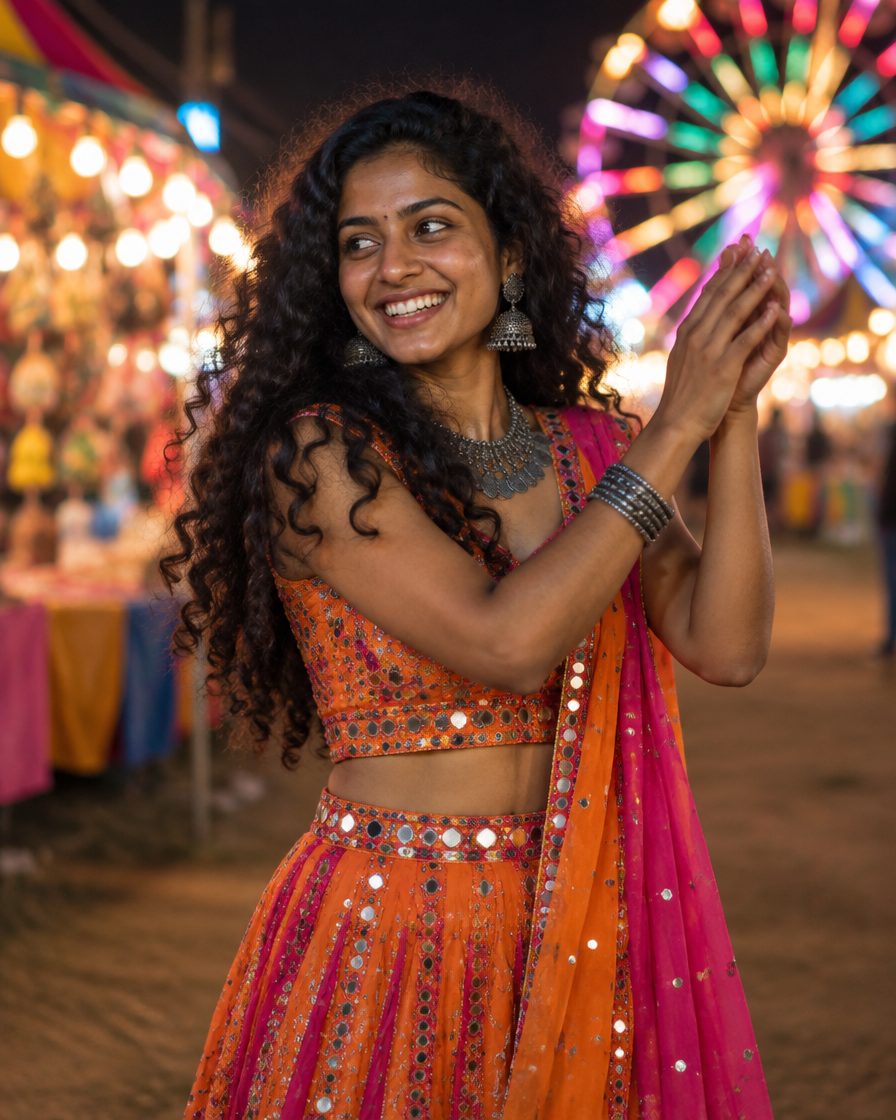
Prompt 1: Mela night, multicolour saree
AI example — aapka result alag ho sakta hai
✦ AI PROMPTCopy → paste in ChatGPT / Gemini
Edit my uploaded photo. If I attached more than one photo of myself, use all of them together to get my face right. Do not redraw my face – keep it exactly as in the original: the same face shape and width, the same cheeks, the same jawline and chin, the same nose shape and width, the same eye shape and spacing, the same eyebrows, the same lip shape, the same skin tone and the same skin texture. Do not slim my face, do not sharpen the jaw, do not enlarge the eyes, do not smooth or airbrush the skin, do not change my age and do not make my features more symmetrical. Change ONLY the clothing, the background and the lighting described below, and keep my head at the same angle as in the photo. Create a knee-up three-quarter shot of me in a bright multicolour georgette saree with a sequin border, heavy oxidised jewellery, big jhumkas and stacked bangles. Background: a village mela at night with a lit ferris wheel, colourful stall lights and bunting, all melted into soft bokeh. Lighting: warm stage key light on the face with a colourful rim light on the hair and shoulders. Catch me mid-twirl with the pallu flying and hair in motion, body turned three-quarters with the face toward the lens, wide joyful smile. Whole head visible with space above the hair, no side profile. Finish it like a professional shoot: 85mm lens look, shallow depth of field, magazine-quality retouch, saturated cinematic colour grade. Vertical 4:5 format, high resolution. No text, no watermark.
Chehra same rehne ki guarantee nahi hai. Result ko apni reference photo se compare karo aur zaroorat ho to correction do.
Prompt 2: Daylight courtyard, lehenga twirl
AI example — aapka result alag ho sakta hai
✦ AI PROMPTCopy → paste in ChatGPT / Gemini
Edit my uploaded photo. If I attached more than one photo of myself, use all of them together to get my face right. Do not redraw my face – keep it exactly as in the original: the same face shape and width, the same cheeks, the same jawline and chin, the same nose shape and width, the same eye shape and spacing, the same eyebrows, the same lip shape, the same skin tone and the same skin texture. Do not slim my face, do not sharpen the jaw, do not enlarge the eyes, do not smooth or airbrush the skin, do not change my age and do not make my features more symmetrical. Change ONLY the clothing, the background and the lighting described below, and keep my head at the same angle as in the photo. Create a knee-up three-quarter shot of me in a bright pink and yellow lehenga choli with mirror work and a contrast dupatta, gold jhumkas and bangles. Background: an open village courtyard with mud walls, a neem tree and clear daylight, kept fully out of focus. Lighting: soft late-morning sun from the side with a warm glow and no harsh shadows. Catch me mid-twirl with the lehenga flaring wide, one arm lifted, head turned toward the camera with a bright smile. Whole head visible with space above the hair, no side profile. Finish it like a professional shoot: 85mm lens look, shallow depth of field, magazine-quality retouch, vivid natural colour grade. Vertical 4:5 format, high resolution. No text, no watermark.
Chehra same rehne ki guarantee nahi hai. Result ko apni reference photo se compare karo aur zaroorat ho to correction do.
Prompt 3: Stage performance look
AI example — aapka result alag ho sakta hai
✦ AI PROMPTCopy → paste in ChatGPT / Gemini
Edit my uploaded photo. If I attached more than one photo of myself, use all of them together to get my face right. Do not redraw my face – keep it exactly as in the original: the same face shape and width, the same cheeks, the same jawline and chin, the same nose shape and width, the same eye shape and spacing, the same eyebrows, the same lip shape, the same skin tone and the same skin texture. Do not slim my face, do not sharpen the jaw, do not enlarge the eyes, do not smooth or airbrush the skin, do not change my age and do not make my features more symmetrical. Change ONLY the clothing, the background and the lighting described below, and keep my head at the same angle as in the photo. Create a knee-up three-quarter shot of me in a shimmer saree with a heavy embellished blouse and statement earrings, standing on a small outdoor stage at night. Background: stage trusses, warm spotlights and a dark crowdless field, completely out of focus, with no other people anywhere in the frame. Lighting: a hard warm spotlight from the front with a strong colourful rim light behind, deep shadows around. Strong confident dance pose with one arm raised and one knee bent, chin lifted, direct look into the lens. Whole head visible with space above the hair, no side profile. Finish it like a professional shoot: 85mm lens look, shallow depth of field, magazine-quality retouch, high-contrast cinematic grade. Vertical 4:5 format, high resolution. No text, no watermark.
Chehra same rehne ki guarantee nahi hai. Result ko apni reference photo se compare karo aur zaroorat ho to correction do.
Prompt 4: Boys version, kurta and gamcha
AI example — aapka result alag ho sakta hai
✦ AI PROMPTCopy → paste in ChatGPT / Gemini
Edit my uploaded photo. If I attached more than one photo of myself, use all of them together to get my face right. Do not redraw my face – keep it exactly as in the original: the same face shape and width, the same cheeks, the same jawline and chin, the same nose shape and width, the same eye shape and spacing, the same eyebrows, the same lip shape, the same skin tone and the same skin texture. Do not slim my face, do not sharpen the jaw, do not enlarge the eyes, do not smooth or airbrush the skin, do not change my age and do not make my features more symmetrical. Change ONLY the clothing, the background and the lighting described below, and keep my head at the same angle as in the photo. Create a knee-up three-quarter shot of me in a bright kurta with the sleeves rolled up, a printed gamcha over one shoulder, a thin gold chain and a wrist band. Background: a village mela at night with colourful stall lights and bunting in soft bokeh. Lighting: warm stage key light with a colourful rim light along the jaw and shoulder. Mid-dance pose with one arm raised and the gamcha in motion, body three-quarters to the camera with the face turned into the lens, confident grin. Whole head visible with space above the hair, no side profile. Finish it like a professional shoot: 85mm lens look, shallow depth of field, magazine-quality retouch, saturated cinematic grade. Vertical 4:5 format, high resolution. No text, no watermark.
Chehra same rehne ki guarantee nahi hai. Result ko apni reference photo se compare karo aur zaroorat ho to correction do.
Crop to 9:16 with the photo resizer before importing, so CapCut does not crop it for you.
Steps
Update CapCut, then search Kamariya Patre Patre in Templates.
Preview two or three versions and pick one by its cutting speed and clip count.
Add your clips in the order you want, strongest one at the beat drop.
Leave the sync alone. The template is already cut to the track, and manual trimming is what breaks the timing.
Export at 1080×1920, 30fps, and add the audio from Instagram’s own library when you post.
FAQs
Is it free?
Yes. CapCut templates are free and the watermark comes off from the export screen without paying.
I cannot dance. Is there a point?
Yes, and this is worth knowing: the template is doing the rhythm, not you. A walk, a turn and a hand gesture cut on the beat read as dance. What fails is standing still, not dancing badly.
Do I need to know Bhojpuri?
No. Nobody reads the lyrics in a six-second edit, and this audio travels well outside the Bhojpuri belt.
How many clips?
Usually five or six, and each version states its own count on the template card before you start.
More like this
For the slow-motion trend running at the same time see the Kalyani template, and for the soft love edit there is Dil Lagana Mana Tha. To build a look that is not listed here, use the Prompt Builder.
Want a different look?Build your own prompt — pick the outfit, background and lighting, then copy it in one tap.


 VN Codes
 VN Codes
 VN Codes
 VN Codes
 VN Codes
 VN Codes