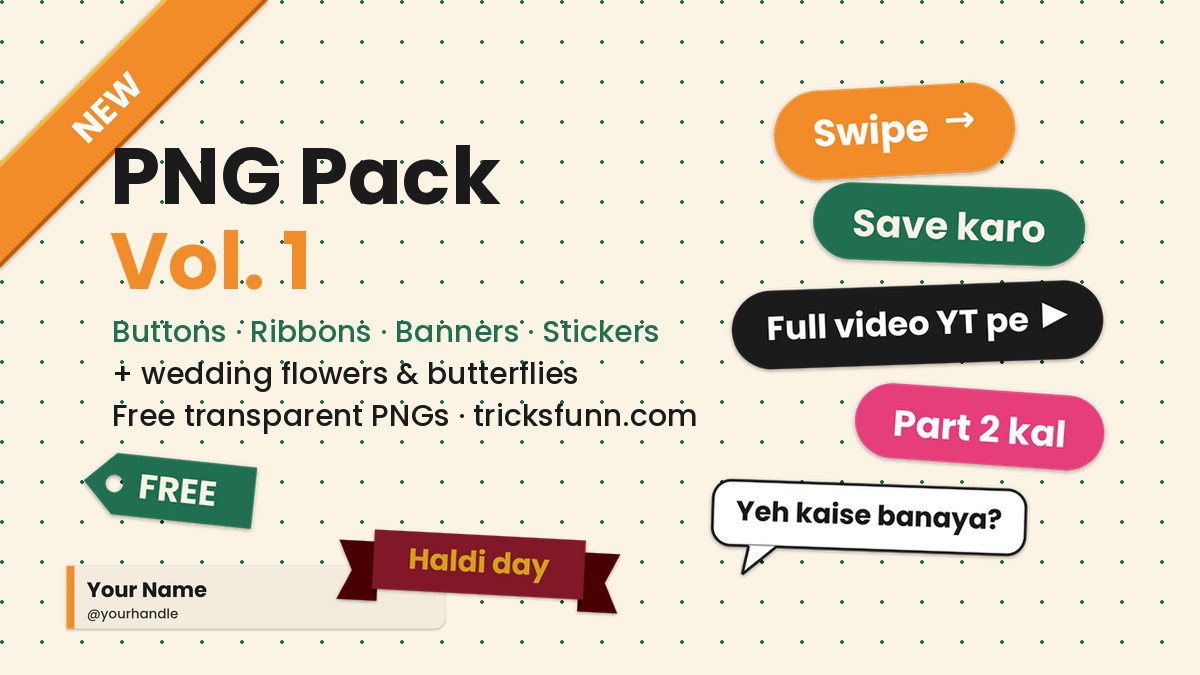
Where does most of your time go when you edit a Reel or a carousel? Hunting for small pieces: a “Swipe” button, a “Part 2 kal” sticker, a marigold or varmala cutout for a wedding edit. So we added a free PNG pack to the TricksFunn Creator Kit. Every file has a transparent background, is made for Indian creators, and costs nothing.
The pack has two parts: (1) 12 high-resolution AI cutouts (wedding flowers, butterflies, bangles, kalire and a mehndi hand) that you can download straight from this page, and (2) 116 UI PNGs (Hinglish-text buttons, corner ribbons, wedding sash banners, speech bubbles, lower-thirds and tags) in one ZIP.
Part 1: 12 wedding & nature cutouts (direct download)
Each image is a transparent PNG (1024 px square or 896×1120 px). Long-press on a phone, or right-click on a computer, and choose Save image. These are AI-generated cutouts with the background removed, and we checked every one on a checkerboard to make sure the edges are clean.


Direct links (full size)
- Varmala garland
- Marigold flower
- Mogra gajra
- Bridal bangles
- Golden kalire
- Mehndi hand
- Brass kalash
- Pink lotus
- Red hibiscus
- Rose petals scatter
- Blue butterfly
- Orange butterfly flying
Part 2: 116 UI PNGs — buttons, ribbons, banners, stickers (ZIP)
We designed these ourselves in the TricksFunn colours (saffron, green, black, pink and maroon) using the Poppins font, with a soft drop shadow built in. They are rendered at 3x so they stay sharp in Reels. All are transparent PNGs, sorted into folders in one 2.1 MB ZIP.
What is in the ZIP
- Pill buttons (5 colours × 12 texts = 60): Swipe →, Link in bio, Save karo, Share karo, Part 2 kal, Full video YT pe ▶, Prompt neeche ↓, Tutorial, Free, New, Try karo and Comment karo, in saffron, green, black, outline-white and pink.
- Corner ribbons (5): NEW, TRENDING, VIRAL, FREE and HOT, made for the top-left corner.
- Wedding sash banners (18): Shaadi vibes, Haldi day, Mehndi night, Sangeet night, Bride tribe, Groom squad, Save the date, Just married and Reception, each in maroon and gold.
- Creator sash banners (16): Part 1 / 2 / 3, Tutorial, Before, After, Prompt inside and Step by step, in saffron and green.
- Speech bubbles (10): Yeh kaise banaya?, Prompt chahiye?, Wait for it…, Dekho zara and Comment me batao, in white and cream.
- Lower-thirds (3): black, cream and green name plates with sample text. Type your own name on top as a text layer in Edits or CapCut.
- Tags (4): FREE, NEW, SALE, 100% FREE.
How to use them (Instagram Edits / CapCut / VN)
- Download the ZIP and extract it on your phone (Files app → long-press → Extract). On Android, ZArchiver also works.
- Instagram Edits: open your clip → Overlay → pick the PNG from your gallery → pinch to set the size and position. The background stays transparent.
- CapCut: Overlay → Add overlay → select the PNG → optionally add Animation → In → Pop.
- VN: tap PIP → add the PNG → keep opacity at 100%.
- Canva / Photoshop: drag and drop; they behave like stickers.
- Tip: bring a button in during the last 1.5 seconds of the clip with a small scale-up animation. It makes “Swipe” and “Part 2 kal” much harder to miss.
License
The pack is free for personal and commercial content: Reels, Shorts, YouTube thumbnails, carousels and wedding invites are all fine. Credit is not required, but tag @tricksfunn and we may share your post in our story. One rule: do not resell the pack as it is, or re-upload it elsewhere as your own pack.
What is coming next
Vol. 2 will bring Christmas and New Year stickers, Lohri and Sankranti elements, and Republic Day ribbons. We are also launching a Save the Date maker: type the names, date and venue in your browser and download a ready card that uses the flowers from this pack. Is there an element you need that is missing? Tell us in the comments.
More trends
View all → Creator Kit
WhatsApp Guest Calling 2026: Join a Call Without an Account
 Creator Kit
Wan 3.0 7-Day Unlimited Offer on Higgsfield: Complete Tutorial
 AI Photo Editing
Royal Navratri AI Photo Prompts: Black Lehenga Look + Instagram Edits Reel Guide
 Creator Kit
Edits Film Festival 2026: A Cinematic Reel from a Simple Clip
 Creator Kit
How to Start a Navratri Reel: 3 Simple Shots in VN
 Creator Kit