Have you seen those dreamy cafe photos taking over your Instagram feed lately? Everyone is posting cozy pictures sitting by a sunlit window with a latte. The good news is you do not need to visit an expensive coffee shop to get this vibe. With simple AI tools like ChatGPT and Google Gemini, you can transform your normal room selfie into a high-end cafe portrait in seconds. This trend is massive right now because it gives your profile an aesthetic, moody, and warm look without any professional camera gear. Here at TricksFunn, we have put together five amazing prompts designed specially for Indian creators. Whether you want a solo cozy portrait, a cute couple shot, or a fun hangout vibe with friends, we have got you covered. Just open your favorite free AI app on your mobile, upload your selfie, and copy-paste these prompts to create viral Instagram content instantly.
Example result — tumhari photo alag aayegi
About this trend
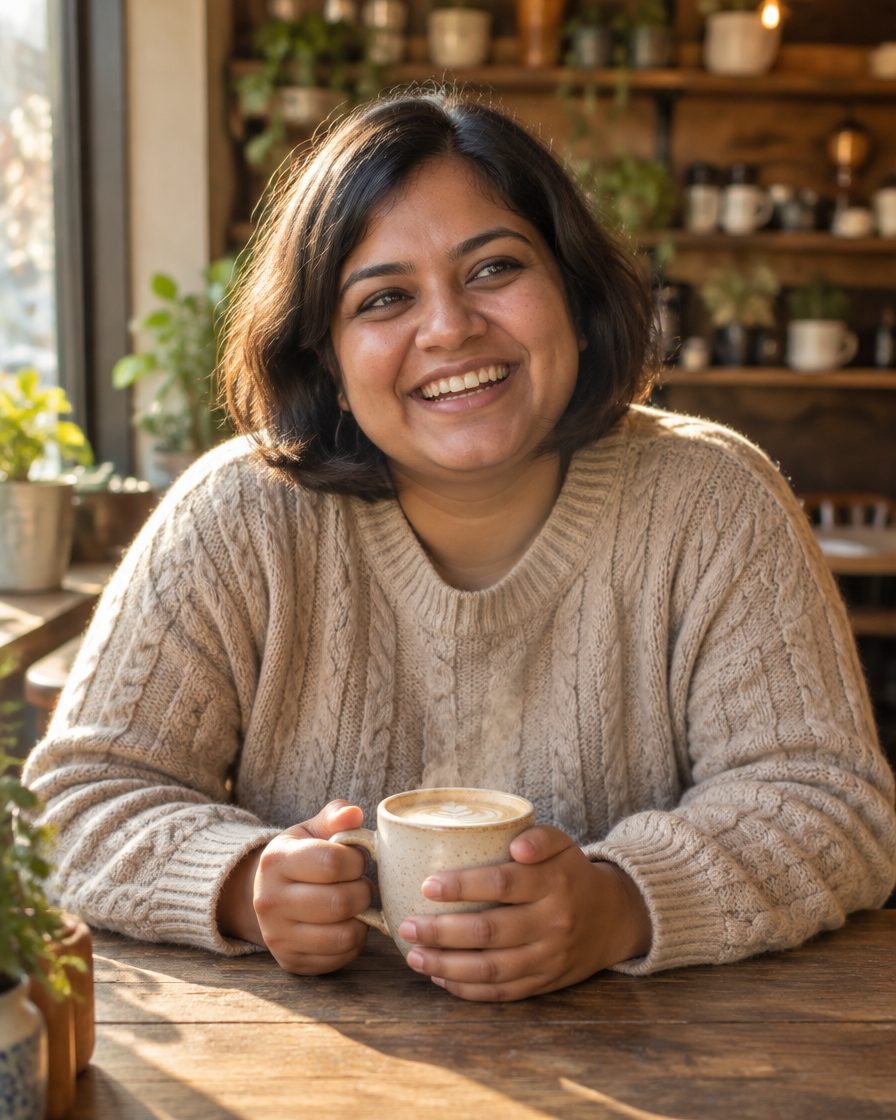
The cafe aesthetic look focuses on warm, inviting tones, soft natural window light, and earthy colors. The outfit usually includes casual knitwear, neutral tones, or comfy oversized shirts that fit the cozy vibe. The background features a blurred rustic coffee shop interior, wooden tables, a steaming ceramic mug, and green indoor plants. This look suits creators who love aesthetic, minimal, and warm photography. It is perfect for lifestyle bloggers, students, and anyone wanting to upgrade their grid with sophisticated, relaxed portraiture. The lighting is always soft golden hour or diffused morning light, giving your skin a natural, glowing, and flawless finish without looking overly edited.
The prompts (copy and paste)
Prompt 1: Cozy Window Seat Portrait for Girls
Use this prompt when you want a relaxed, solo aesthetic portrait sitting by a sunlit cafe window with a hot drink.
AI example — aapka result alag ho sakta hai
✦ AI PROMPTCopy → paste in ChatGPT / Gemini
Edit my uploaded photo. If I attached more than one photo of myself, use all of them together to get my face right. Do not redraw my face – keep it exactly as in the original: the same face shape and width, the same cheeks, the same jawline and chin, the same nose shape and width, the same eye shape and spacing, the same eyebrows, the same lip shape, the same skin tone and the same skin texture. Do not slim my face, do not sharpen the jaw, do not enlarge the eyes, do not smooth or airbrush the skin, do not change my age and do not make my features more symmetrical. Change ONLY the clothing, the background and the lighting described below, and keep my head at the same angle as in the photo. Generate a realistic Instagram portrait of me sitting at a rustic wooden table inside a cozy artisanal cafe. I am wearing a beige cable-knit sweater and holding a ceramic latte mug with steam rising. Soft golden hour sunlight streams through a large glass window, casting gentle shadows. The background is softly blurred with warm pendant lights, exposed brick walls, and green potted plants. Moody yet warm color grading, natural skin texture, candid smiling expression. Vertical 4:5 format. No text, no watermark.
Chehra same rehne ki guarantee nahi hai. Result ko apni reference photo se compare karo aur zaroorat ho to correction do.
Prompt 2: Chill Casual Look for Boys
Best for guys who want a cool, effortless lifestyle look set against a modern coffee shop interior.
AI example — aapka result alag ho sakta hai
✦ AI PROMPTCopy → paste in ChatGPT / Gemini
Edit my uploaded photo. If I attached more than one photo of myself, use all of them together to get my face right. Do not redraw my face – keep it exactly as in the original: the same face shape and width, the same cheeks, the same jawline and chin, the same nose shape and width, the same eye shape and spacing, the same eyebrows, the same lip shape, the same skin tone and the same skin texture. Do not slim my face, do not sharpen the jaw, do not enlarge the eyes, do not smooth or airbrush the skin, do not change my age and do not make my features more symmetrical. Change ONLY the clothing, the background and the lighting described below, and keep my head at the same angle as in the photo. Create a realistic vertical portrait of me sitting in a modern minimalist cafe, wearing an olive green casual overshirt and a simple white t-shirt. I am leaning on the wooden table, looking away from the camera thoughtfully with a iced coffee glass nearby. Soft diffused morning lighting, earthy brown and green tones, clean bokeh background showing a subtle coffee bar counter. Sharp focus on subject, authentic skin details, lifestyle photography style. Vertical 4:5 format. No text, no watermark.
Chehra same rehne ki guarantee nahi hai. Result ko apni reference photo se compare karo aur zaroorat ho to correction do.
Prompt 3: Romantic Couple Coffee Date
Perfect for sharing a special moment with your partner over coffee with a warm, cinematic feel.
AI example — aapka result alag ho sakta hai
✦ AI PROMPTCopy → paste in ChatGPT / Gemini
Edit my uploaded photo. If I attached more than one photo of myself, use all of them together to get my face right. Do not redraw my face – keep it exactly as in the original: the same face shape and width, the same cheeks, the same jawline and chin, the same nose shape and width, the same eye shape and spacing, the same eyebrows, the same lip shape, the same skin tone and the same skin texture. Do not slim my face, do not sharpen the jaw, do not enlarge the eyes, do not smooth or airbrush the skin, do not change my age and do not make my features more symmetrical. Change ONLY the clothing, the background and the lighting described below, and keep my head at the same angle as in the photo. Generate a realistic romantic photo of us sitting close together at a corner table in a vintage European-style cafe. We are sharing a dessert plate and smiling at each other. Warm fairy lights stringing overhead, soft candlelight on the table, cozy winter clothing in neutral shades. Cinematic depth of field, rich warm tones, authentic and joyful mood. Vertical 4:5 format. No text, no watermark.
Chehra same rehne ki guarantee nahi hai. Result ko apni reference photo se compare karo aur zaroorat ho to correction do.
Prompt 4: Best Friends Hangout Vibe
Great for showcasing friendship goals with a lively, candid group setting inside a bustling cafe.
AI example — aapka result alag ho sakta hai
✦ AI PROMPTCopy → paste in ChatGPT / Gemini
Edit my uploaded photo. If I attached more than one photo of myself, use all of them together to get my face right. Do not redraw my face – keep it exactly as in the original: the same face shape and width, the same cheeks, the same jawline and chin, the same nose shape and width, the same eye shape and spacing, the same eyebrows, the same lip shape, the same skin tone and the same skin texture. Do not slim my face, do not sharpen the jaw, do not enlarge the eyes, do not smooth or airbrush the skin, do not change my age and do not make my features more symmetrical. Change ONLY the clothing, the background and the lighting described below, and keep my head at the same angle as in the photo. Create a realistic group portrait of me and two friends laughing together around a small circular cafe table filled with pastries and coffee cups. Bright daytime lighting from a storefront window, casual stylish college-wear outfits, vibrant and cheerful atmosphere. Blurred background of a busy trendy coffee shop with warm wooden decor. Sharp details, candid lifestyle shot. Vertical 4:5 format. No text, no watermark.
Chehra same rehne ki guarantee nahi hai. Result ko apni reference photo se compare karo aur zaroorat ho to correction do.
Prompt 5: Moody Evening Aesthetic Bonus
Choose this dark, moody variation for a dramatic nighttime coffee shop atmosphere that stands out on your grid.
AI example — aapka result alag ho sakta hai
✦ AI PROMPTCopy → paste in ChatGPT / Gemini
Edit my uploaded photo. If I attached more than one photo of myself, use all of them together to get my face right. Do not redraw my face – keep it exactly as in the original: the same face shape and width, the same cheeks, the same jawline and chin, the same nose shape and width, the same eye shape and spacing, the same eyebrows, the same lip shape, the same skin tone and the same skin texture. Do not slim my face, do not sharpen the jaw, do not enlarge the eyes, do not smooth or airbrush the skin, do not change my age and do not make my features more symmetrical. Change ONLY the clothing, the background and the lighting described below, and keep my head at the same angle as in the photo. Generate a moody, cinematic nighttime photo of me sitting at an outdoor sidewalk cafe table under glowing amber string lights. I am wearing a dark stylish jacket, reading a book with a warm cup of tea beside me. Deep shadows, rich contrast, urban street bokeh in the background at twilight. Introspective and cozy mood, high-end editorial photography look. Vertical 4:5 format. No text, no watermark.
Chehra same rehne ki guarantee nahi hai. Result ko apni reference photo se compare karo aur zaroorat ho to correction do.
How to create it
Open your ChatGPT or Google Gemini mobile app on your phone.
Upload a clear, front-facing selfie where your face and lighting are clearly visible.
Copy your favorite cafe aesthetic prompt from our list above and paste it into the chat box.
If the face or outfit needs minor adjustments, reply with a simple follow-up message like ‘make the lighting softer’ or ‘change shirt color to black’.
Download the final image in 4:5 ratio, apply your favorite warm filter, and upload it to Instagram.
Tips for a better result
Always use a clear, high-resolution selfie with good lighting as your reference upload for the best face match.
If the AI changes your facial features too much, reply in the chat asking it to strictly keep your original face from the uploaded photo.
Add a warm orange-brown preset or filter in Lightroom or Instagram after downloading to enhance the cozy cafe vibe.
If the first result is not perfect, hit regenerate or use a follow-up prompt to fix minor details like cups or background clutter.
FAQs
Which free apps support these cafe aesthetic prompts?
You can use either ChatGPT or Google Gemini on your mobile phone. Both apps are completely free to download and support photo uploads for generating these prompts.
Can I change the clothing color in the prompt?
Yes, absolutely! You can easily edit any prompt text before copying it to change clothing colors, drink types, or even background details to match your preference.
What should I do if the AI changes my face?
Make sure your uploaded selfie is bright and clear. If the result looks different, reply to the chat with: ‘Please make the face look exactly like the uploaded reference photo without changing my features.’
Are these copy-paste prompts really free to use?
Yes, all prompts on TricksFunn are 100% free for you to copy, paste, and use for generating viral Instagram photos without any paid subscriptions.
The 1980s AI photo trend is everywhere on Reels this month: big hair, neon geometric backdrops, grainy film texture and that old mall-studio flash. Achhi baat ye hai ki iske liye koi shoot ya costume nahi chahiye. Apni ek normal selfie ChatGPT ya Gemini mein upload karo, neeche wala prompt paste karo, aur 30 second mein 1986 wali album photo ready.
Example result — tumhari photo alag aayegi
About this trend
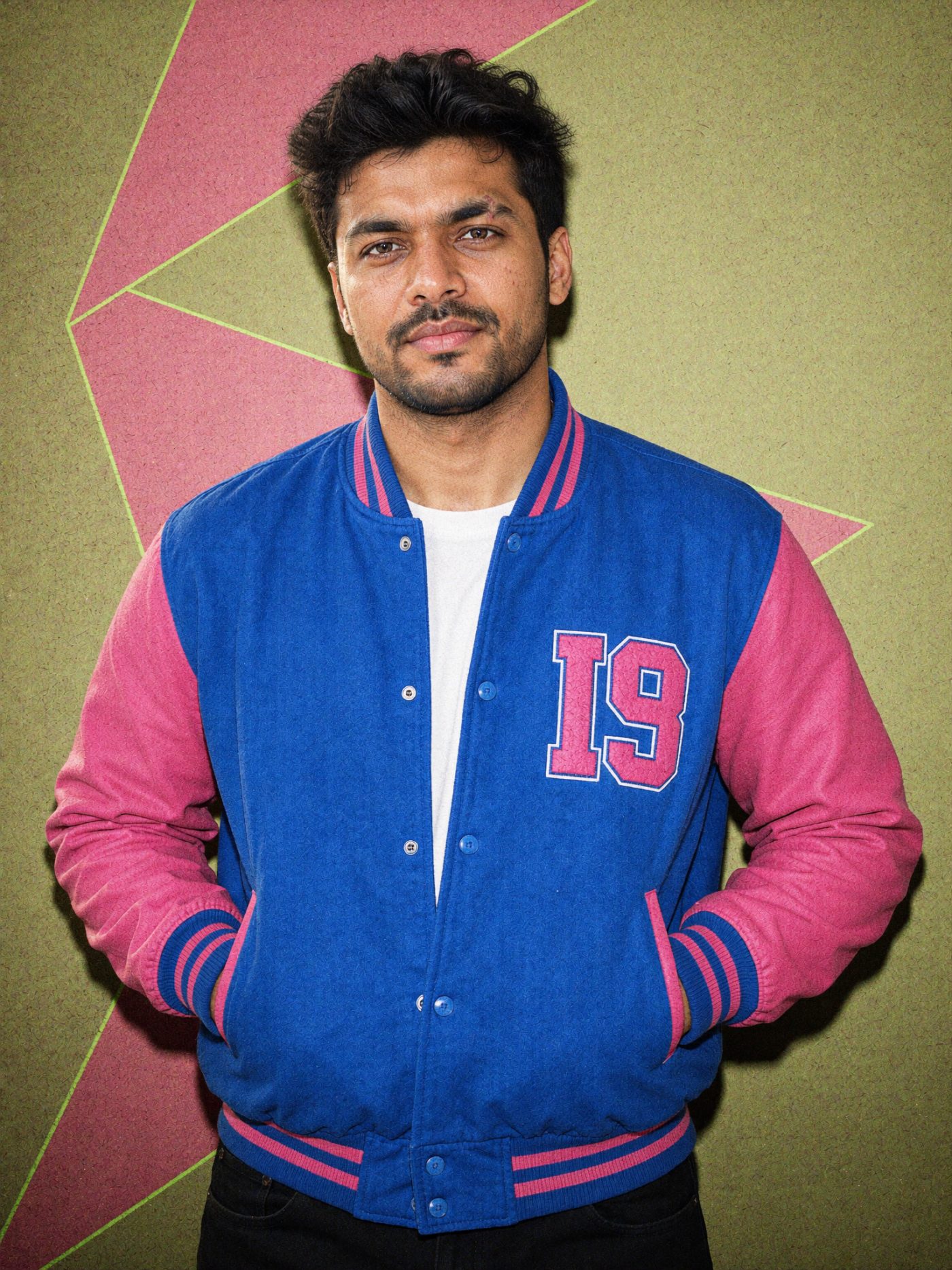
Ye look ek 1986 ke mall photo studio jaisa feel deta hai: studio flash, neon pink aur blue backdrop, film grain aur halki dust scratches. AI tumhara chehra same rakhta hai aur sirf hair volume, outfit aur background badalta hai. Vertical 4:5 mein banao to feed post aur Story dono ke liye perfect rehta hai.
The prompts (copy and paste)
Prompt 1: Classic 80s mall studio look
Ye main prompt hai. Ladke aur ladkiyan dono use kar sakte hain, jacket wali line badal ke.
AI example — aapka result alag ho sakta hai
✦ AI PROMPTCopy → paste in ChatGPT / Gemini
Edit my uploaded photo. If I attached more than one photo of myself, use all of them together to get my face right. Do not redraw my face – keep it exactly as in the original: the same face shape and width, the same cheeks, the same jawline and chin, the same nose shape and width, the same eye shape and spacing, the same eyebrows, the same lip shape, the same skin tone and the same skin texture. Do not slim my face, do not sharpen the jaw, do not enlarge the eyes, do not smooth or airbrush the skin, do not change my age and do not make my features more symmetrical. Change ONLY the clothing, the background and the lighting described below, and keep my head at the same angle as in the photo. The one exception: change my hairstyle to big 1980s curly volume. Create a 1980s retro studio portrait: I am wearing a vintage 80s varsity jacket in blue and pink with a small embroidered patch, standing in front of a neon pink and blue geometric backdrop. Studio flash lighting, grainy film texture, slight dust and scratches, photorealistic, realistic skin texture. Vertical 4:5 format. No text, no watermark.
Chehra same rehne ki guarantee nahi hai. Result ko apni reference photo se compare karo aur zaroorat ho to correction do.
Prompt 2: 80s glam portrait (saree / satin dress)
Ye softer version hai: warm lighting, glossy makeup aur retro Indian glam. Girls ke liye best chalta hai.
AI example — aapka result alag ho sakta hai
✦ AI PROMPTCopy → paste in ChatGPT / Gemini
Edit my uploaded photo. If I attached more than one photo of myself, use all of them together to get my face right. Do not redraw my face – keep it exactly as in the original: the same face shape and width, the same cheeks, the same jawline and chin, the same nose shape and width, the same eye shape and spacing, the same eyebrows, the same lip shape, the same skin tone and the same skin texture. Do not slim my face, do not sharpen the jaw, do not enlarge the eyes, do not smooth or airbrush the skin, do not change my age and do not make my features more symmetrical. Change ONLY the clothing, the background and the lighting described below, and keep my head at the same angle as in the photo. Create a glamorous 1980s Indian studio portrait: I am wearing a shiny satin saree (or a satin puff-sleeve dress) in jewel tones with gold jewellery, warm tungsten studio lighting with a soft glow, a dark gradient backdrop with a gentle halo of light behind me. Film grain, soft focus glamour look, photorealistic, realistic skin texture. Vertical 4:5 format. No text, no watermark.
The monsoon season brings a moody, romantic vibe that instantly boosts your Instagram reach, and the rainy aesthetic AI photo trend is taking over Indian feeds in 2026. Instead of waiting for actual rain or buying expensive camera gear, creators are using smart AI tools to drop themselves right into cinematic, rain-soaked city streets. If your grid needs a fresh, moody upgrade that stops users from scrolling, you are in the right place. In this beginner-friendly guide, we share an exclusive, copy-paste AI prompt designed specifically for mobile editors. Whether you love cozy sweater weather vibes or dramatic street reflections, this tutorial walks you through everything. From uploading your selfie to tweaking the final output, you will learn how to create stunning 4:5 vertical portraits using free AI tools in just a few simple taps.
Example result — your photo will look different
About this trend
As Instagram trends evolve in 2026, realism and mood are everything. The rainy aesthetic trend combines soft neon lights, wet pavement reflections, and cozy clothing to create a cinematic look that feels both personal and artistic. In the past, achieving this required complex Photoshop layers or expensive DSLR shoots. Today, you can use free AI tools like ChatGPT or Google Gemini that support direct photo uploads. These platforms let you preserve your exact facial features while completely transforming your background and lighting. It is the ultimate shortcut for Indian content creators who want to post high-engagement, aesthetic portrait photos without spending hours editing on their mobile phones.
Copy the AI prompt
✦ AI PROMPTCopy → paste in ChatGPT / Gemini
Edit my uploaded photo. If I attached more than one photo of myself, use all of them together to get my face right. Do not redraw my face – keep it exactly as in the original: the same face shape and width, the same cheeks, the same jawline and chin, the same nose shape and width, the same eye shape and spacing, the same eyebrows, the same lip shape, the same skin tone and the same skin texture. Do not slim my face, do not sharpen the jaw, do not enlarge the eyes, do not smooth or airbrush the skin, do not change my age and do not make my features more symmetrical. Change ONLY the clothing, the background and the lighting described below, and keep my head at the same angle as in the photo. Place me standing on a bustling Mumbai street during a gentle evening drizzle. For women: wearing an oversized beige trench coat over a simple white top. For men: wearing a dark charcoal hoodie and a denim jacket. I am holding a transparent umbrella, looking slightly away from the camera with a calm expression. Soft neon city lights are glowing in the wet background, creating beautiful bokeh and realistic water droplet reflections on the pavement. Cinematic mood, dramatic side lighting casting soft shadows. Vertical 4:5 format. No text, no watermark.
Chehra same rehne ki guarantee nahi hai. Result ko apni reference photo se compare karo aur zaroorat ho to correction do.
How to create it
Open the free ChatGPT or Google Gemini app on your mobile phone and start a new chat.
Tap the attachment icon to upload a clear, front-facing selfie showing your face well.
Copy and paste our exact rainy aesthetic prompt into the text box and hit send.
Review the generated image, and if needed, type a follow-up message to adjust the lighting or colors before downloading for Instagram.
FAQs
Which free apps support photo uploads for this trend?
You can use either the free ChatGPT app or Google Gemini on your mobile phone. Both tools allow you to upload a reference selfie and use text prompts to edit your background and outfit.
Will the AI change my face or skin tone?
No, because the prompt explicitly instructs the AI to keep your face, facial features, and skin tone exactly the same as your uploaded selfie. Always use a clear, well-lit photo for the best face-matching results.
How do I post this in the correct Instagram size?
The prompt is specifically designed to output a vertical 4:5 aspect ratio. This is the optimal size for Instagram grid posts and carousels, ensuring no important details get cropped out.
Are your Instagram Reels and posts missing that nostalgic retro magic? The vintage 90s Bollywood AI edit is trending again, and Indian creators love how easily it brings back the golden era of cinema: grainy film grain, dramatic lighting and classic retro styling, with no Photoshop skills needed. Whether you want a filmy hero look or a timeless heroine portrait, AI can transform an ordinary selfie in seconds. In this guide you get a ready-to-copy prompt, simple steps for beginners using free mobile tools, and tips to make your feed stand out in 2026.
Example result — your photo will look different
About this trend
The vintage 90s Bollywood aesthetic is huge on Instagram right now. Creators are trading modern minimalism for warm, golden-hour tones, dramatic shadow play, and classic retro outfits that pay homage to Indian cinema history. Bringing this trend to life used to require advanced graphic design knowledge or expensive editing apps. Today, advanced generative AI models make it incredibly easy. By using free tools like ChatGPT or Google Gemini that support photo uploads, you can seamlessly blend your actual facial features into a custom, cinematic retro setting. This beginner-friendly method ensures you stay ahead of the social media curve without spending a single rupee.
Copy the AI prompt
✦ AI PROMPTCopy → paste in ChatGPT / Gemini
Edit my uploaded photo. If I attached more than one photo of myself, use all of them together to get my face right. Do not redraw my face – keep it exactly as in the original: the same face shape and width, the same cheeks, the same jawline and chin, the same nose shape and width, the same eye shape and spacing, the same eyebrows, the same lip shape, the same skin tone and the same skin texture. Do not slim my face, do not sharpen the jaw, do not enlarge the eyes, do not smooth or airbrush the skin, do not change my age and do not make my features more symmetrical. Change ONLY the clothing, the background and the lighting described below, and keep my head at the same angle as in the photo. Generate a cinematic 1990s Bollywood film still. For men: wearing an unbuttoned retro silk shirt with a collar over a white undershirt. For women: wearing a vibrant chiffon saree with traditional jhumka earrings. The subject is posing outdoors against a hazy, nostalgic Mumbai sunset backdrop with soft glowing lights and retro film grain texture. Warm color grading, nostalgic mood, highly detailed, photorealistic. Vertical 4:5 format. No text, no watermark.
Chehra same rehne ki guarantee nahi hai. Result ko apni reference photo se compare karo aur zaroorat ho to correction do.
How to create it
Open ChatGPT or Google Gemini on your mobile phone and ensure you are logged into your free account.
Upload a clear, well-lit front-facing selfie where your face and hair are fully visible.
Copy and paste our exact vintage 90s Bollywood prompt into the chat box and hit send.
Review your generated image, and if needed, type a follow-up message to tweak the lighting or colors before downloading it for Instagram.
FAQs
Which free apps can I use for this vintage 90s Bollywood AI prompt?
You can use either ChatGPT or Google Gemini on your mobile phone or desktop browser. Both platforms allow you to upload your selfie for free and paste the text prompt to generate your retro image.
Does the AI change my face in the final Instagram edit?
A little, yes – every AI tool redraws the face slightly, usually by slimming it, enlarging the eyes or smoothing the skin. Our prompt blocks each of those by name, which gets you most of the way. Upload three or four photos of yourself instead of one, and when the first result comes back, reply in the same chat naming exactly what looks wrong about the face.
How do I make the final image look even more authentic to the 90s?
You can enhance the retro vibe by adding a subtle film dust overlay or adjusting the warmth and contrast inside Instagram before publishing your Reel or photo post.