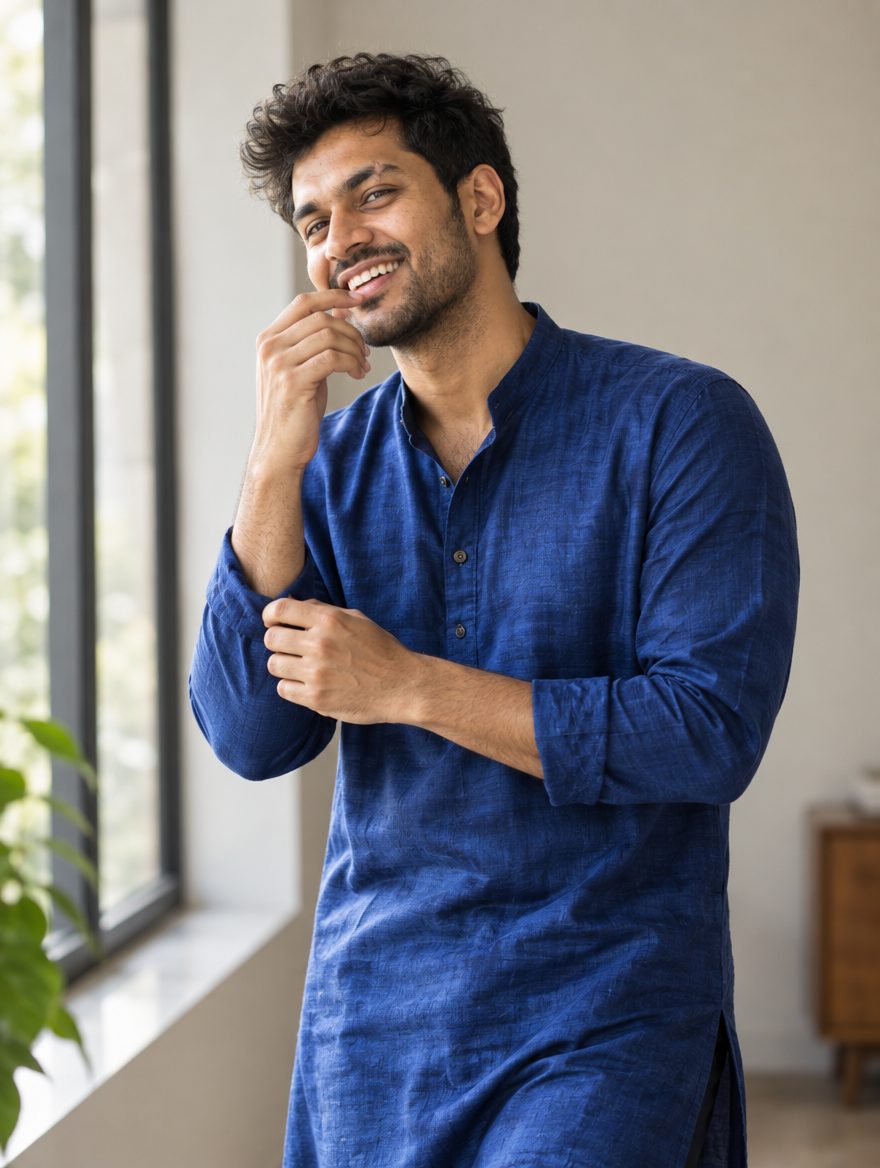
Kabhi-kabhi AI photo banate waqt face toh theek aa jata hai, par kapde ka color bilkul badal jata hai. Agar aapke sath bhi aisa ho raha hai, toh pareshan hone ki zarurat nahi hai. Yeh problem aksar prompt me color details theek se na likhne ya AI ke shade mix karne ki wajah se hoti hai. Is guide me hum batayenge ki agar AI photo me kapde ka rang galat aa raha hai, toh aapko kya karna chahiye. Aapko bas apne current chat me ek chhota sa follow-up message bhejna hai, jisse AI wahi image dobara sahi color ke sath bana dega. Chaliye dekhte hain ki aap is problem ko kaise turant theek kar sakte hain.
AI example — aapka result alag ho sakta hai
Prompts (copy karo, paste karo)
Prompt 1: Royal Blue Traditional Kurta
Agar blue color dark ki jagah light ya cyan aa raha hai, toh yeh specific shade prompt use karein.
✦ AI PROMPTCopy → paste in ChatGPT / Gemini
Edit my uploaded photo. If I attached more than one photo of myself, use all of them together to get my face right. Do not redraw my face – keep it exactly as in the original: the same face shape and width, the same cheeks, the same jawline and chin, the same nose shape and width, the same eye shape and spacing, the same eyebrows, the same lip shape, the same skin tone and the same skin texture. Do not slim my face, do not sharpen the jaw, do not enlarge the eyes, do not smooth or airbrush the skin, do not change my age and do not make my features more symmetrical. Change ONLY the clothing, the background and the lighting described below, and keep my head at the same angle as in the photo. Put me in a royal cobalt blue raw silk kurta with intricate silver zari threadwork on the collar and cuffs, paired with an off-white cotton pajama, standing against a soft-focus warm terracotta wall, soft afternoon golden sunlight illuminating one side of the face, realistic fabric texture, natural skin tone. Vertical 4:5 format. No text, no watermark.
Chehra same rehne ki guarantee nahi hai. Result ko apni reference photo se compare karo aur zaroorat ho to correction do.
Prompt 2: Emerald Green Festive Wear
Green color ko neon ya mint banne se rokne ke liye yeh rich festive look try karein.
✦ AI PROMPTCopy → paste in ChatGPT / Gemini
Edit my uploaded photo. If I attached more than one photo of myself, use all of them together to get my face right. Do not redraw my face – keep it exactly as in the original: the same face shape and width, the same cheeks, the same jawline and chin, the same nose shape and width, the same eye shape and spacing, the same eyebrows, the same lip shape, the same skin tone and the same skin texture. Do not slim my face, do not sharpen the jaw, do not enlarge the eyes, do not smooth or airbrush the skin, do not change my age and do not make my features more symmetrical. Change ONLY the clothing, the background and the lighting described below, and keep my head at the same angle as in the photo. Put me in a deep emerald green velvet sherwani with subtle antique gold buttons and traditional embroidery along the placket, standing in a dimly lit heritage room with warm ambient chandelier lighting casting soft shadows, rich fabric depth, natural hair styling. Vertical 4:5 format. No text, no watermark.
Chehra same rehne ki guarantee nahi hai. Result ko apni reference photo se compare karo aur zaroorat ho to correction do.
Prompt 3: Sunset Orange Casual Shirt
Jab bhi orange color yellow ya red lagne lage, toh is vibrant shade prompt ka use karein.
✦ AI PROMPTCopy → paste in ChatGPT / Gemini
Edit my uploaded photo. If I attached more than one photo of myself, use all of them together to get my face right. Do not redraw my face – keep it exactly as in the original: the same face shape and width, the same cheeks, the same jawline and chin, the same nose shape and width, the same eye shape and spacing, the same eyebrows, the same lip shape, the same skin tone and the same skin texture. Do not slim my face, do not sharpen the jaw, do not enlarge the eyes, do not smooth or airbrush the skin, do not change my age and do not make my features more symmetrical. Change ONLY the clothing, the background and the lighting described below, and keep my head at the same angle as in the photo. Put me in a burnt orange linen roll-up sleeve casual shirt with tortoiseshell buttons, sitting at a wooden outdoor cafu00e9 table with green plants in the background, bright natural daylight, crisp clothing folds, relaxed expression. Vertical 4:5 format. No text, no watermark.
Chehra same rehne ki guarantee nahi hai. Result ko apni reference photo se compare karo aur zaroorat ho to correction do.
Prompt 4: Classic Jet Black Jacket
Black color aksar grey ya faded dark blue ho jata hai, isliye isko solid dark banane ke liye yeh try karein.
✦ AI PROMPTCopy → paste in ChatGPT / Gemini
Edit my uploaded photo. If I attached more than one photo of myself, use all of them together to get my face right. Do not redraw my face – keep it exactly as in the original: the same face shape and width, the same cheeks, the same jawline and chin, the same nose shape and width, the same eye shape and spacing, the same eyebrows, the same lip shape, the same skin tone and the same skin texture. Do not slim my face, do not sharpen the jaw, do not enlarge the eyes, do not smooth or airbrush the skin, do not change my age and do not make my features more symmetrical. Change ONLY the clothing, the background and the lighting described below, and keep my head at the same angle as in the photo. Put me in a jet black matte finish biker leather jacket over a plain white crew-neck t-shirt, standing on a modern urban street during overcast daylight with soft neutral grey lighting, sharp clothing details, confident pose. Vertical 4:5 format. No text, no watermark.
Chehra same rehne ki guarantee nahi hai. Result ko apni reference photo se compare karo aur zaroorat ho to correction do.
Prompt 5: Blush Pink Ethnic Suit
Pastel pink ko bright red ya magenta banne se bachane ke liye yeh soft toned prompt use karein.
✦ AI PROMPTCopy → paste in ChatGPT / Gemini
Edit my uploaded photo. If I attached more than one photo of myself, use all of them together to get my face right. Do not redraw my face – keep it exactly as in the original: the same face shape and width, the same cheeks, the same jawline and chin, the same nose shape and width, the same eye shape and spacing, the same eyebrows, the same lip shape, the same skin tone and the same skin texture. Do not slim my face, do not sharpen the jaw, do not enlarge the eyes, do not smooth or airbrush the skin, do not change my age and do not make my features more symmetrical. Change ONLY the clothing, the background and the lighting described below, and keep my head at the same angle as in the photo. Put me in a soft pastel blush pink cotton-silk anarkali suit with delicate silver foil print work, standing in a bright minimalist room with white walls and natural sunlight streaming through a large window, clean styling, elegant posture. Vertical 4:5 format. No text, no watermark.
Chehra same rehne ki guarantee nahi hai. Result ko apni reference photo se compare karo aur zaroorat ho to correction do.
Is look ke baare mein
Yeh troubleshooting guide un sabhi creators ke liye hai jo ChatGPT ya Google Gemini par apni selfies upload karke nayi styling try karte hain. Aksar deep red ki jagah pink ya blue ki jagah purple aa jata hai. Is guide me hum alag-alag looks ke liye 5 aise tested prompts de rahe hain jisme color codes aur fabric details clear hain, taaki AI rang na badle. Yeh un sabhi ke liye best hai jo bina kisi heavy editing software ke apni reel ya post ke liye ekdum perfect color combination chahte hain.
Kaise banana hai
Step 1: Apne phone me ChatGPT ya Google Gemini app kholein jo photo upload support karta hai.
Step 2: App kholne ke baad apni ek clear selfie upload karein jisme lighting acchi ho.
Step 3: Hamara koi bhi copy-paste prompt message box me daal kar send kar dein.
Step 4: Agar pehli baar me kapde ka rang galat aaye, toh naya chat kholne ki bajaye usi chat me likhein: ‘Make the outfit color strictly [color name] and fix the shade.’
Step 5: Jab pasand ka result aa jaye, toh image ko high resolution me download karke apni gallery me save kar lein.
Behtar result ke liye
Pehla result kabhi final nahi hota, isliye agar rang galat ho toh wahi chat me color correction ke liye message karein.
Upload karne wali selfie daylight me li gayi ho aur face par shadow na ho, isse AI ko original colors match karne me asani hoti hai.
Prompt me sirf ‘red’ ya ‘blue’ likhne ke bajaye ‘deep emerald green’ ya ‘royal cobalt blue’ jaise specific shade names use karein.
Agar fir bhi color match na ho, toh pehle sirf kapde badalne ka prompt dein aur background baad me add karein.
FAQs
AI photo me kapde ka rang apne aap kyu badal jata hai?
AI models kai baar standard prompts me color ko apne hisab se interpret karte hain. Isliye prompt me specific shade aur fabric ka naam likhna zaruri hota hai.
Kya main bina naya prompt dale sirf color badal sakta hoon?
Haan, aap usi chat me follow-up message bhej sakte hain jaise ‘Change the shirt color to dark maroon’ aur AI pichli photo ka base rakh kar rang badal dega.
Kaun sa tool color accuracy ke liye sabse accha hai?
ChatGPT aur Google Gemini dono hi detailed color prompts ko acche se samajhte hain agar aap unhe shade ka exact naam batayein.
Kya AI photo me mera chehra bilkul same aayega?
Face uploaded selfie ke bahut kareeb aata hai, par 100% exact match ki guarantee koi bhi AI tool nahi deta hai.