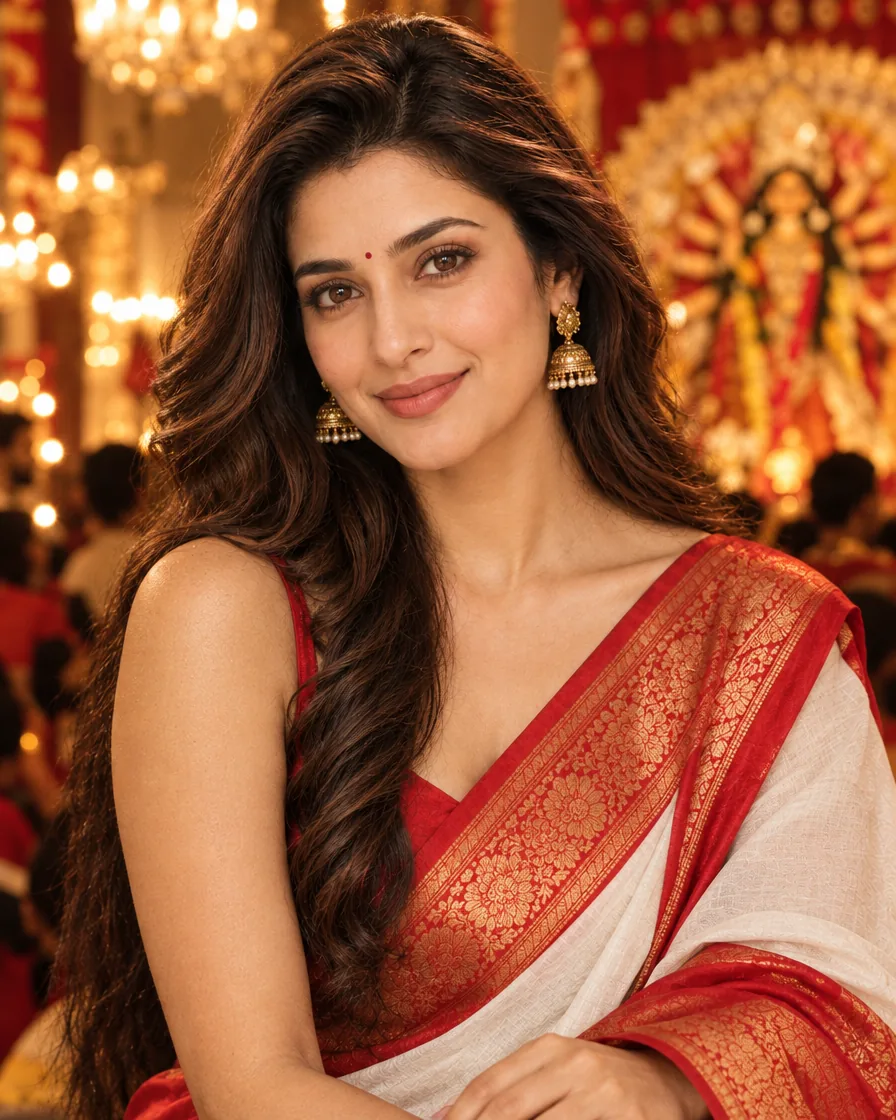
Pujo season means one thing on Instagram: the classic Bengali look. White saree with red border, sindoor-red bindi, dhunuchi smoke and glowing pandal lights. With this free AI prompt you can turn a normal selfie into that Durga Puja portrait in a minute. Just upload your photo, paste the prompt and generate.
Example result — your photo will look different
About the Durga Puja look
The Durga Puja Bengali look edit keeps your real face and dresses you in traditional Bengali attire: a lal-paar sada (red-bordered white) saree for women or a dhoti-panjabi for men, inside a lit-up pandal in the evening. Warm golden light and dhunuchi smoke give it the cinematic Pujo feel.
Copy the AI prompt
AI example. Your result may look different.
✦ AI PROMPTCopy → paste in ChatGPT / Gemini
Edit my uploaded photo. If I attached more than one photo of myself, use all of them together to get my face right. Do not redraw my face - keep it exactly as in the original: the same face shape and width, the same cheeks, the same jawline and chin, the same nose shape and width, the same eye shape and spacing, the same eyebrows, the same lip shape and the same natural skin tone. Do not slim my face, do not sharpen the jaw, do not enlarge the eyes, do not change my age and do not make my features more symmetrical. Change ONLY the clothing, the background and the lighting described below, and keep my head at the same angle as in the photo. Transform me into a Durga Puja Bengali look portrait: I am wearing a traditional white saree with a wide red border, a red bindi and elegant gold jewellery (for men: a cream dhoti with a silk panjabi). I am standing inside a beautifully lit Durga Puja pandal in the evening, with soft dhunuchi incense smoke, warm golden fairy lights and festive bokeh behind me. Gentle smile, cinematic warm lighting, realistic skin texture, photorealistic, high detail. Vertical 4:5 format. No text, no watermark. Skin quality and face: keep the original facial identity, structure, proportions, expression and natural skin tone. Render the skin clean, flawless, healthy and naturally radiant, with an even tone across the forehead, cheeks, nose and chin. Remove AI-generated patchiness, blotches, unwanted discoloration, rough rendering, artificial noise and uneven skin texture. Make the skin high-resolution and photorealistic, with subtle natural pores, soft realistic highlights and smooth tonal transitions, refined but never plastic, waxy, blurred or over-airbrushed. The face must be sharp, clear, evenly lit and professionally photographed: no patchy complexion, muddy texture, oversharpening, grain or compression artifacts on the skin. Keep the face fully visible: no hand, arm, hair, prop or flame covers the forehead, eyes, nose, mouth or chin. Final quality: premium professional portrait photography, natural flawless skin, crisp facial detail and a realistic photographic finish.
The face may not match exactly. Compare the result with your photo and ask the AI to fix anything that looks different.
How to make your Pujo photo
Open ChatGPT or Google Gemini and start a new chat, so old pictures do not mix in.
Upload one clear photo of your face in good light. For the dhoti-panjabi look, a photo that also shows your shoulders helps.
Copy the prompt above, paste it with your photo and send.
Want a different vibe? Reply with “add sindoor khela with red colour on the face” or “make it daytime at the pandal”.
Save the picture for your Pujo Story or post, and mention that it is AI-edited.
FAQs
Can I add a dhunuchi in my hands?
Yes. Add “I am holding a brass dhunuchi with soft smoke” to the prompt, then check that the fingers hold the handle naturally.
Will it look like me in the pandal light?
Mostly, but warm pandal light can change small details like the eyes or jaw. Compare it with your photo and generate again if it does not look like you.
What should men wear in this edit?
The prompt already switches to a dhoti with silk panjabi for men. You can also ask for a “white kurta with a red gamcha”.