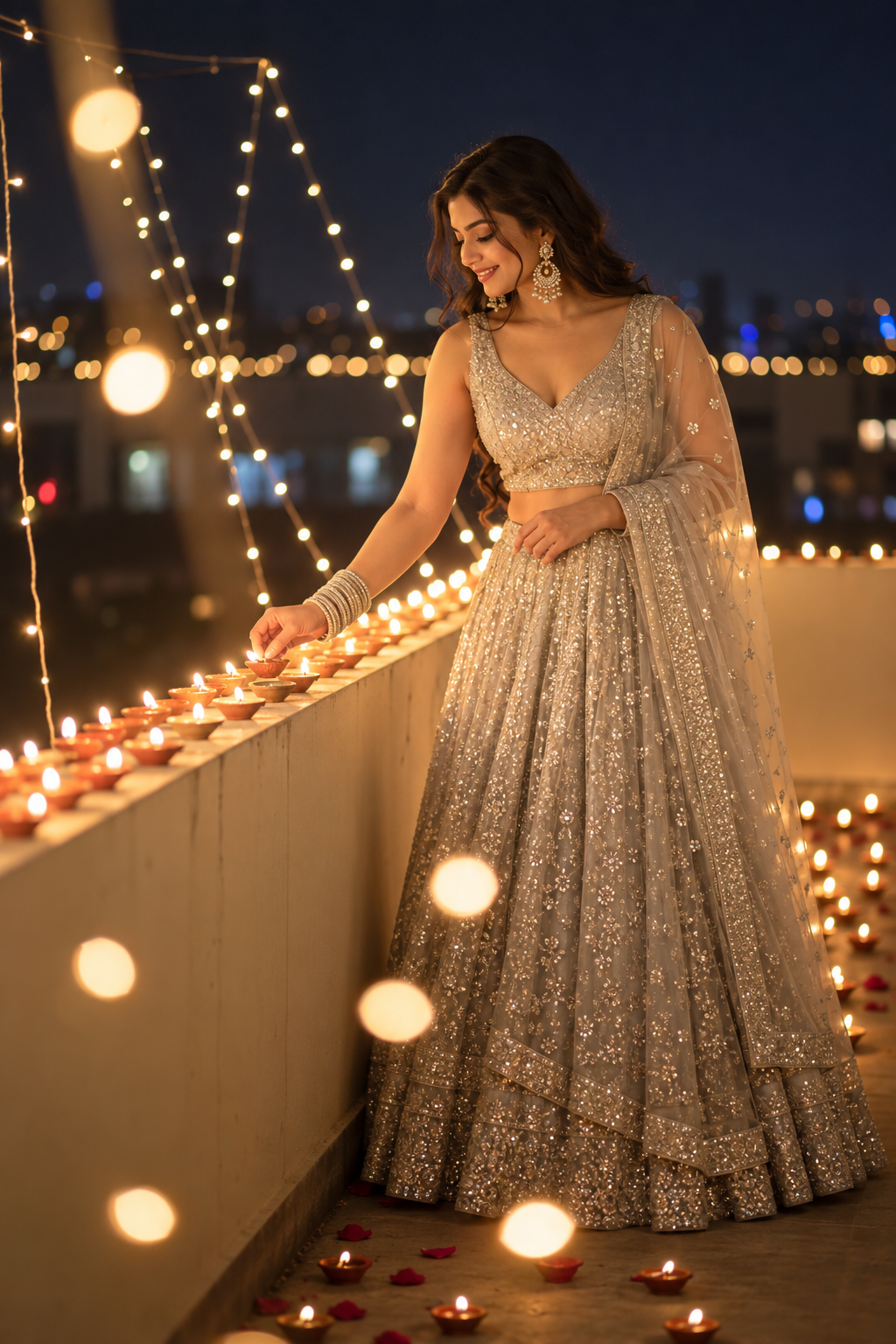
A rooftop Diwali photo gets its depth from several layers: blurred lights near the camera, a line of diyas on the terrace wall and soft light on the face. This pack has four looks: a silver lehenga at night, a blue-hour terrace portrait, a glowing sky lantern and a maroon outfit with a sparkler in a courtyard.
Each look below includes a new AI-generated example and a complete copy prompt. The examples show fictional adult models. To edit your own photo, use a clear adult photo of yourself as the identity reference. Use the selected example only to guide the style.
Set up your two reference images
Image 1: Upload a clear photo of yourself. Your face shape, cheeks, nose and eyes should be easy to see. Use a sharp photo with no heavy beauty filter. Image 2: Upload your chosen example from this article. It will guide the camera angle, outfit, lighting and background.
Use an image editor that accepts reference photos. Label the role of each image, then copy the matching prompt and generate one look. Check the face shape and framing first. Make small corrections after that. Results can vary, so compare each image with your original photo.
Choose the mood for your photo
Keep the night background dark and the silver embroidery gently lit. In the blue-hour look, the sky should stay blue. In the lantern scene, the raised hands and gaze should follow the lantern. Balance the bright sparks with soft light on the face in the sparkler scene. These are AI image prompts, so you can create the scenes without setting up real flames or fireworks.
1. Silver Night Diyas
AI-generated creative Diwali portrait · fictional adult model
Keep the diya line aligned with the terrace wall. Separate the silver embroidery from the dark city background.
✦ AI PHOTO PROMPTUpload your photo + style reference
Use Image 1 as my personal identity reference and Image 2 only as the style and composition reference. Preserve my original facial identity, age, face width, cheeks, jawline, nose, eye shape and spacing, lips, original eye colour, natural skin tone and skin texture. Do not copy the style model’s face or reshape my features. Create a photorealistic adult festive portrait: Full-length silver lehenga lighting row of diyas on rooftop parapet night, hanging lights huge foreground amber bokeh dark blue city.. Match Image 2 closely for camera height, angle, perspective, framing, subject placement, light direction, shadow softness, exposure, white balance, contrast, saturation and foreground blur. Preserve the outfit colours, fabric texture, jewellery and scene geometry described above. Allow a small natural pose or expression variation while keeping the main composition. Keep realistic head-to-body proportions, coherent hands with five natural fingers per hand, believable jewellery placement and fine skin detail. Use a clean vertical photographic frame. No screenshot interface, captions, text, readable lettering, signatures, logos, watermark, extra limbs, duplicate face, plastic skin or sharpening halos.
🎨 Customize prompt size, colour, glasses
Size
Outfit colour
Keep the same
2. Silver Blue Hour
AI-generated creative Diwali portrait · fictional adult model
Balance the blue evening sky with the orange diya light. Keep the face visible between the blurred foreground lights.
✦ AI PHOTO PROMPTUpload your photo + style reference
Use Image 1 as my personal identity reference and Image 2 only as the style and composition reference. Preserve my original facial identity, age, face width, cheeks, jawline, nose, eye shape and spacing, lips, original eye colour, natural skin tone and skin texture. Do not copy the style model’s face or reshape my features. Create a photorealistic adult festive portrait: Full-length silver lehenga standing beside rooftop parapet row of diyas hand at waist looking sideways smiling, blue hour vertical fairy lights foreground bokeh.. Match Image 2 closely for camera height, angle, perspective, framing, subject placement, light direction, shadow softness, exposure, white balance, contrast, saturation and foreground blur. Preserve the outfit colours, fabric texture, jewellery and scene geometry described above. Allow a small natural pose or expression variation while keeping the main composition. Keep realistic head-to-body proportions, coherent hands with five natural fingers per hand, believable jewellery placement and fine skin detail. Use a clean vertical photographic frame. No screenshot interface, captions, text, readable lettering, signatures, logos, watermark, extra limbs, duplicate face, plastic skin or sharpening halos.
🎨 Customize prompt size, colour, glasses
Size
Outfit colour
Keep the same
3. Sky Lantern
AI-generated creative Diwali portrait · fictional adult model
Let the lantern cast warm light on the face and raised hands. Keep the paper texture and lantern frame clear.
✦ AI PHOTO PROMPTUpload your photo + style reference
Use Image 1 as my personal identity reference and Image 2 only as the style and composition reference. Preserve my original facial identity, age, face width, cheeks, jawline, nose, eye shape and spacing, lips, original eye colour, natural skin tone and skin texture. Do not copy the style model’s face or reshape my features. Create a photorealistic adult festive portrait: Three-quarter silver ivory lehenga portrait holding glowing orange paper sky lantern above head looking up, rooftop night distant lanterns city strings diagonal row of diyas.. Match Image 2 closely for camera height, angle, perspective, framing, subject placement, light direction, shadow softness, exposure, white balance, contrast, saturation and foreground blur. Preserve the outfit colours, fabric texture, jewellery and scene geometry described above. Allow a small natural pose or expression variation while keeping the main composition. Keep realistic head-to-body proportions, coherent hands with five natural fingers per hand, believable jewellery placement and fine skin detail. Use a clean vertical photographic frame. No screenshot interface, captions, text, readable lettering, signatures, logos, watermark, extra limbs, duplicate face, plastic skin or sharpening halos.
🎨 Customize prompt size, colour, glasses
Size
Outfit colour
Keep the same
4. Maroon Sparkler
AI-generated creative Diwali portrait · fictional adult model
Use short, bright sparks. Keep the maroon outfit, wooden columns and rangoli easy to see.
✦ AI PHOTO PROMPTUpload your photo + style reference
Use Image 1 as my personal identity reference and Image 2 only as the style and composition reference. Preserve my original facial identity, age, face width, cheeks, jawline, nose, eye shape and spacing, lips, original eye colour, natural skin tone and skin texture. Do not copy the style model’s face or reshape my features. Create a photorealistic adult festive portrait: Crouching maroon gold lehenga holding sparkler smiling down beside large flower rangoli dotted with diyas, traditional timber courtyard marigold garlands fairy lights.. Match Image 2 closely for camera height, angle, perspective, framing, subject placement, light direction, shadow softness, exposure, white balance, contrast, saturation and foreground blur. Preserve the outfit colours, fabric texture, jewellery and scene geometry described above. Allow a small natural pose or expression variation while keeping the main composition. Keep realistic head-to-body proportions, coherent hands with five natural fingers per hand, believable jewellery placement and fine skin detail. Use a clean vertical photographic frame. No screenshot interface, captions, text, readable lettering, signatures, logos, watermark, extra limbs, duplicate face, plastic skin or sharpening halos.
🎨 Customize prompt size, colour, glasses
Size
Outfit colour
Keep the same
Check these details before saving
Check that the terrace wall and the line of diyas follow the same perspective. Blurred foreground lights should leave the face visible. Silver fabric should keep its detail in bright areas. Fingers holding the lantern should look natural. Check the sparkler grip and wrist, and keep sparks away from the face.
Compare the face with your identity photo. Check the face width, jaw, nose and distance between the eyes, as well as the hairstyle and makeup. Keep natural skin texture and skin tone. If you need a different crop, check the hands, outfit edges and diya placement before cropping. Avoid stretching the image.
Useful correction messages
If the face looks different: “Correct only my identity using Image 1. Restore my original face width, cheeks, jawline, nose, eyes and lips. Preserve the approved outfit, camera angle, lighting and background.”
To fix hands or jewellery: “Correct only the hands and jewellery placement. Restore natural finger count, wrist joints and believable contact with the object. Keep my face and the existing composition unchanged.”
To fix the colours and lighting: “Restore Image 2’s white balance, contrast, shadow colour and light direction. Preserve my natural skin tone and the approved facial identity.”
Common questions
Can I use the same face for every look? Yes. Use the same identity photo each time and check every result. Different angles and warm lighting can change how the face appears.
Can I use a prompt without a style image? Yes, a text prompt can create a similar scene. Adding the example helps guide the crop, hand position and direction of light.
What can I change in the prompt? You can change the outfit colour, jewellery or expression. Change one detail at a time so it is easier to compare the new result with the look you liked.


 AI Photo Editing
 AI Photo Editing
 AI Photo Editing
 AI Photo Editing
 AI Photo Editing
 AI Photo Editing