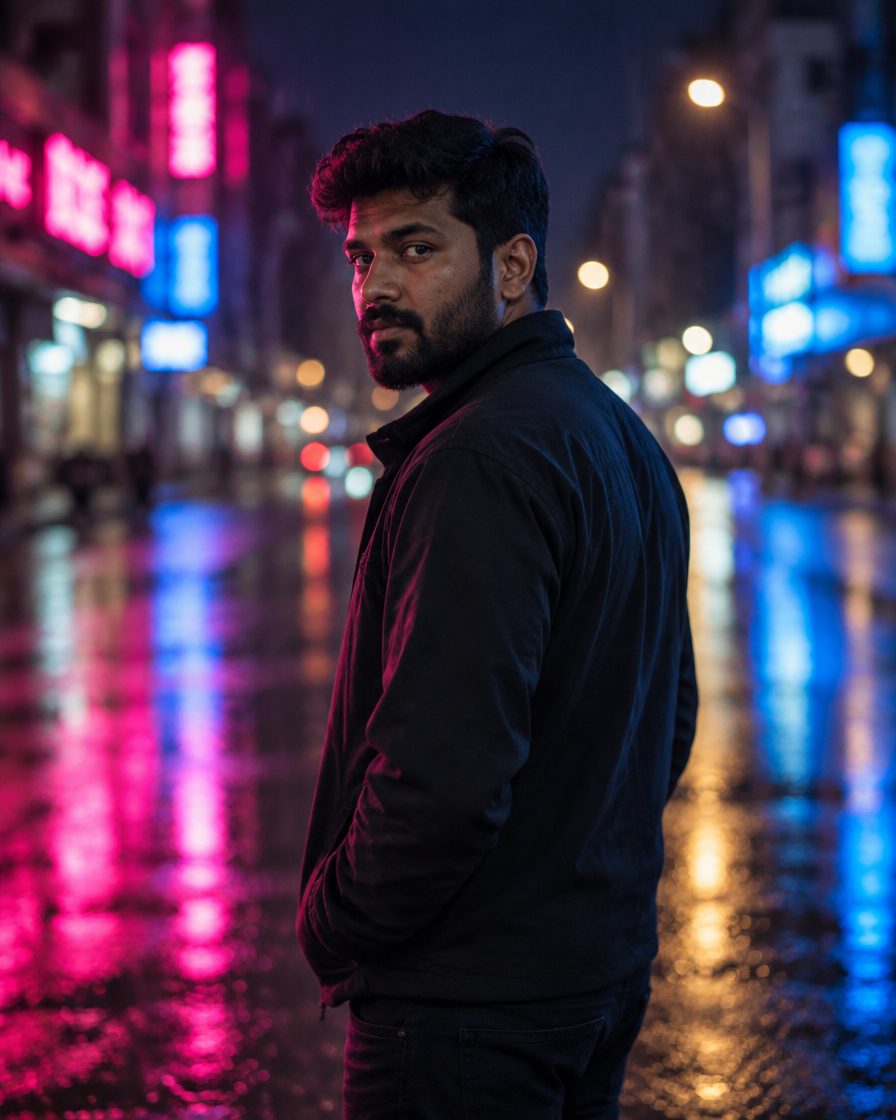
Night street cinematic edits are taking over Instagram feeds in India right now. Everyone wants that moody, neon-lit, blockbuster film look on their profile without spending hours in heavy software. The best part? You do not need a DSLR camera or expensive editing skills anymore. Artificial intelligence tools like ChatGPT and Google Gemini can now transform your basic mobile selfies into stunning masterpieces in seconds. On TricksFunn, we bring you the ultimate collection of night street cinematic AI photo editing prompts for 2026. Whether you want a neon cyberpunk aesthetic or a classic rainy city vibe, we have got you covered. All you need is a clear selfie and a free AI app to get started. Scroll down, copy your favorite prompt, and watch your social media engagement skyrocket with these breathtaking, high-quality night portraits.

About this trend
The night street cinematic look is all about moody neon glows, wet asphalt reflections, and dramatic shadows that make your portrait pop instantly. This style typically features trendy streetwear or stylish casual outfits paired with vibrant city lights like pink, cyan, and amber glowing in the background. It suits anyone who loves urban photography, night walks, and dramatic aesthetics. Whether you are a college student wanting a cool profile picture or an Instagram creator looking for high-engagement grid posts, this look works wonders. Because the lighting is rich and contrasty, it easily hides background distractions and focuses all the attention on your face and expression.
The prompts (copy and paste)
Prompt 1: Neon Cyberpunk Vibe for Girls
Use this edgy neon street prompt when you want a bold, high-fashion look with vibrant pink and blue city lights that instantly grabs attention on your feed.

Is prompt ko kaise use karein
1. Article mein bataya gaya app kholein. Image editing ka option aapke account mein available hona chahiye.
2. Apni saaf photo attach karein. Chehra roshni mein aur bina heavy filter ke ho. Couple prompt ke liye dono logon ki photos chahiye. Extra photos tabhi jodein jab zaroorat ho aur app support kare.
3. Prompt copy karke message box mein paste karein. Photo upload hone ke baad bhejein. Prompt AI ko batata hai ki kya badalna hai.
4. Bani hui photo check karke save karein. Chehra ya haath galat lagein toh usi chat mein bataayein ki kya sudharna hai. Nayi chat mein original photo dobara attach karein. Result pasand aaye toh Save/Download use karein.
Har result alag ho sakta hai. Kisi tool, paid plan ya prompt se same face ki guarantee nahi hoti.
Chehra same rehne ki guarantee nahi hai. Result ko apni reference photo se compare karo aur zaroorat ho to correction do.
Prompt 2: Moody Rainy Alley for Boys
Perfect for a dramatic, hero-like aesthetic, this rainy night street look adds serious attitude and film-like depth to your Instagram grid.

Is prompt ko kaise use karein
1. Article mein bataya gaya app kholein. Image editing ka option aapke account mein available hona chahiye.
2. Apni saaf photo attach karein. Chehra roshni mein aur bina heavy filter ke ho. Couple prompt ke liye dono logon ki photos chahiye. Extra photos tabhi jodein jab zaroorat ho aur app support kare.
3. Prompt copy karke message box mein paste karein. Photo upload hone ke baad bhejein. Prompt AI ko batata hai ki kya badalna hai.
4. Bani hui photo check karke save karein. Chehra ya haath galat lagein toh usi chat mein bataayein ki kya sudharna hai. Nayi chat mein original photo dobara attach karein. Result pasand aaye toh Save/Download use karein.
Har result alag ho sakta hai. Kisi tool, paid plan ya prompt se same face ki guarantee nahi hoti.
Chehra same rehne ki guarantee nahi hai. Result ko apni reference photo se compare karo aur zaroorat ho to correction do.
Prompt 3: Romantic Couple Night Walk
Share this dreamy couple portrait prompt with your partner to capture a cozy, cinematic evening stroll under glowing city streetlights.

Is prompt ko kaise use karein
1. Article mein bataya gaya app kholein. Image editing ka option aapke account mein available hona chahiye.
2. Apni saaf photo attach karein. Chehra roshni mein aur bina heavy filter ke ho. Couple prompt ke liye dono logon ki photos chahiye. Extra photos tabhi jodein jab zaroorat ho aur app support kare.
3. Prompt copy karke message box mein paste karein. Photo upload hone ke baad bhejein. Prompt AI ko batata hai ki kya badalna hai.
4. Bani hui photo check karke save karein. Chehra ya haath galat lagein toh usi chat mein bataayein ki kya sudharna hai. Nayi chat mein original photo dobara attach karein. Result pasand aaye toh Save/Download use karein.
Har result alag ho sakta hai. Kisi tool, paid plan ya prompt se same face ki guarantee nahi hoti.
Chehra same rehne ki guarantee nahi hai. Result ko apni reference photo se compare karo aur zaroorat ho to correction do.
Prompt 4: Retro 90s Filmy Night Vibe
Bring back classic Bollywood nostalgia with this warm, vintage street lamp aesthetic that gives your photos a timeless, emotional touch.

Is prompt ko kaise use karein
1. Article mein bataya gaya app kholein. Image editing ka option aapke account mein available hona chahiye.
2. Apni saaf photo attach karein. Chehra roshni mein aur bina heavy filter ke ho. Couple prompt ke liye dono logon ki photos chahiye. Extra photos tabhi jodein jab zaroorat ho aur app support kare.
3. Prompt copy karke message box mein paste karein. Photo upload hone ke baad bhejein. Prompt AI ko batata hai ki kya badalna hai.
4. Bani hui photo check karke save karein. Chehra ya haath galat lagein toh usi chat mein bataayein ki kya sudharna hai. Nayi chat mein original photo dobara attach karein. Result pasand aaye toh Save/Download use karein.
Har result alag ho sakta hai. Kisi tool, paid plan ya prompt se same face ki guarantee nahi hoti.
Chehra same rehne ki guarantee nahi hai. Result ko apni reference photo se compare karo aur zaroorat ho to correction do.
Prompt 5: Futuristic Neon Cyber Look
Try this ultra-modern futuristic prompt when you want a sci-fi action movie look with hyper-detailed lighting effects and high-tech urban surroundings.

Is prompt ko kaise use karein
1. Article mein bataya gaya app kholein. Image editing ka option aapke account mein available hona chahiye.
2. Apni saaf photo attach karein. Chehra roshni mein aur bina heavy filter ke ho. Couple prompt ke liye dono logon ki photos chahiye. Extra photos tabhi jodein jab zaroorat ho aur app support kare.
3. Prompt copy karke message box mein paste karein. Photo upload hone ke baad bhejein. Prompt AI ko batata hai ki kya badalna hai.
4. Bani hui photo check karke save karein. Chehra ya haath galat lagein toh usi chat mein bataayein ki kya sudharna hai. Nayi chat mein original photo dobara attach karein. Result pasand aaye toh Save/Download use karein.
Har result alag ho sakta hai. Kisi tool, paid plan ya prompt se same face ki guarantee nahi hoti.
Chehra same rehne ki guarantee nahi hai. Result ko apni reference photo se compare karo aur zaroorat ho to correction do.
How to create it
- Open ChatGPT or Google Gemini on your mobile phone and ensure you are logged into your free account.
- Upload a clear, front-facing selfie with good lighting to the chat box.
- Copy your favorite night street prompt from TricksFunn and paste it right below your uploaded photo.
- Hit send and wait a few seconds for the AI to generate your cinematic night street image.
- If the face or lighting needs a minor adjustment, reply with a simple follow-up message, then download and share on Instagram.
Tips for a better result
- Always use a sharp, well-lit selfie where your face is fully visible so the AI can match your facial features accurately.
- If the background looks too bright or the face changes slightly, type a follow-up message like ‘make the face match my uploaded photo exactly’ to fix it.
- Save your generated images in high resolution before uploading them to Instagram Reels or your story feed for maximum clarity.
- Experiment with both ChatGPT and Google Gemini to see which AI tool gives you the most realistic lighting and texture results.
FAQs
Are these night street AI prompts completely free to use?
Yes, all the prompts shared on TricksFunn are 100 percent free to copy and use. You can generate your edits using free mobile AI tools like ChatGPT or Google Gemini without paying any subscription fees.
Why does the AI sometimes change my facial features?
AI tools sometimes alter faces if the uploaded selfie is blurry or taken in poor lighting. Always start your prompt with the exact instruction to keep your face and skin tone unchanged, and use a clear, high-resolution photo.
Which tool is best for applying these night street prompts?
You can use either ChatGPT or Google Gemini on your phone. Both platforms support photo uploads and follow detailed text prompts very well to create stunning cinematic edits.
Can I use these edited photos directly on my Instagram account?
Absolutely! These prompts are specifically optimized to generate photos in a 4:5 vertical format, which is the ideal size for Instagram posts, reels covers, and stories.