
Hey, tech enthusiasts! Ready to dive into the latest scoop on Android’s next big thing? Well, buckle up because Android 15 is gearing up to revolutionize your mobile experience!

Picture this: It’s October 2023, and Google unveils the Pixel 8 series, introducing the world to the sleek and powerful Android 14. Fast forward to now, and we’re already eyeing the horizon with Android 15 Beta 2 making waves in the tech sphere. As early adopters and app aficionados, we’re in for a treat as Google tantalizes us with what’s to come.
Officially, Android 15 ditches the dessert theme Google used for past versions. It’s simply known as Android 15.

However, internally, Google still uses codenames for fun. Android 15’s internal codename is Vanilla Ice Cream.

As for the release date, there’s no official confirmation yet, but looking at past release cycles and the current stage of the beta program, we can make an educated guess.
The final release of Android 15 is expected sometime in Q3 (July-September) 2024. Pixel phones will likely be the first to receive the update, followed by other manufacturers at their own pace.
Lets take look some of the most interesting features in Android 15:
Private Space: This feature creates a secure vault within your phone where you can store sensitive apps and data completely hidden from the main operating system. You’ll need an extra layer of authentication to access this private space, making it ideal for work apps, financial apps, or anything you want to keep extra secure.

Theft Detection Lock: Leveraging Google AI, this feature can detect if your phone is being snatched and automatically lock it down. This could deter theft or at least make it more difficult for the thief to access your data.

Partial Screen Sharing: Tired of sharing your entire screen while video chatting? Android 15 allows you to share only a specific app window during video calls, offering more privacy and control over what you share.

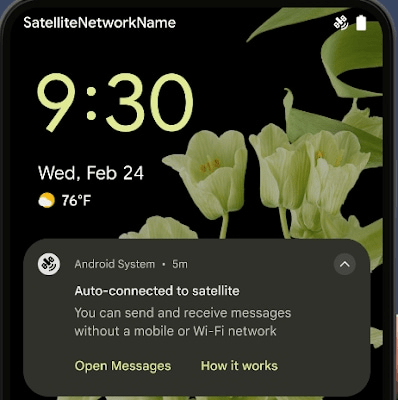
Satellite Connectivity: Finally, Android offers native support for satellite connectivity. This means apps can detect when you’re out of cellular range and utilize satellite connections for basic messaging (SMS and RCS) even in remote areas.
Improved Notifications: Android 15 enhances notifications with features like rich vibrations. You can set custom vibration patterns for different types of notifications, allowing you to distinguish between important alerts and less urgent messages without even looking at your phone.

Better Large Screen Support: Android 15 improves the user experience for phones with large screens and foldable displays. Expect a persistent taskbar for easier app switching, drag-and-drop functionality between apps, and better continuity features for folding phones.

Predictive Back: This feature analyzes your app usage patterns and predicts which app you’re most likely to return to when you press the back button. This can save time and frustration by taking you directly to the most relevant app.

App Pairs: Tired of switching back and forth between two frequently used apps? Android 15 lets you create app pairs, launching two specific apps simultaneously in a split-screen view.
High-Quality Webcam Mode: For those who use their phone for video conferencing, Android 15 offers a High-Quality Webcam mode. This could leverage computational photography techniques to improve video call image quality.
The “HQ” symbol.
This little icon is a game-changer for anyone who wants to look their absolute best on video calls. With a simple tap, you can unlock the full potential of your phone’s camera, delivering crisp, clear video quality that’ll make you the envy of your colleagues (or maybe just your grandma – hi grandma!).
But here’s the thing: great power comes with a little responsibility. Just like pushing your car’s engine for maximum performance, using “HQ” mode means your phone will work a little harder. You might experience some increased battery drain and the phone might feel a bit warmer.


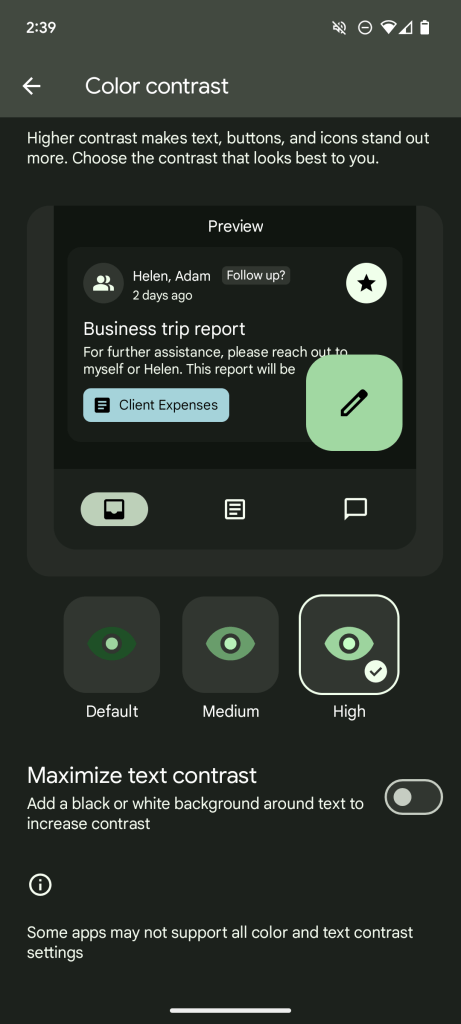
Color Contrast Settings: This accessibility feature allows users to adjust the contrast of text, buttons, and icons within apps, making content easier to read for people with visual impairments.
Android 15 is still under development, and the final feature set may differ slightly. These are some of the most interesting and anticipated features based on current information.
Overall, Android 15 seems to be a well-rounded update that offers something for everyone. Whether you’re a security-conscious user, a productivity powerhouse, or simply someone who wants the most out of their phone, Android 15 has features that can enhance your mobile experience.
Lets wait for the final release and then will share more updates. What’s your thoughts on this, let me know in the comments. Catch you in the next one.




 TRICKSFUNN
Comments are like sprinkles on an ice cream sundae – they make everything better!